


Webhook personnalisé + La Growth Machine : connectez n'importe quel outil, dans les deux sens.
Exportez les données de vos leads depuis vos séquences à l'étape exacte de votre choix, injectez des leads depuis n'importe quel outil et streamez chaque message LinkedIn et email vers votre propre endpoint en temps réel.
API et webhooks disponibles à partir du plan Pro
Pas d'intégration native pour votre outil ? Vous n'en avez pas besoin.
Un webhook est une URL. Si votre outil peut en recevoir ou en appeler une, il peut communiquer avec La Growth Machine : Zapier, Make, n8n, votre CRM, votre data warehouse ou votre propre backend.
Sortie, depuis une séquence
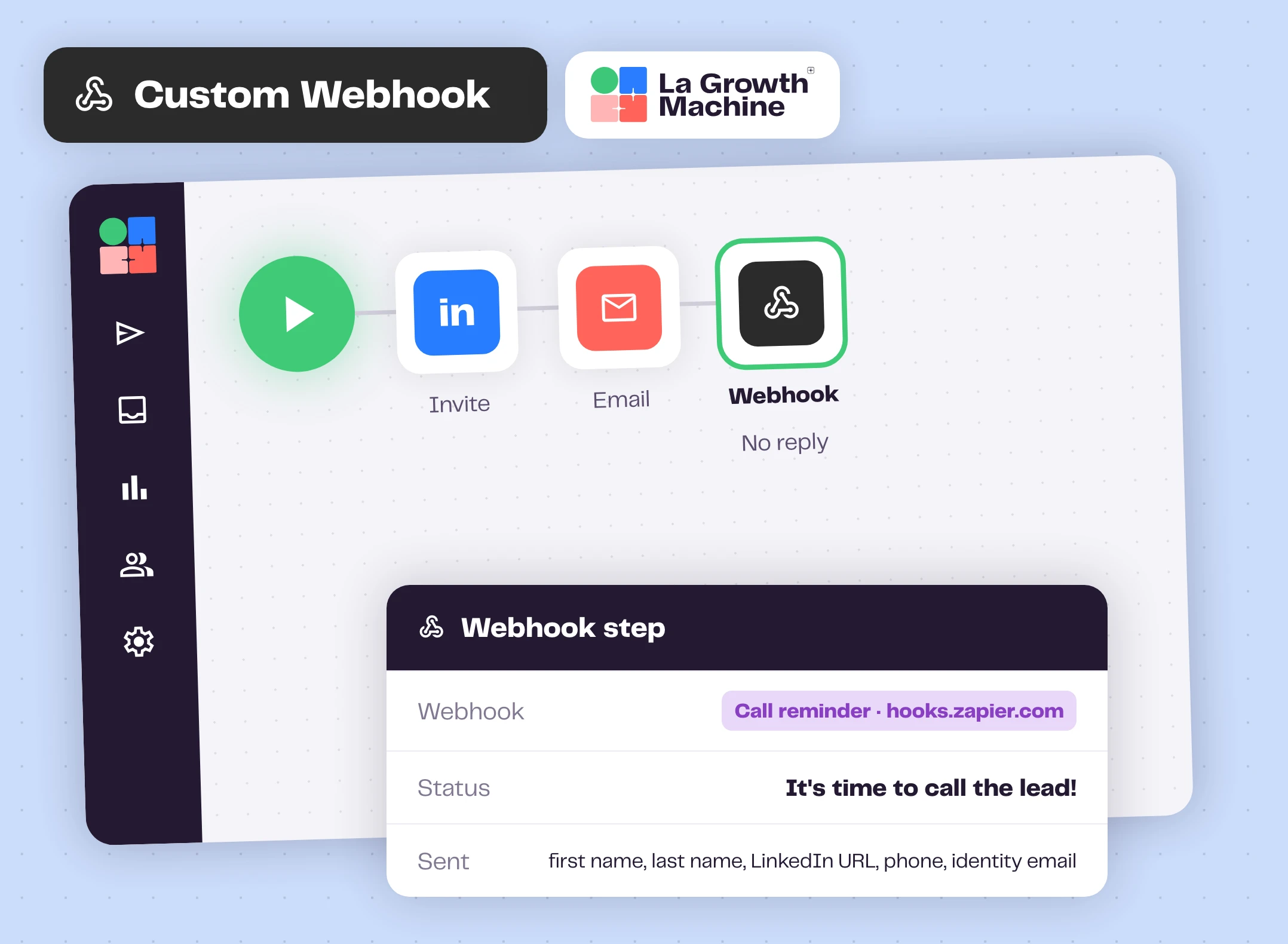
Une étape Webhook transmet les données du lead ainsi qu'un statut personnalisé dès qu'il l'atteint.
Entrée, vers une audience
N'importe quel outil peut ajouter des leads à une audience, et ceux-ci intègrent la campagne en cours.
Sortie, en temps réel
Les webhooks d'inbox publient chaque message LinkedIn et email vers votre URL.
Déclenchez vos outils depuis n'importe quelle étape d'une séquence
Enregistrez une URL une seule fois dans Paramètres, Webhooks, puis glissez une étape Webhook n'importe où dans votre séquence, sur la branche sans réponse par exemple. Lorsqu'un lead l'atteint, La Growth Machine envoie ses informations ainsi que le statut que vous avez défini, du type « Il est temps d'appeler le lead ! ».
Le lead poursuit son parcours dans la séquence. Vous pouvez également déclencher un webhook depuis une sortie personnalisée, au moment précis où un lead répond.
Ce que les équipes en font expand_more
- Créer une tâche d'appel dans HubSpot ou Aircall lorsqu'un lead n'a pas répondu
- Envoyer le statut du lead vers Salesforce ou n'importe quel CRM
- Ajouter des leads engagés à des audiences personnalisées Facebook ou LinkedIn
- Journaliser les stats dans Google Sheets
- Sur réponse : créer un deal, notifier Slack, ouvrir une tâche de qualification
Importez des leads depuis n'importe où
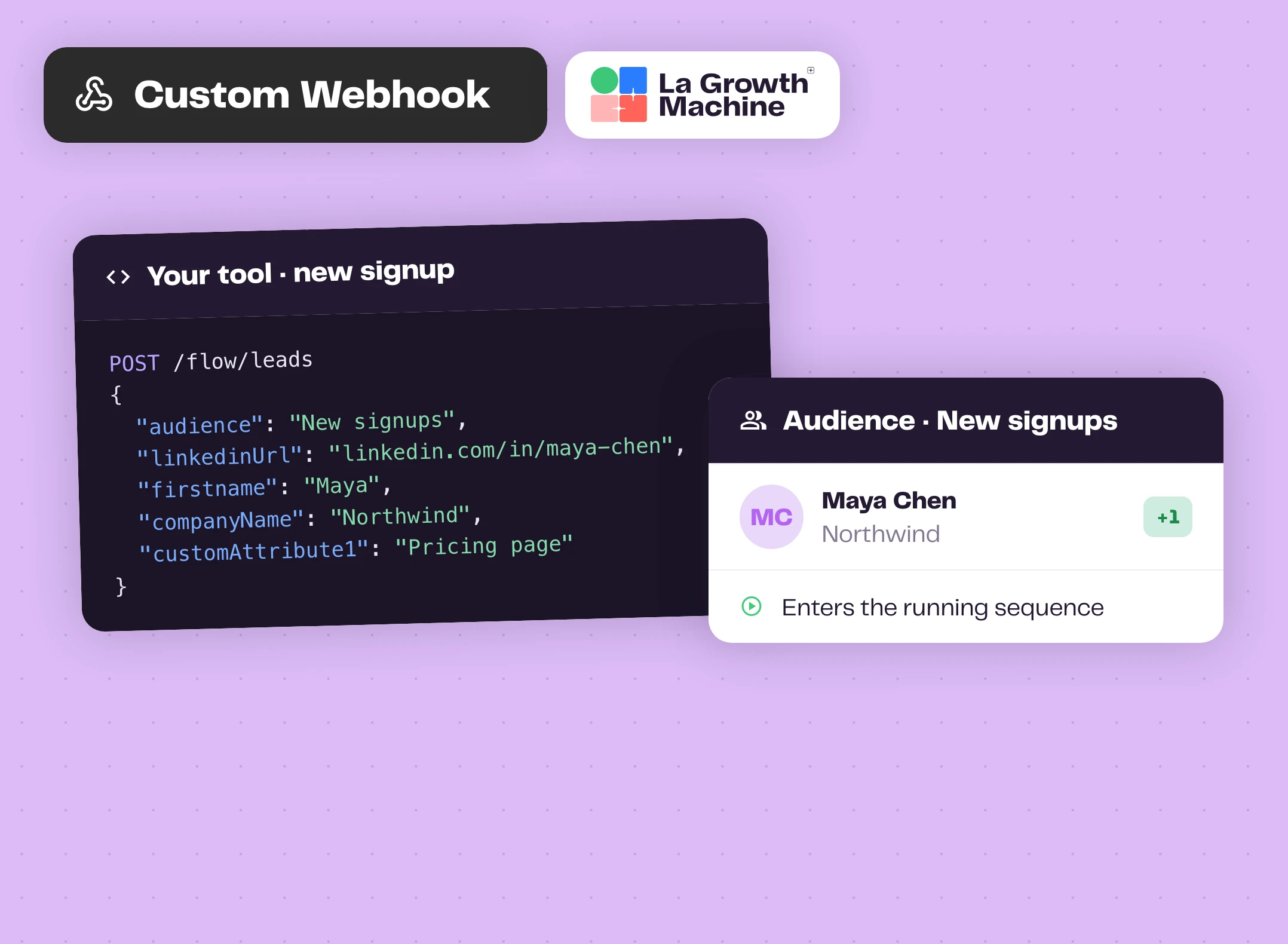
Une inscription, un formulaire, un événement produit : envoyez-le à La Growth Machine via votre clé API et le nom d'une audience. Une URL LinkedIn, un e-mail ou un nom et une entreprise suffisent. Les leads ajoutés à l'audience d'une campagne entrent automatiquement dans la séquence.
Vous utilisez RB2B ou Warmly ? Collez l'URL des visiteurs de votre site directement dans leurs paramètres. Zéro ligne de code.
La requête expand_more
POST https://apiv2.lagrowthmachine.com/flow/leads avec le nom d'une audience et au moins un identifiant : URL LinkedIn, e-mail pro ou perso, ou prénom, nom et entreprise. Ajoutez jusqu'à 10 attributs personnalisés et excluez les leads que vous avez déjà contactés.
Chaque message, transmis en direct sur votre endpoint
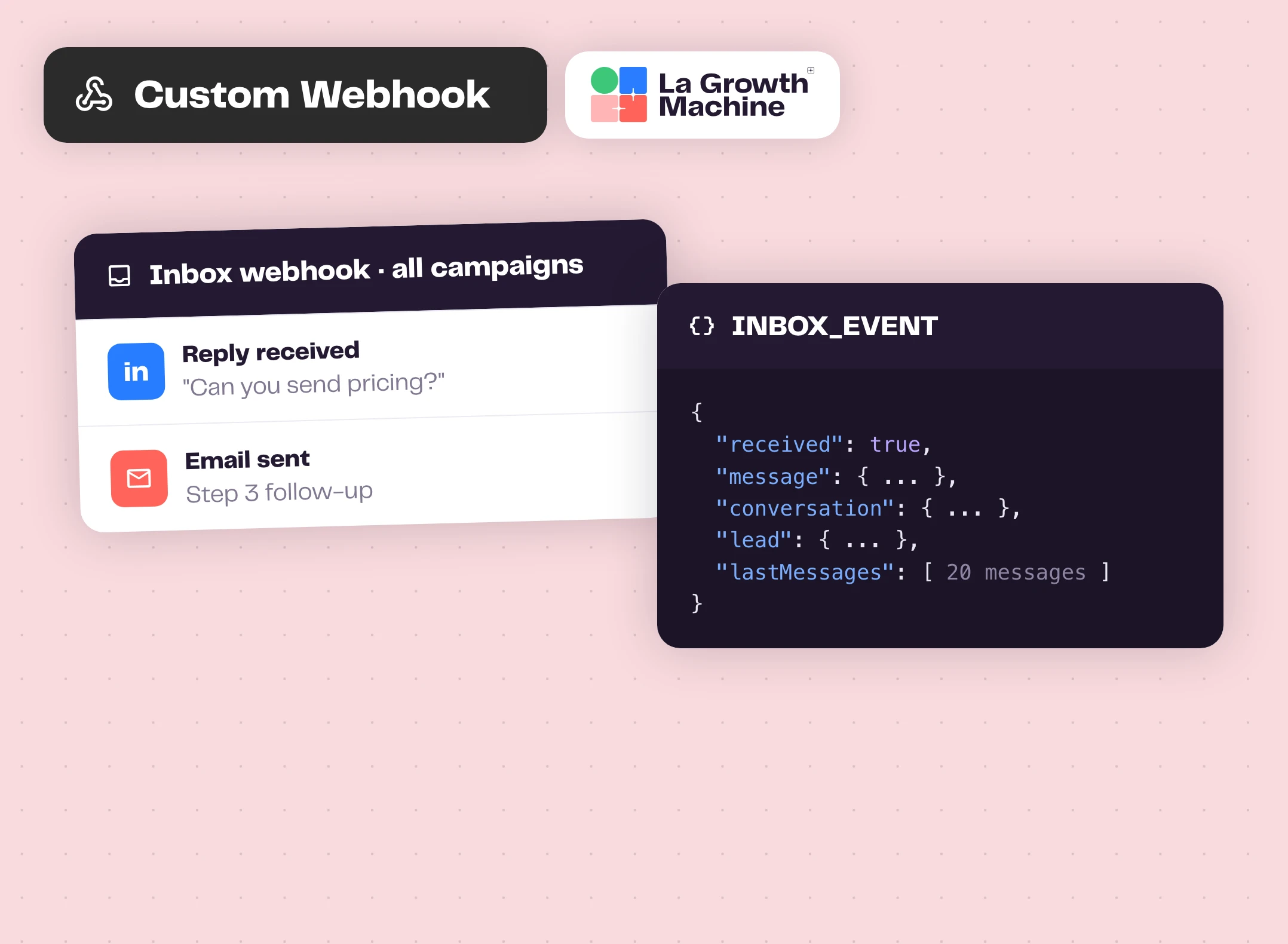
Enregistrez un webhook d'inbox et La Growth Machine transmet chaque message LinkedIn et e-mail (envoyé ou reçu) vers votre URL en temps réel. Restreignez-le à certaines campagnes ou appliquez-le à l'ensemble.
Chaque événement contient le message, la conversation, la fiche lead complète et les 20 derniers messages. De quoi rédiger une réponse par IA, la logger dans votre CRM ou alerter la bonne personne instantanément.
Comment démarrer ?
Le webhook outbound en quatre étapes.
- webhookÉtape 1
Obtenez une URL
Créez un catch hook dans Zapier, Make ou n8n, ou utilisez votre propre endpoint HTTPS.
- add_linkÉtape 2
Enregistrez-la
Dans La Growth Machine : Paramètres, Webhooks, Créer, puis collez l'URL.
- account_treeÉtape 3
Ajoutez l'étape
Ajoutez une étape Webhook ou une sortie personnalisée dans votre séquence, sélectionnez le webhook et définissez le statut.
- scienceÉtape 4
Testez à petite échelle
Lancez-le sur une petite audience, vérifiez le résultat, puis passez à l'échelle.
Les webhooks fonctionnent avec ces fonctionnalités de La Growth Machine
Déclenchez un webhook depuis n'importe quelle étape d'une séquence et transmettez chaque message de votre inbox vers votre URL.
Sequence Builder
Créez des séquences multicanales personnalisées, étape par étape.
Découvrez la fonctionnalité arrow_forward forumMultichannel Inbox
Toutes vos conversations LinkedIn et email au même endroit.
Découvrez la fonctionnalité arrow_forward sendAutomatisation LinkedIn
Automatisez vos demandes de connexion, messages et notes vocales sur LinkedIn.
Découvrez la fonctionnalité arrow_forwardAllez plus loin avec les webhooks
Webinaires, playbooks et guides de l'équipe La Growth Machine et de nos partenaires.
Documentation de l'API La Growth Machine
Tous les endpoints, y compris les webhooks, avec leurs champs et exemples.
Ouvrir la documentation arrow_forward articleArticleWebhook : définition, fonctionnement et cas d'usage B2B
Comprendre ce qu'est un webhook et comment les équipes sales l'utilisent.
Lire l'article arrow_forward schoolAcademyComment tout intégrer avec Zapier, Make et des API
Un chapitre de La Growth Machine Academy.
Lire le chapitre arrow_forwardQuestions fréquentes
Est-ce qu'une étape Webhook arrête la séquence ? add
Non. Le lead continue sa route dans la séquence, sauf indication contraire de votre part, par exemple avec une sortie personnalisée.
Où puis-je trouver ma clé API ? add
Dans Tous les paramètres, Intégrations & API, onglet API. Cette même page affiche vos logs API, avec chaque appel, son statut et son résultat.
Y a-t-il une limite de taux (rate limit) ? add
Oui : 50 appels API par tranche de 10 secondes et par clé.
De quoi mon endpoint a-t-il besoin ? add
Une URL HTTPS publique qui accepte une requête POST et répond 200 OK.
De quel abonnement ai-je besoin ? add
L'API, les étapes de webhook et les webhooks d'inbox sont tous disponibles à partir du plan Pro.