


Sendspark + La Growth Machine : une vidéo personnalisée pour chaque lead, dans chaque séquence.
Enregistrez une seule vidéo dans Sendspark pour générer une version personnalisée par prospect. La Growth Machine se charge de l'envoyer à l'étape clé de votre séquence email ou LinkedIn.
Sans code : un CSV et un snippet
Une vidéo à leur nom sort du lot dans une boîte de réception saturée.
Enregistrer une vidéo pour chaque prospect n'est pas une solution évolutive. Avec Sendspark, vous n'avez qu'à enregistrer une seule fois et à prononcer un mot de remplacement à l'endroit où doit figurer le prénom. Sendspark génère alors une vidéo par contact, et La Growth Machine les intègre à votre séquence multicanal.
Enregistrer une seule fois
Sendspark personnalise le nom, la voix et l'arrière-plan pour chaque contact.
Importer
Le fichier CSV des vidéos générées constitue l'audience de La Growth Machine.
Envoyer
La vidéo est envoyée par email ou via un message LinkedIn, à l'étape de votre choix.
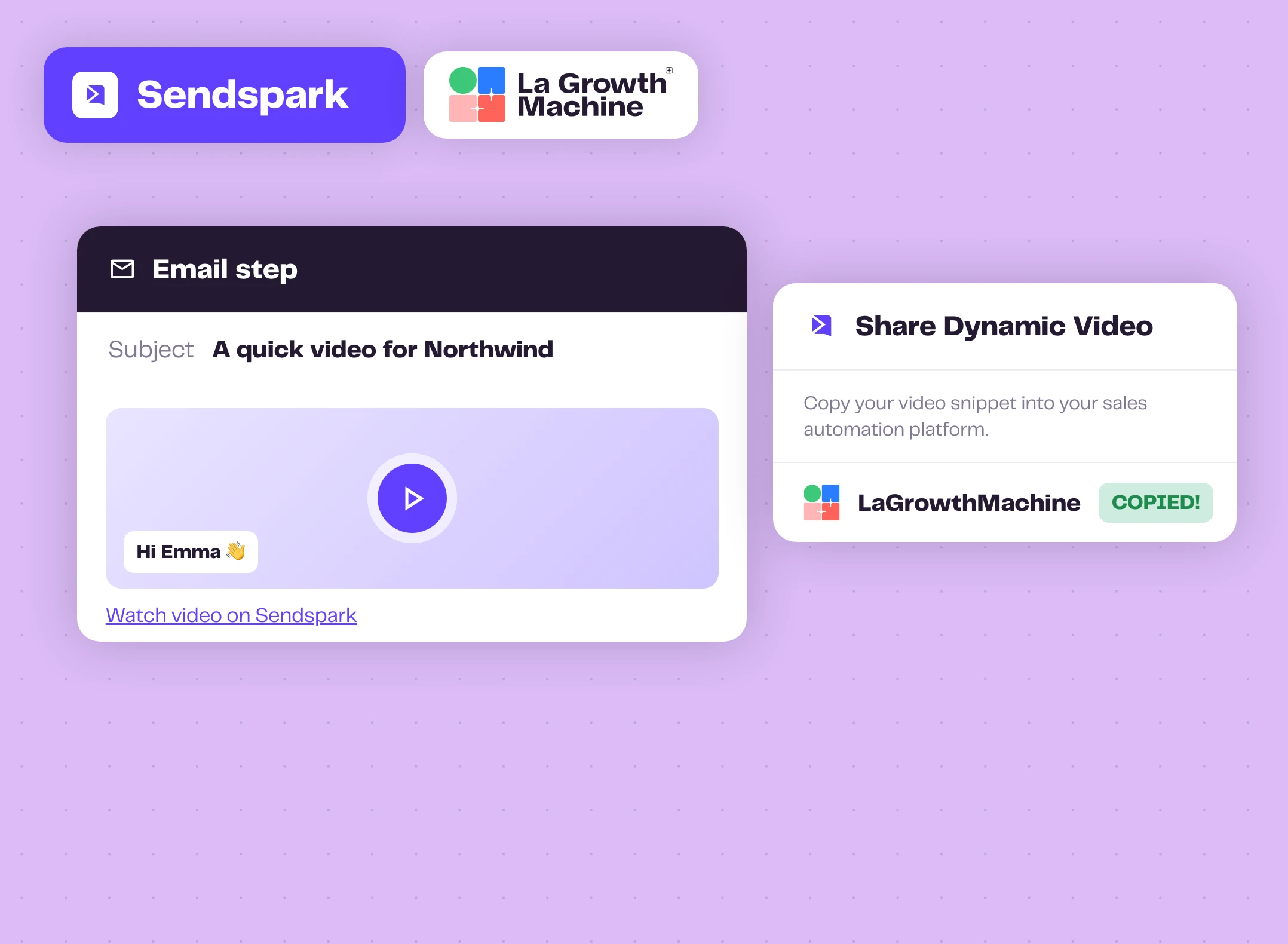
Par email, une miniature qui donne envie de cliquer
Dans Sendspark, cliquez sur Partager la campagne et sélectionnez LaGrowthMachine pour copier le snippet. Collez-le directement dans le corps de votre étape email. Chaque lead reçoit sa propre miniature ainsi qu'un lien vers sa vidéo.
L'éditeur affiche une miniature générique : chaque lead reçoit celle générée pour lui, mise en correspondance via les contacts que vous avez importés.
Bon à savoir expand_more
- Importez le fichier CSV exporté depuis Sendspark, et non celui utilisé pour créer la campagne
- Pour les emails, vous pouvez ignorer la colonne Video Link lors de l'import
- Conservez le mapping des colonnes prénom et email
- Les contacts dont la génération de vidéo a échoué ne figurent pas dans l'export
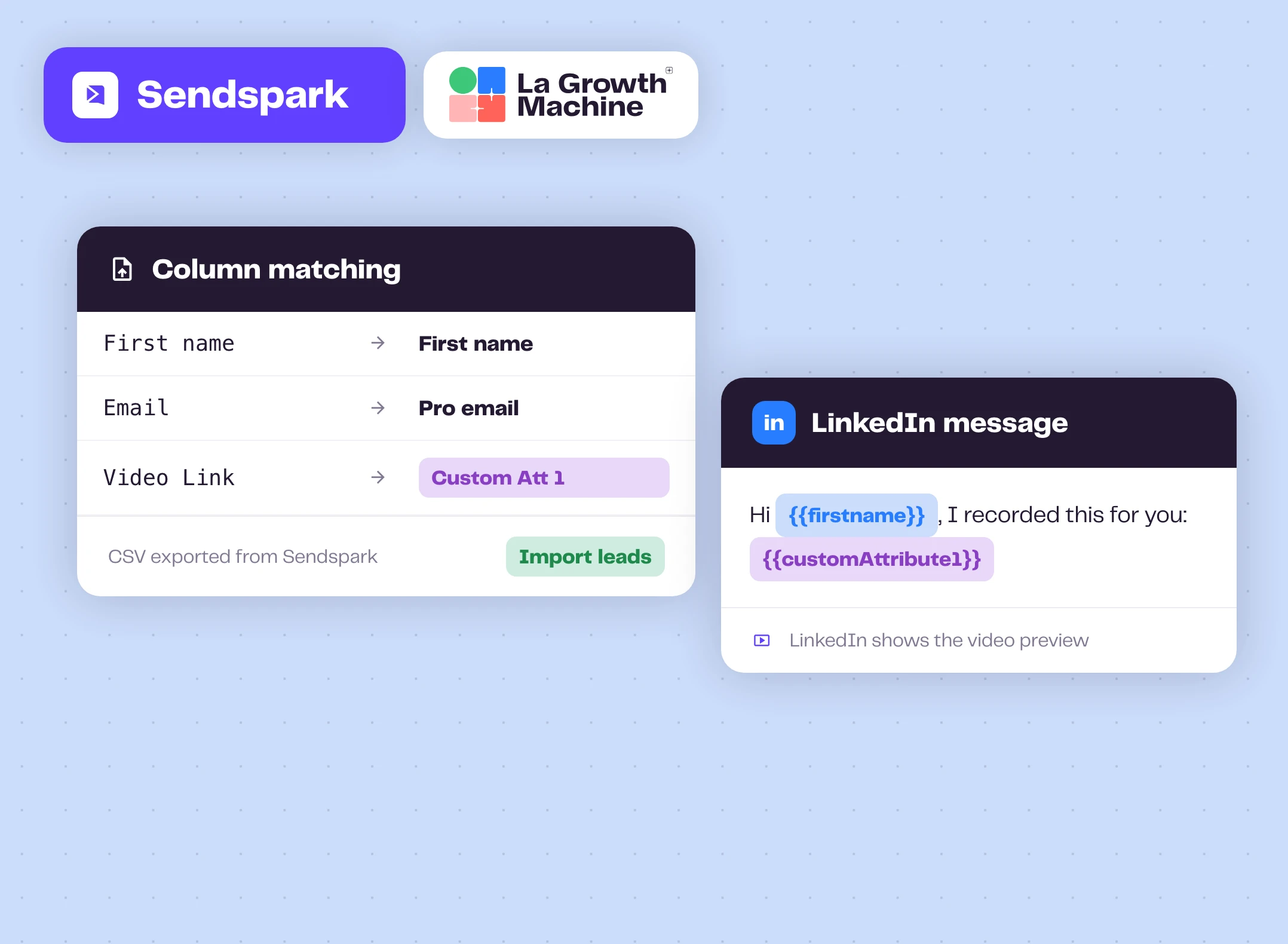
Sur LinkedIn, le lien vidéo dans votre message
Lors de l'import du CSV Sendspark, associez la colonne Video Link à Custom Att 1. Insérez ensuite {{customAttribute1}} dans votre message LinkedIn, après l'acceptation d'une invitation par exemple.
LinkedIn génère l'aperçu vidéo à partir du lien, si bien que le prospect aperçoit sa miniature personnalisée directement dans la conversation.
Astuces de Sendspark expand_more
- Testez l'apparence du lien avant le lancement
- Ajoutez un en-tête textuel sur la landing page de la vidéo, du type « Salut Prénom », pour qu'il apparaisse sur la miniature
- LinkedIn met en cache les aperçus : régénérez la vidéo si un lien a déjà été partagé
- Pour supprimer sendspark.com du lien, il faut disposer d'un domaine personnalisé Sendspark.
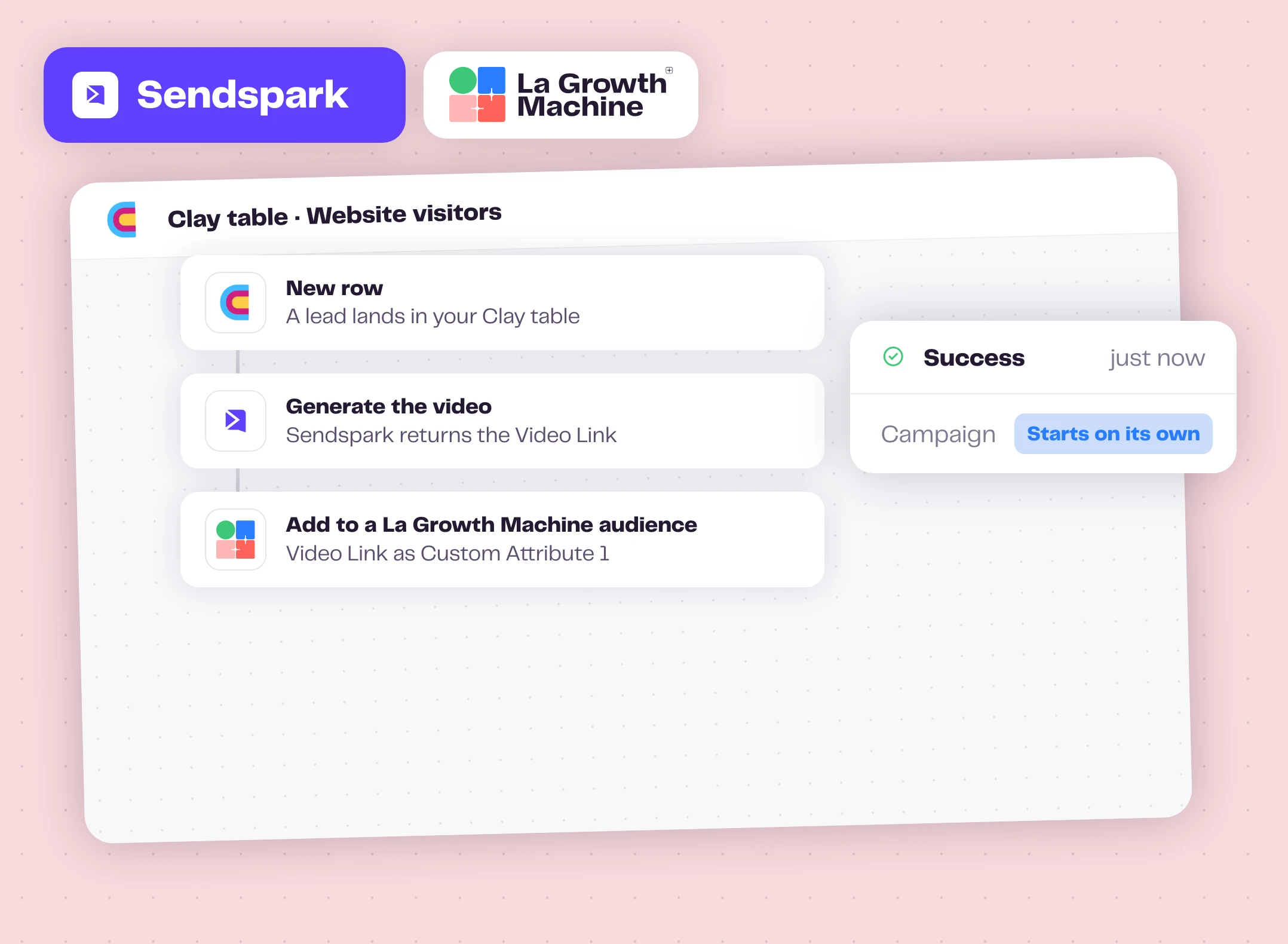
Entièrement automatisé, avec Clay au centre
Pas besoin de fichier CSV : lorsqu'un prospect arrive dans votre table Clay, l'intégration Sendspark avec Clay génère la vidéo, puis l'action « La Growth Machine » de Clay ajoute le prospect à une audience avec le lien vers la vidéo dans l'attribut personnalisé n° 1.
La campagne associée à cette audience se lance automatiquement, avec une vidéo personnalisée pour chaque nouveau prospect.
Comment démarrer ?
Votre première campagne vidéo en quelques minutes.
- videocamÉtape 1
Enregistrez dans Sendspark
Créez une vidéo dynamique, dites « watermelon » à l'endroit du prénom, puis cliquez sur Generate.
- downloadÉtape 2
Exportez le fichier CSV
Téléchargez le fichier CSV contenant les vidéos générées par votre campagne Sendspark.
- upload_fileÉtape 3
Importez-le
Prospects, Importer des prospects, Importer depuis un fichier CSV. Pour LinkedIn, associez Video Link à Custom Att 1.
- rocket_launchÉtape 4
Ajoutez la vidéo
Collez l'extrait de code Sendspark dans une étape « e-mail », ou {{customAttribute1}} dans un message LinkedIn, puis lancez la campagne.
Sendspark est compatible avec les fonctionnalités suivantes de La Growth Machine
Vos vidéos Sendspark sont diffusées dans les étapes « e-mail » et « LinkedIn ». Associez-les à ces fonctionnalités dans la même séquence.
AI Voice Messages
Envoyez des messages vocaux personnalisés sur LinkedIn, à grande échelle.
Découvrez la fonctionnalité arrow_forward sendAutomatisation LinkedIn
Automatisez vos demandes de connexion, messages et notes vocales sur LinkedIn.
Découvrez la fonctionnalité arrow_forward timelineSéquences multicanal
Combinez vos étapes LinkedIn et email au sein d'une même séquence.
Découvrez la fonctionnalité arrow_forwardAllez plus loin avec Sendspark
Webinaires, playbooks et guides de l'équipe La Growth Machine et de nos partenaires.
La Growth Machine : envoyer des vidéos dynamiques
L'équipe de Sendspark vous guide tout au long de la configuration en moins de quatre minutes.
Voir la vidéo arrow_forward articleGuideIntégrer des vidéos Sendspark dans les campagnes LinkedIn de La Growth Machine
Associez le lien vidéo à un attribut personnalisé et envoyez-le sur LinkedIn.
Lire le guide arrow_forward articleGuideEnvoyez des vidéos générées par IA sur LinkedIn via Clay et La Growth Machine
La version entièrement automatisée, de la table Clay à votre campagne.
Lire le guide arrow_forwardQuestions fréquentes
Ai-je besoin d'une clé API ? add
Non. Les flux d'e-mails et de LinkedIn utilisent une importation CSV et un extrait de code. Seul le flux automatisé de Clay utilise votre clé API La Growth Machine, au sein de Clay.
De quels plans ai-je besoin ? add
Sur La Growth Machine, l'importation CSV, l'e-mail et LinkedIn sont inclus dans toutes les formules. Le flux Clay nécessite la formule La Growth Machine Pro ou une formule supérieure. Sur Sendspark, les vidéos dynamiques sont incluses dans toutes les formules payantes, et la page des tarifs mentionne La Growth Machine parmi les intégrations de la formule Growth et des formules supérieures.
Comment chaque prospect reçoit-il la vidéo qui lui correspond ? add
Via les contacts que vous importez. Utilisez le fichier CSV exporté depuis Sendspark, afin que les prospects dans La Growth Machine soient bien ceux pour lesquels Sendspark a généré des vidéos.
Comment les minutes Sendspark sont-elles comptabilisées ? add
Sendspark comptabilise la durée totale de la vidéo pour chaque prospect : une vidéo de 60 secondes pour 50 prospects correspond à 50 minutes.