

TL;DR
– Ask Your Outbound lets you query your full La Growth Machine activity log in plain English. The AI writes the query, you read the number.
– 14 prompts, grouped by role: GTM Engineer, RevOps, Head of Sales, Head of Marketing. Each one ran on our own workspace, with the results.
– Two surprises: connection notes lifted acceptance to 91% but cut replies to 13%, and half of our replied leads were missing from the CRM.
– Included on the Ultimate plan (trial included). Works with Claude, ChatGPT (OpenAI) and any MCP-compatible assistant.
Jump to your role
Every outreach dashboard shows you averages someone else decided to display. Reply rate by campaign, open rate by step, a funnel chart. Useful, until you have a question the dashboard was not built for.
Does a connection note help or hurt? Which sender identity is burning your domain? How many of the leads who replied last quarter never made it into the CRM?
Ask Your Outbound answers those questions in plain English. You ask, the AI writes the query against your full activity log in La Growth Machine, you get the number. This article gives you 14 prompts we run ourselves, grouped by the person who needs them, with the real results from our own workspace.
What Ask Your Outbound is
Ask Your Outbound is a tool in the La Growth Machine MCP server that lets an AI assistant query your complete outreach activity log in natural language. One row equals one timestamped action on one lead. You describe the question, the assistant writes and runs the query, and you read the answer.
It works with Claude, ChatGPT (OpenAI), and any other assistant or LLM that supports the Model Context Protocol.
What sits in the log:
- Every LinkedIn invitation, with or without a note
- Every LinkedIn message and voice note
- Every email sent, opened, clicked, bounced or unsubscribed
- Every reply, on LinkedIn or by email
- Every invitation accepted and every new connection
- Every CRM sync event, conversion and enrichment result
Each row carries the date, the exact time, the campaign, the step, the template, the sending identity and the channel. That granularity is what makes the difference. A dashboard aggregates upfront. Here, nothing is aggregated until you ask.
⚠️ Ask Your Outbound is included in the Ultimate plan. The trial is an Ultimate plan, so you can test it from day one. On Pro, support can open a one-month test on request.
Three rules for a prompt that gets a useful answer
A good Ask Your Outbound prompt names the metric, the time window and the minimum volume. Vague prompts return vague numbers. The assistant is good at writing the query. Your job is to be precise about what counts as a contact, a reply or a win.
- Name the window: “over the last 90 days” or “since January”. Campaigns that started last week have not had time to collect replies.
- Ask for distinct leads, not events: a lead who opened four times is one opened lead. The assistant knows this rule, but say it anyway when the answer looks too good.
- Set a floor: “ignore segments with fewer than 30 contacted leads”. A 100% reply rate on 3 leads is noise.
One more habit. When a result surprises you, ask “what could bias this?” before you act on it. Two of the 14 results below carry exactly that kind of bias, and we say so.
The results below come from La Growth Machine’s own workspace, last 180 days, campaign and identity names anonymized.
Prompts for GTM and Growth Engineers: test what you believe
The GTM Engineer’s job is to turn beliefs into tests. These four prompts each replace a common piece of outbound folklore with your own number. Run them on your workspace before you change a sequence, not after.
1. Does a connection note help acceptance, or replies?
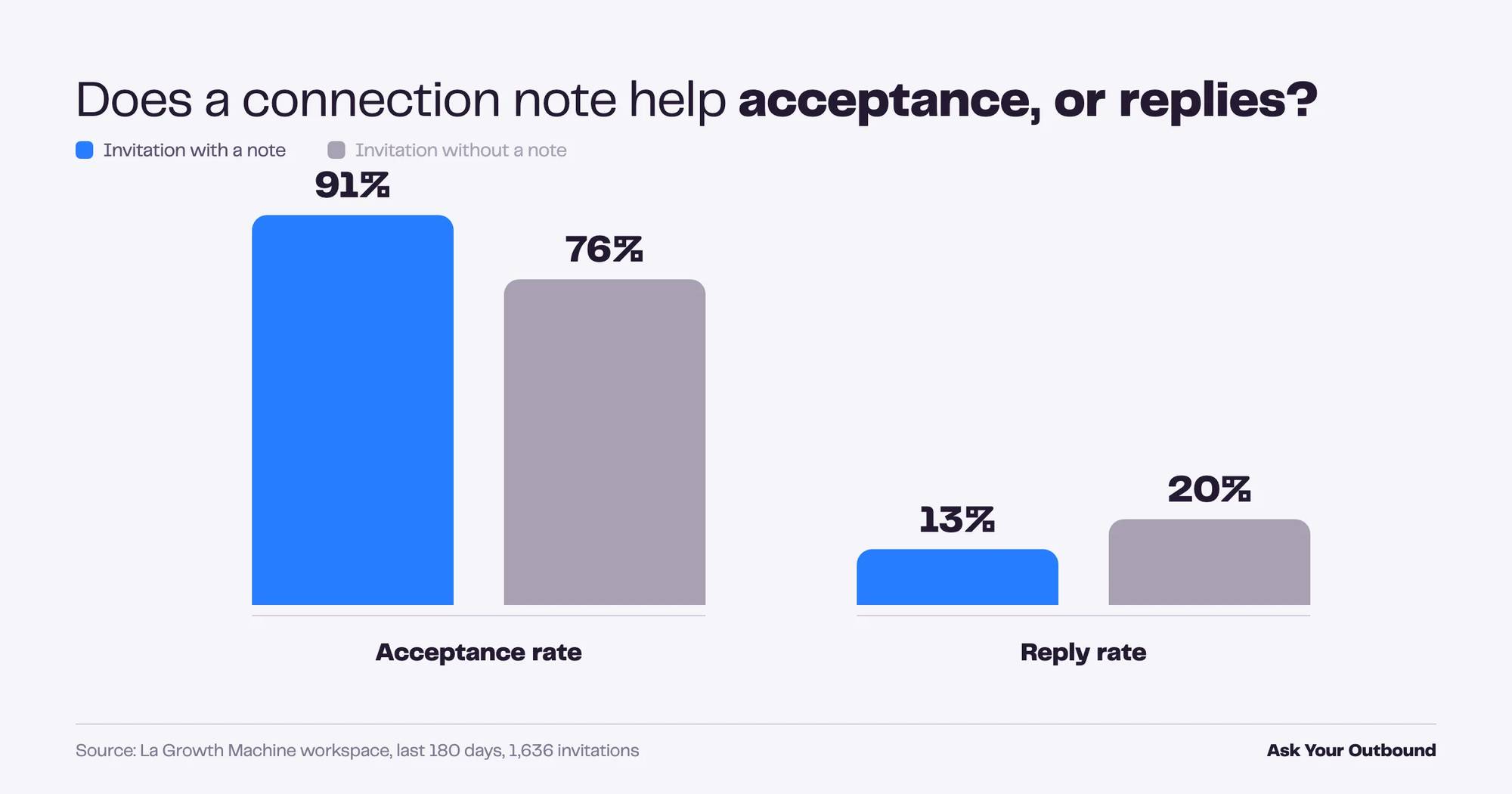
A connection note raises acceptance but can lower the reply rate on the same leads. In our workspace, invitations with a note were accepted 91% of the time versus 76% without. The reply rate went the other way: 13% with a note, 20% without. The note buys the connection, not the conversation.
Prompt
Over the last 180 days, compare LinkedIn invitations sent with a note versus without a note.
For each group give me: invited leads, accepted leads, acceptance rate, replied leads, reply rate.
Count distinct leads and ignore groups under 30 leads.
What we got
What to do with it
Decide what your first step is for. If the campaign needs the connection before a message sequence can start, keep the note. If the invitation is the pitch, test dropping it.
2. Which message gets the best reply rate?
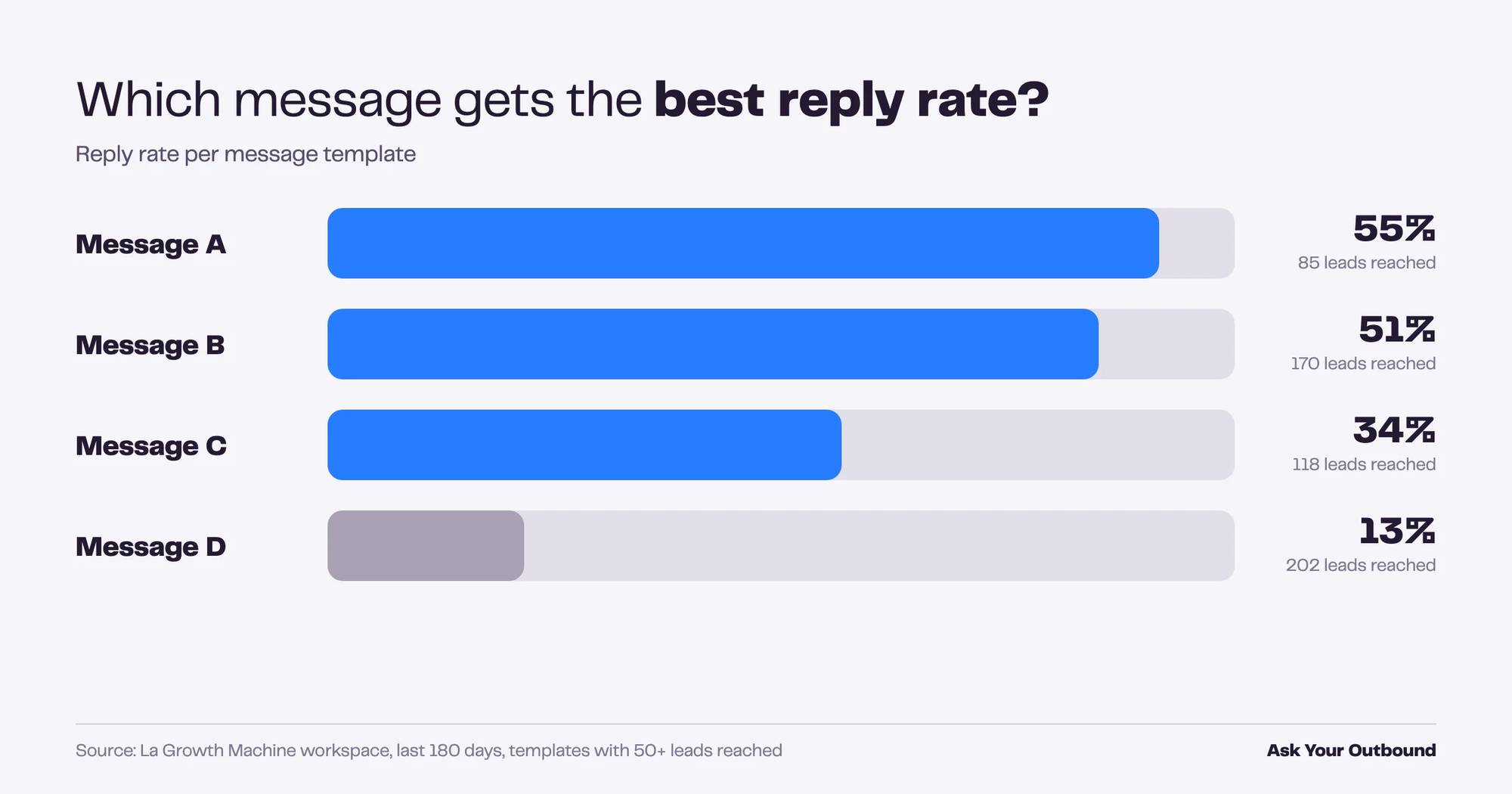
Ranking every message template by reply rate shows how wide the gap is between your best and worst copy. In our workspace the top message converted 55% of the leads who received it into a reply. The bottom of the table sat at 13%. Same product, same quarter, four times the result.
Prompt
Rank my message templates by reply rate over the last 180 days.
Include LinkedIn messages, emails and invitation notes.
Show leads reached, replied leads and reply rate, only for templates that reached at least 50 leads.
What we got
What to do with it
Open the top two in La Growth Machine and read them side by side with the bottom two. The pattern is usually visible in ten minutes. Then rewrite the worst one and re-run the prompt in 30 days.
3. At which touch do replies actually come?
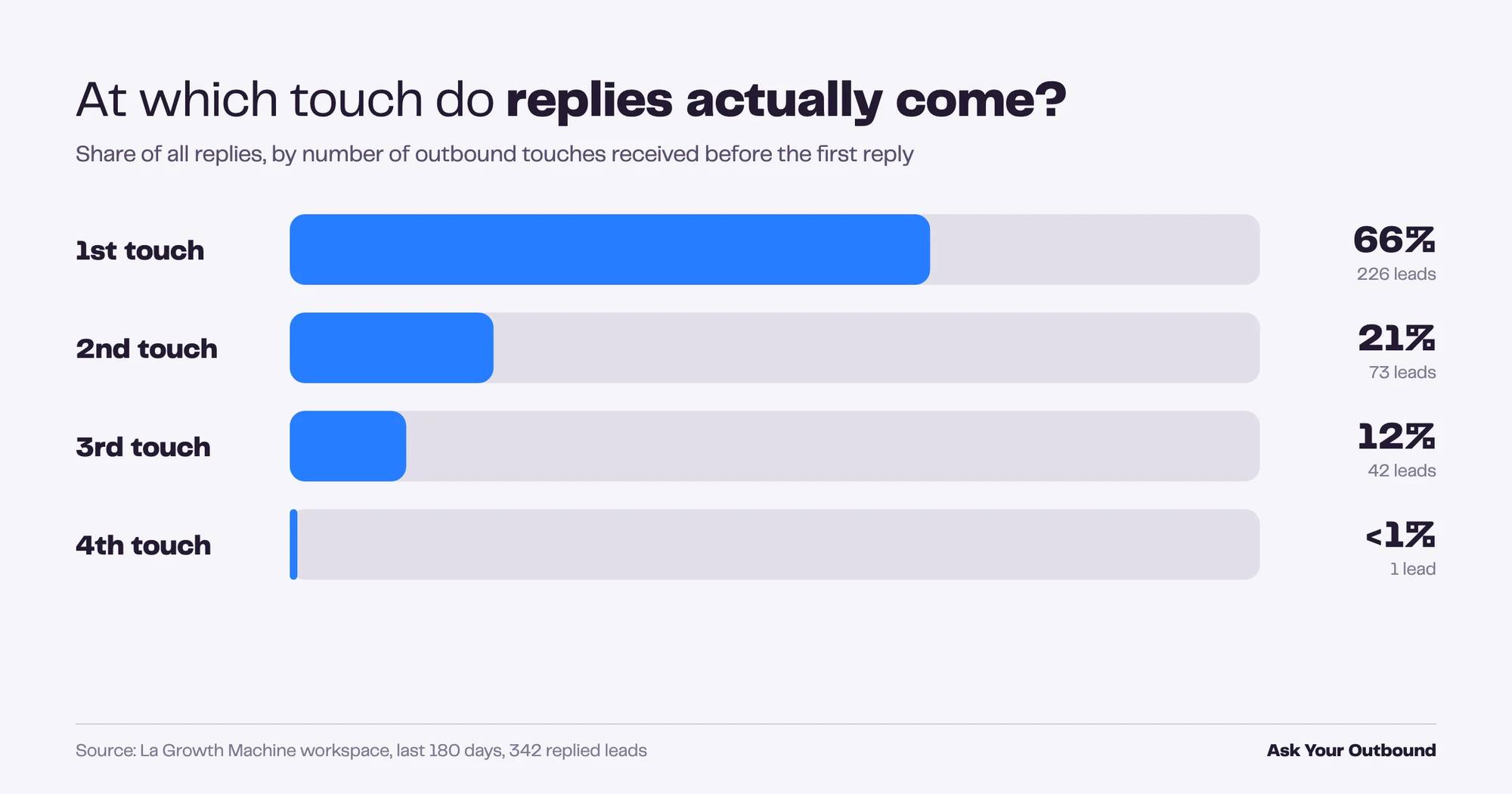
Two thirds of our replies came after the first touch, and almost none after the third. Over 180 days, 66% of replied leads answered the first message, 21% the second, 12% the third. One lead replied at touch four. Long sequences are not where our pipeline comes from.
Prompt
For every lead who replied in the last 180 days, count how many outbound touches they had received before their first reply.
Show the distribution: number of touches, replied leads, share of all replies.
What we got
What to do with it
If touches four and five bring nothing, cut them and reinvest the sending capacity in a new segment. Fewer touches on more relevant people beats more touches on the same ones.
4. LinkedIn only, email only, or both?
Comparing reply rate by channel mix tells you where replies come from, but the answer needs a second look. In our workspace, leads contacted on LinkedIn only replied 23% of the time. Email only: 2.3%. Both channels: 1%. The last number looks wrong, and that is the point.
Prompt
Group contacted leads from the last 180 days by channel mix: LinkedIn only, email only, LinkedIn and email.
For each group show contacted leads, replied leads and reply rate.
Then tell me what could bias this comparison.
What we got
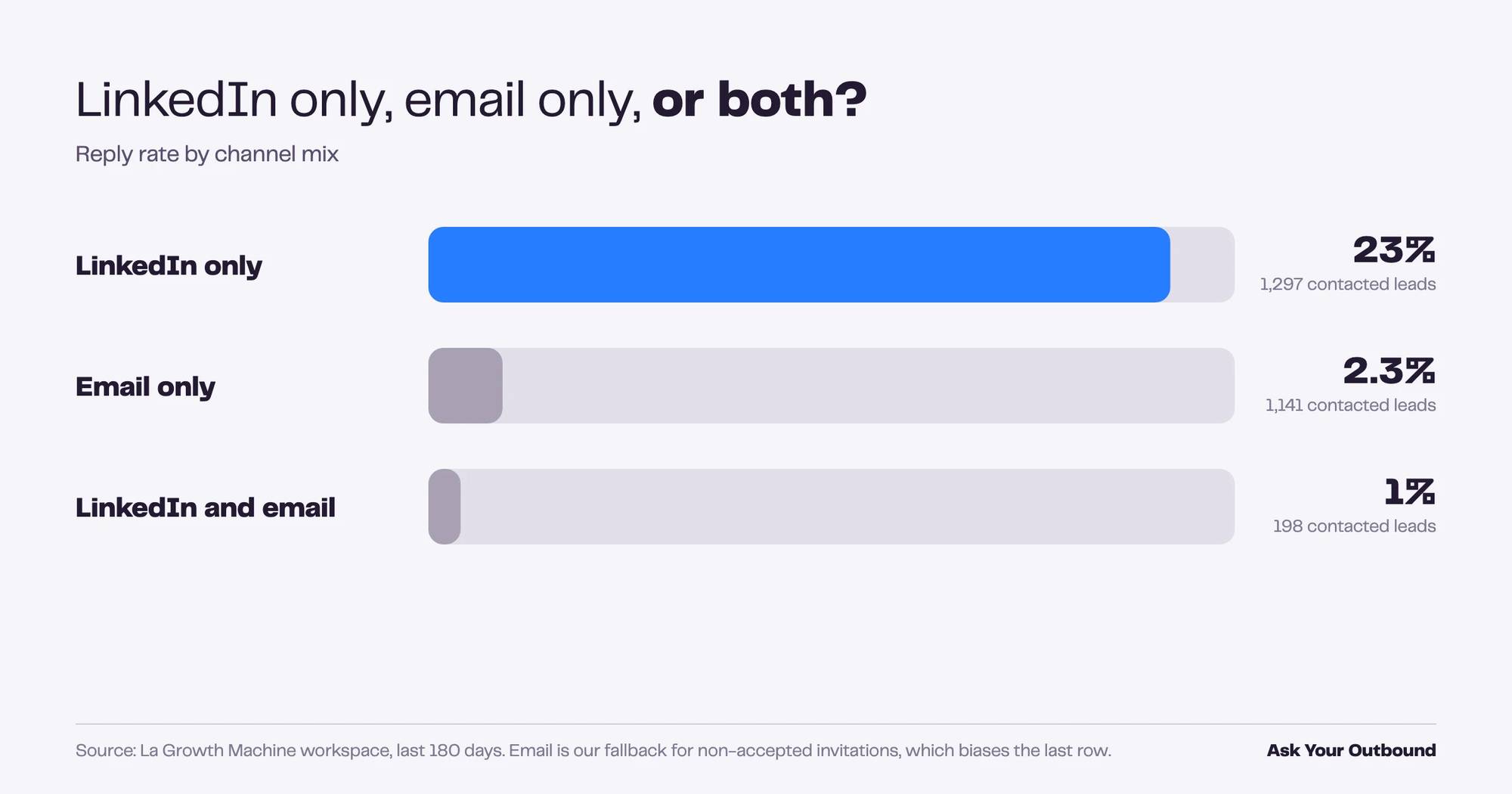
⚠️ In most of our sequences, email is the fallback for leads who did not accept the invitation. The “both channels” group is therefore made of people who already ignored us once. The low rate measures the segment, not the channel.
What to do with it
This is what “AI takes the intelligence, you keep the judgment” means in practice. The query is correct. Reading it still requires knowing how your own sequences branch.
Prompts for RevOps and SalesOps: reliability and data hygiene
RevOps owns the plumbing between outreach and the CRM, and the health of the identities that send. These three prompts surface the problems a campaign dashboard hides: a sender quietly damaging deliverability, a bounce spike nobody noticed, replies that never reached the CRM.
5. Which sending identity has a deliverability problem?
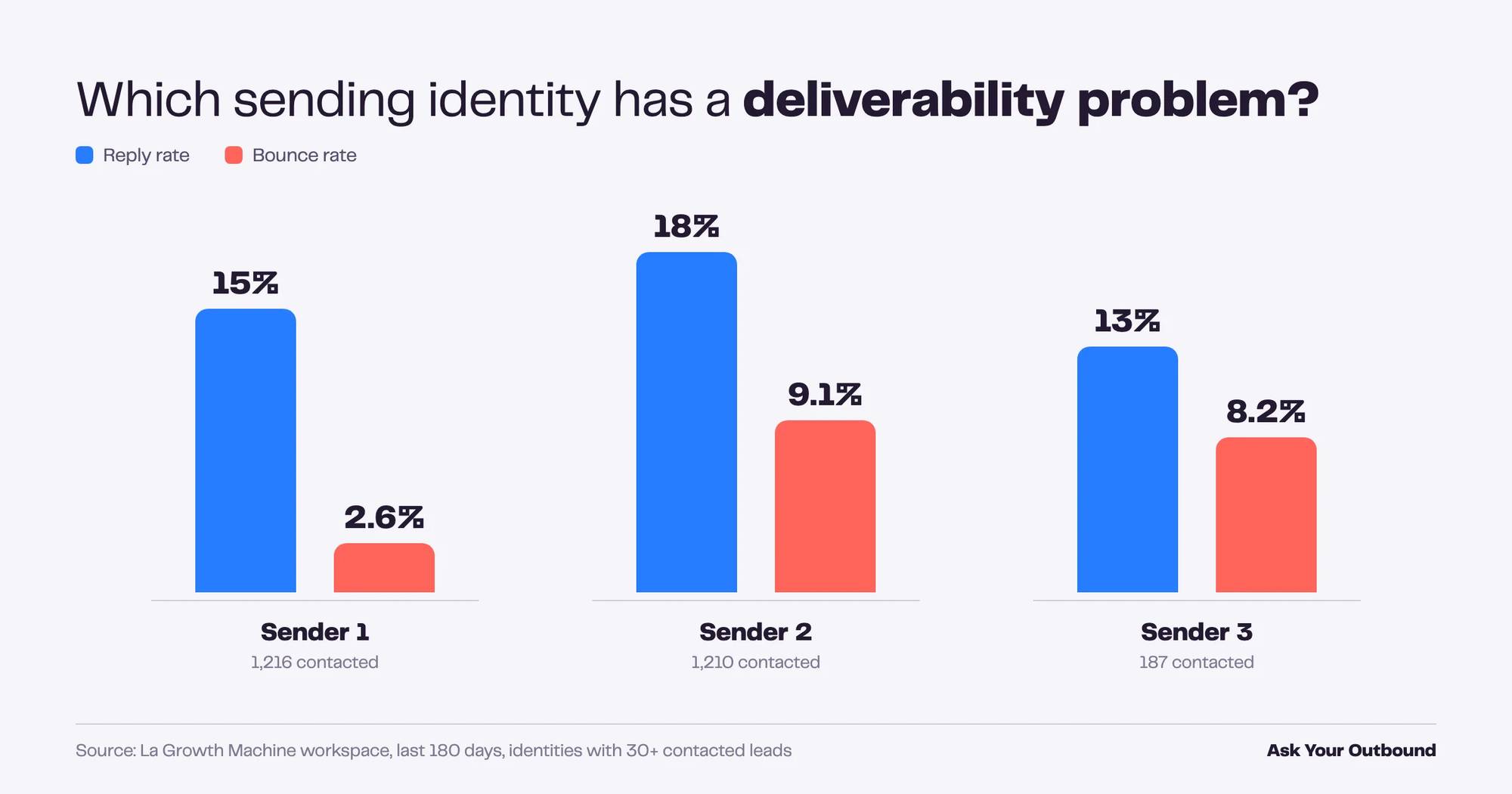
Comparing identities on reply rate and bounce rate catches a bad sender before the domain pays for it. In our workspace, three identities had reply rates within a few points of each other (13% to 18%). Bounce rates did not: one identity bounced 2.6% of its emails, the other two bounced 8% and 9%.
Prompt
For each sending identity active in the last 180 days, show: contacted leads, replied leads, reply rate,
emailed leads, bounced leads and bounce rate. Only include identities with at least 30 contacted leads.
What we got
What to do with it
A bounce rate three times higher on similar reply rates usually points at the lists, not at the mailboxes. Check where the audiences of Senders 2 and 3 come from before you touch any sending setting.
6. Is my bounce rate trending up?
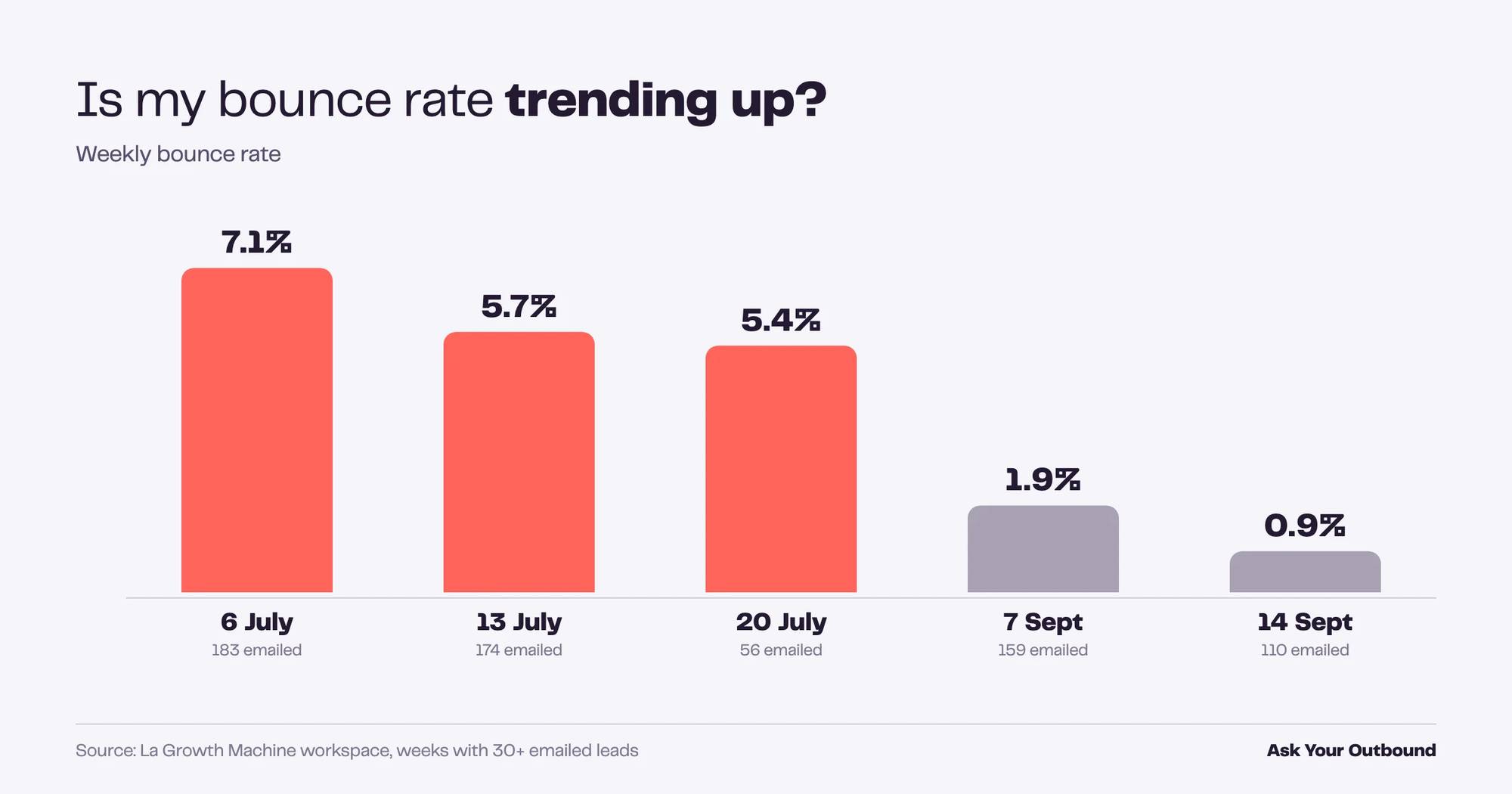
A weekly bounce trend shows whether a deliverability problem is behind you or building. Our workspace had a spike in early July at 7% bounce on 183 emailed leads, then a steady decline to 0.9% in mid-September. Without the weekly view, the July number would have looked like the baseline.
Prompt
Show me, week by week for the last 120 days: emailed leads, bounced leads, bounce rate and unsubscribed leads.
Skip weeks with fewer than 30 emailed leads.
What we got
What to do with it
Set a threshold. Above 3% bounce for two weeks in a row, pause the campaign and re-verify the list. Run this prompt every Monday, or hand it to a scheduled task.
7. Which replied leads never reached the CRM?
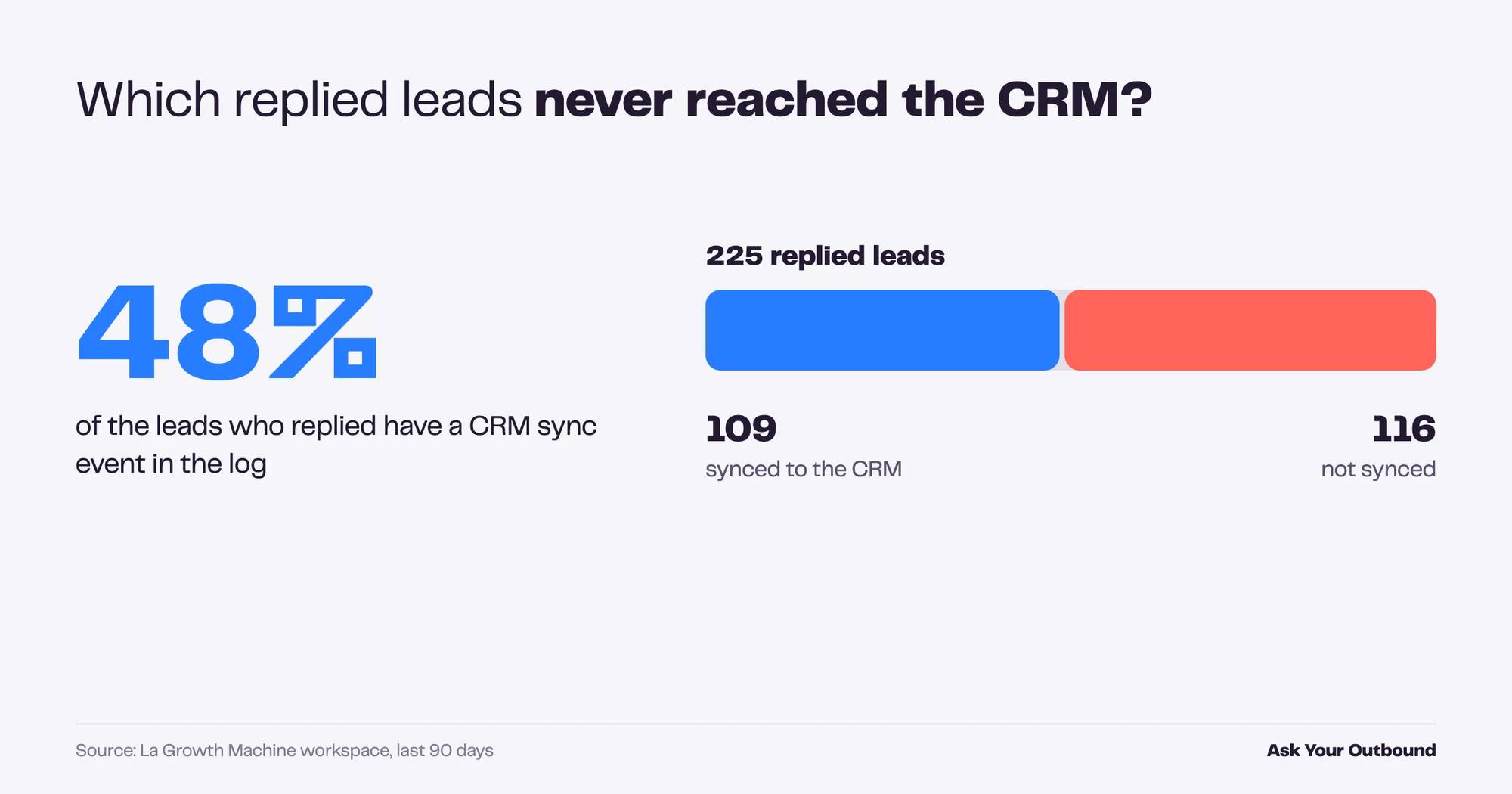
Counting replied leads with no CRM sync event tells you how much pipeline is invisible to sales. Over the last 90 days, 225 leads replied to us. 109 of them have a HubSpot sync event in the log. 116 do not. Half of our conversations were not in the CRM.
Prompt
List the leads who replied in the last 90 days but have no CRM sync event in the log.
Give me the total replied leads, how many were synced, how many were not, and the coverage rate.
What we got
What to do with it
Ask the assistant which campaigns those 116 leads belong to, then check whether CRM sync is switched on for each. The HubSpot and Pipedrive integrations sync at the campaign level, so this is usually a settings check, not a data migration.
Prompts for Heads of Sales: pipeline and team rhythm
A Head of Sales needs two things from outreach data: which campaigns fill the pipeline and how fast prospects respond. These four prompts answer both without a report request to ops. The output is a ranking and a set of expectations you can hand to the team.
8. Which campaigns generate the most conversations?
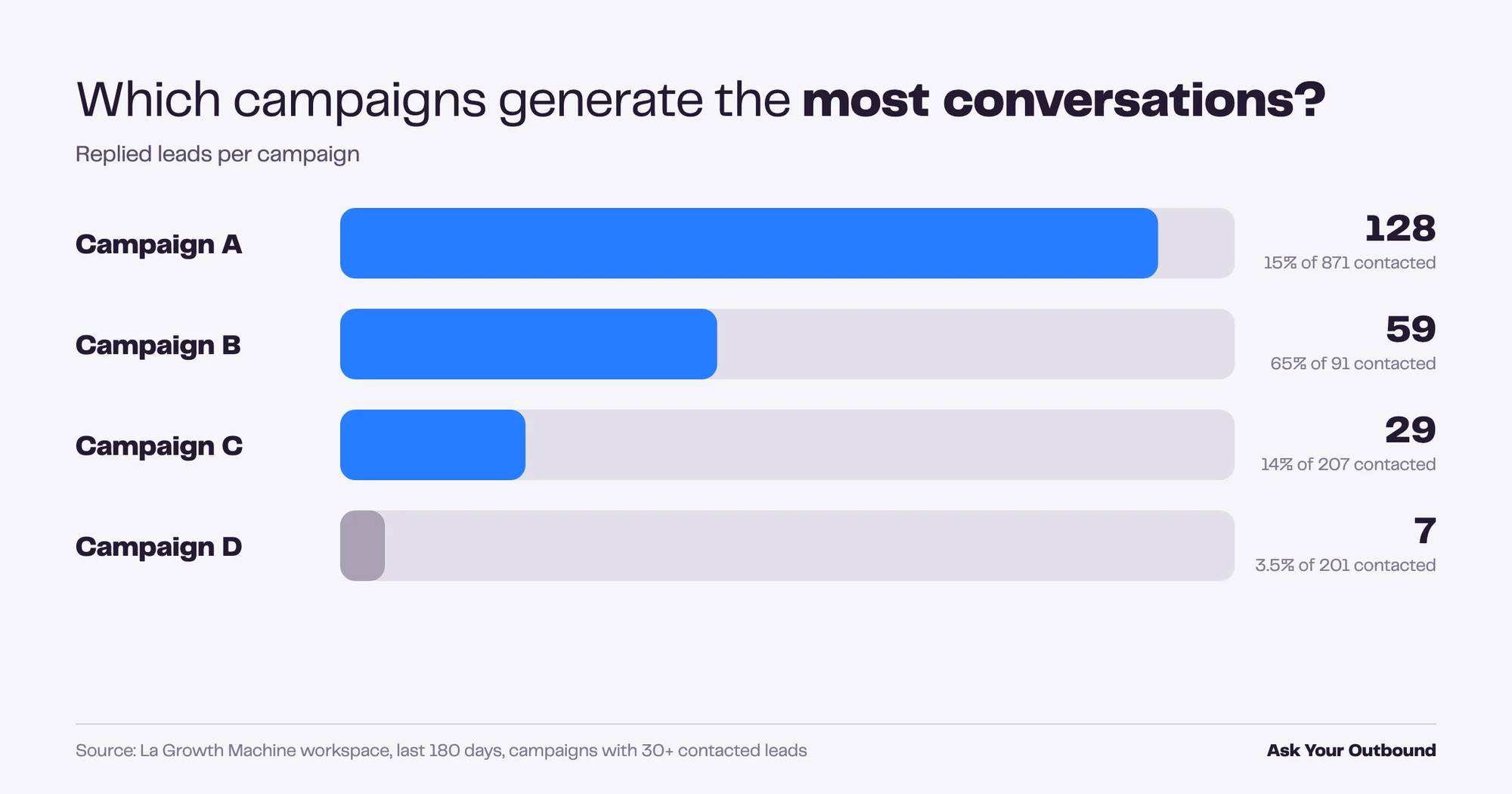
Ranking campaigns by replied leads, not by reply rate alone, shows where pipeline actually comes from. Our biggest campaign contacted 871 leads and generated 128 conversations at 15%. A small one contacted 91 leads and generated 59 conversations at 65%. Both matter for different reasons.
Prompt
Rank my campaigns from the last 180 days by number of replied leads.
Show contacted leads, replied leads and reply rate. Only campaigns with at least 30 contacted leads.
What we got
What to do with it
Campaign B is the one to study and scale. Campaign D is the one to stop. Then connect the ranking to your CRM to see which conversations turned into meetings. The performance view in La Growth Machine gives you the campaign side, your CRM gives you the revenue side.
9. How fast do prospects reply, per channel?
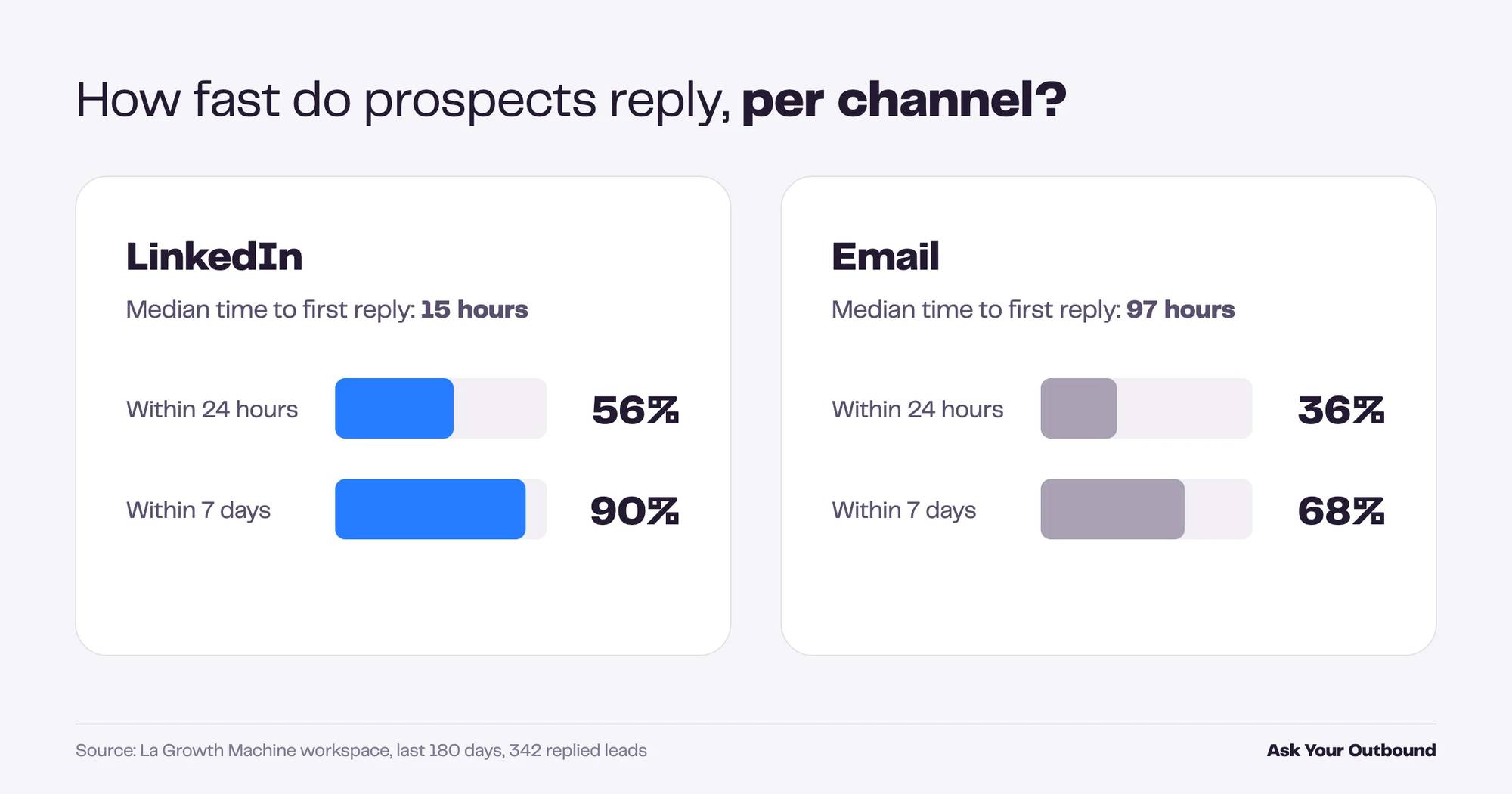
Measuring time to first reply sets realistic follow-up expectations for the team. On LinkedIn, half of our replies arrived within 15 hours, 56% within a day and 90% within a week. Email was slower: a median of 97 hours, 36% within a day and 68% within a week.
Prompt
For leads who replied in the last 180 days, measure the time between first contact and first reply.
Split by reply channel (LinkedIn, email). Show median hours, share within 24 hours and share within 7 days.
What we got
What to do with it
If 90% of LinkedIn replies arrive within a week, a follow-up on day 10 is talking to the 10%. Set the delays in your sequences from this table, not from a blog post.
10. Who accepted my invitation but never replied?
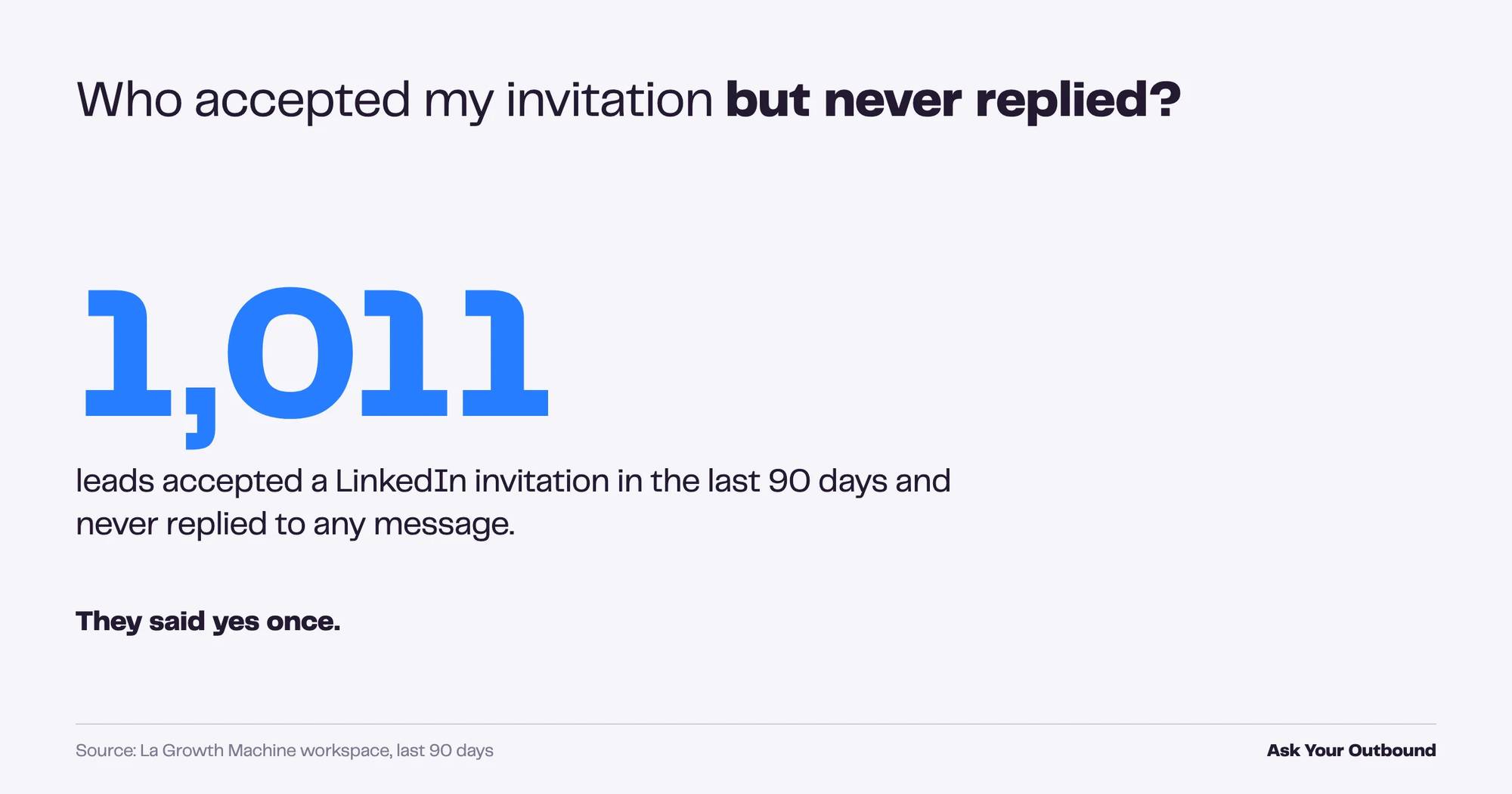
Leads who connected and went silent are your cheapest re-engagement pool. In our workspace, 1,011 leads accepted a LinkedIn invitation in the last 90 days and never replied to anything. They know who we are. They said yes once.
Prompt
How many leads accepted a LinkedIn invitation in the last 90 days but never replied to any message?
Give me the count, and list them with their campaign so I can build a re-engagement audience.
What we got
What to do with it
Do not re-send the same pitch. Build a separate audience, give it to your reps with a different angle, and measure it as its own campaign. The list is already in La Growth Machine, so the assistant can create the audience for you in the same conversation.
11. How long until a prospect accepts an invitation?
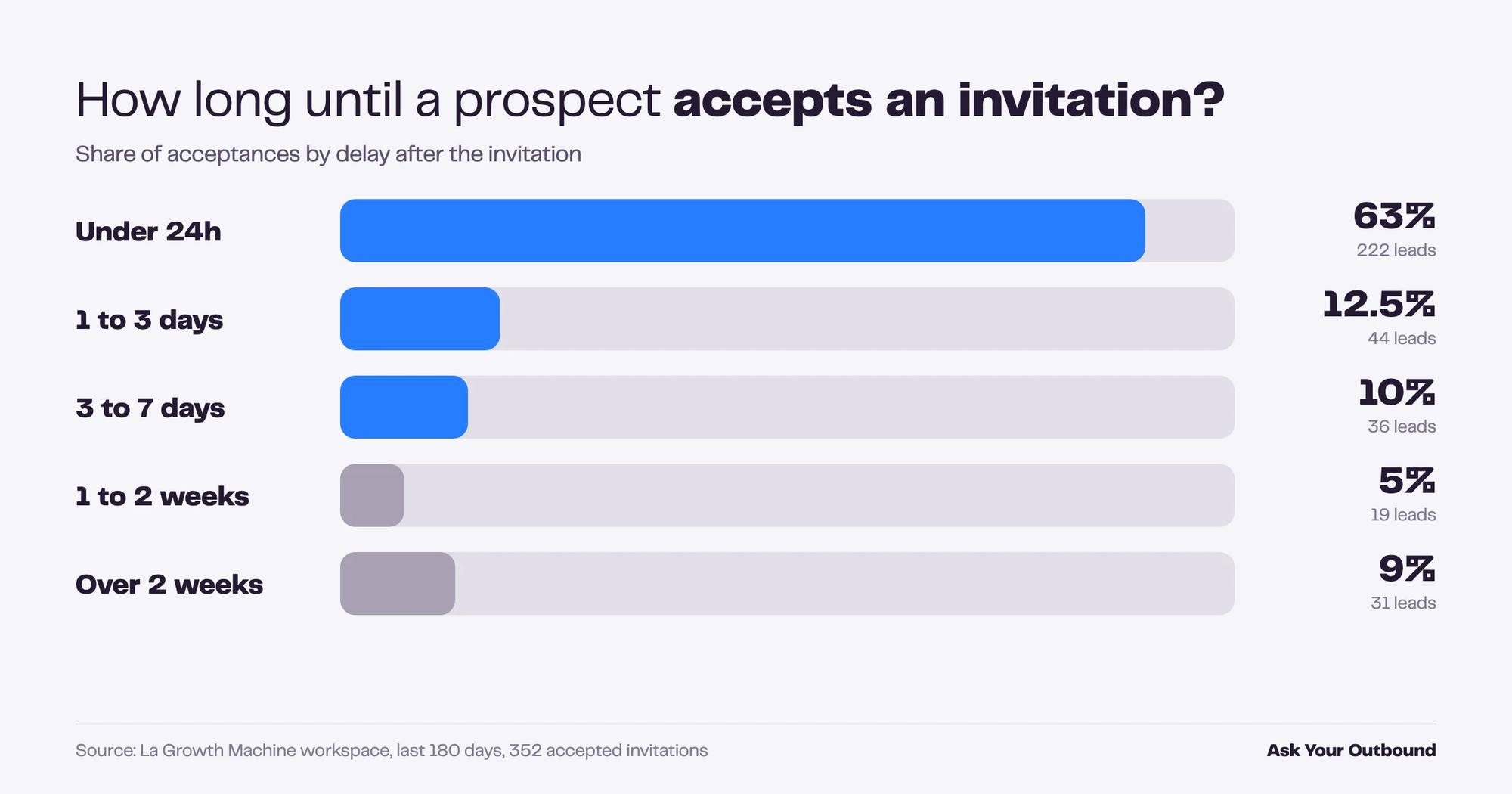
Knowing the acceptance curve tells you how long to wait before switching channel. In our data, 63% of acceptances happened within 24 hours, 12.5% between one and three days, 10% between three and seven days. Then a long tail: 9% of acceptances came more than two weeks after the invitation.
Prompt
For invitations sent in the last 180 days that were accepted, measure the delay between invitation and acceptance.
Bucket it: under 24h, 1 to 3 days, 3 to 7 days, 1 to 2 weeks, over 2 weeks. Show count and share per bucket.
What we got
What to do with it
Waiting seven days before the email fallback captures 86% of acceptances. Waiting three days captures 76%. Pick your trade-off knowingly.
Prompts for Heads of Marketing: messaging and deliverability
Marketing owns the message and, often, the domain reputation. These three prompts check both. One of them also shows why an open rate should never be the metric you report upward.
12. What does my email funnel look like, and can I trust the open rate?
An email funnel per campaign shows sent, opened, clicked, replied and bounced side by side, and the open column is the one to distrust. Our largest email campaign reported a 99% open rate on 701 emails. Nobody opens 99% of cold emails, but privacy proxies and link scanners do.
Prompt
Build the email funnel for each campaign over the last 180 days: emailed leads, opened, clicked, replied, bounced,
with open rate, reply rate and bounce rate. Campaigns with at least 30 emailed leads only.
Flag any open rate above 80% as unreliable.
What we got
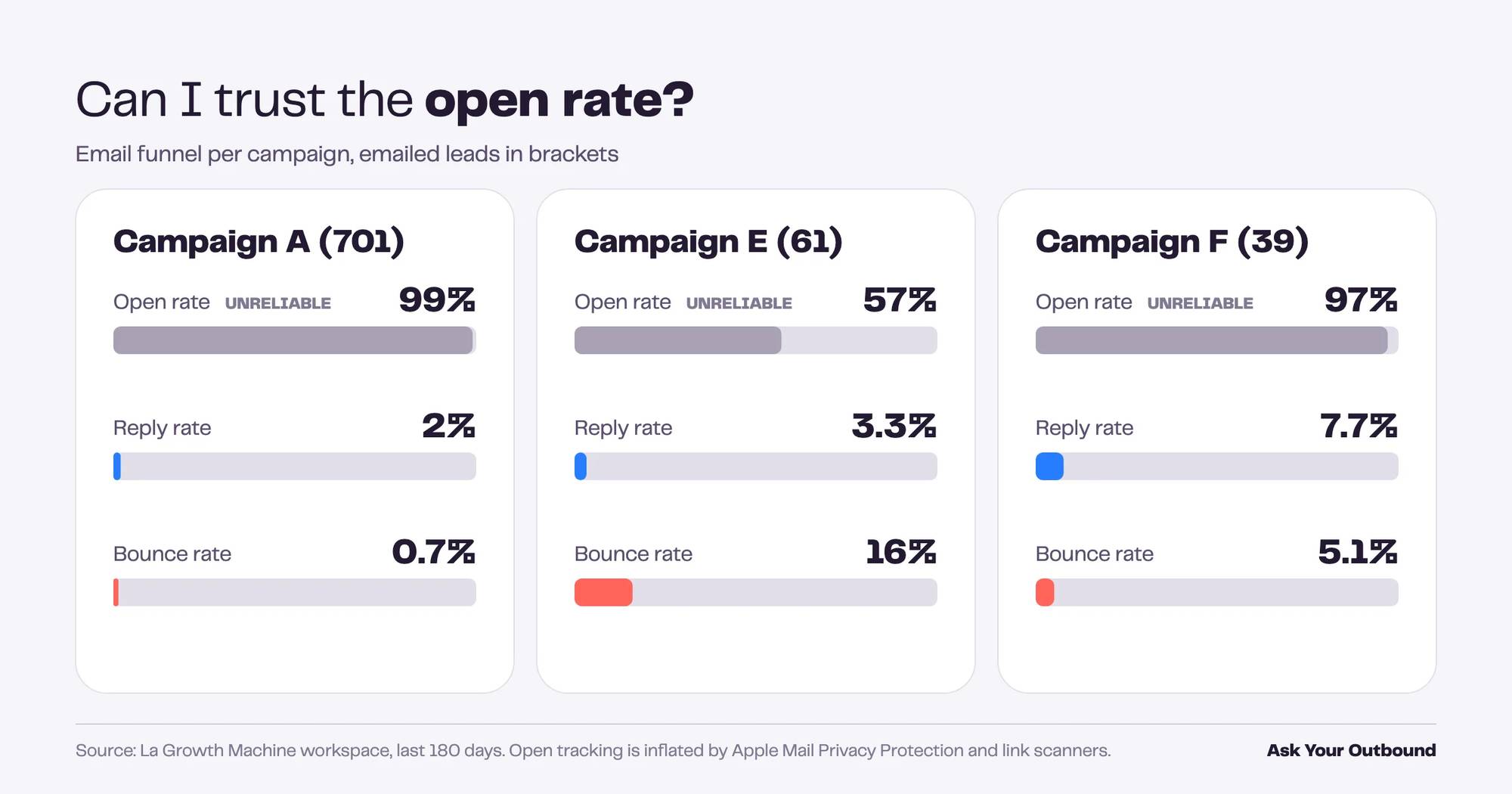
⚠️ Open tracking is inflated by Apple Mail Privacy Protection and corporate link scanners. Treat opens as a directional signal. Replies and bounces are real events.
What to do with it
Report replies and meetings, never opens. And look at Campaign E: a 16% bounce rate on a marketing list is a list-quality problem that will follow your domain into every other campaign.
13. When should I send?
Reply rate by weekday and by time slot gives you your own sending calendar instead of a generic one. In our workspace, Monday and Friday first contacts replied at 14.5% and 14.3%. Tuesday to Thursday sat around 12%. Saturday dropped to 8%. Late afternoon sends did slightly better than mornings.
Prompt
Group first contacts from the last 180 days by weekday and by time slot (before 9am, 9 to 12, 12 to 2pm, 2 to 6pm, after 6pm)
in the Europe/Paris timezone. Show contacted leads, replied leads and reply rate for each. Skip slots under 30 leads.
What we got
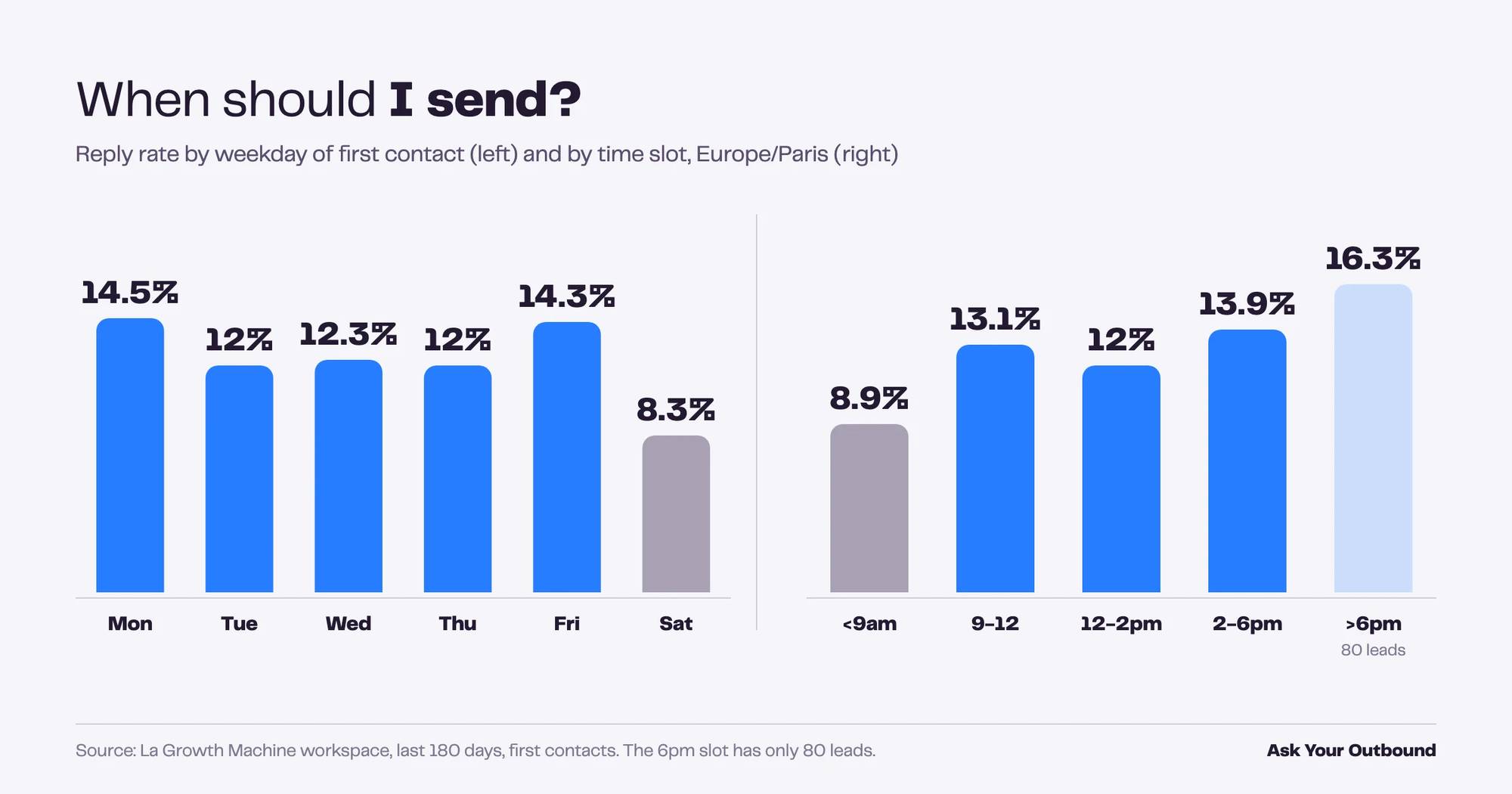
⚠️ The “after 6pm” slot has 80 leads. It is the highest number in the table and the least reliable one.
What to do with it
Stop sending before 9am and on Saturdays. Do not build a strategy on the 6pm slot until it has 300 leads behind it.
14. Which leads are warm but silent?
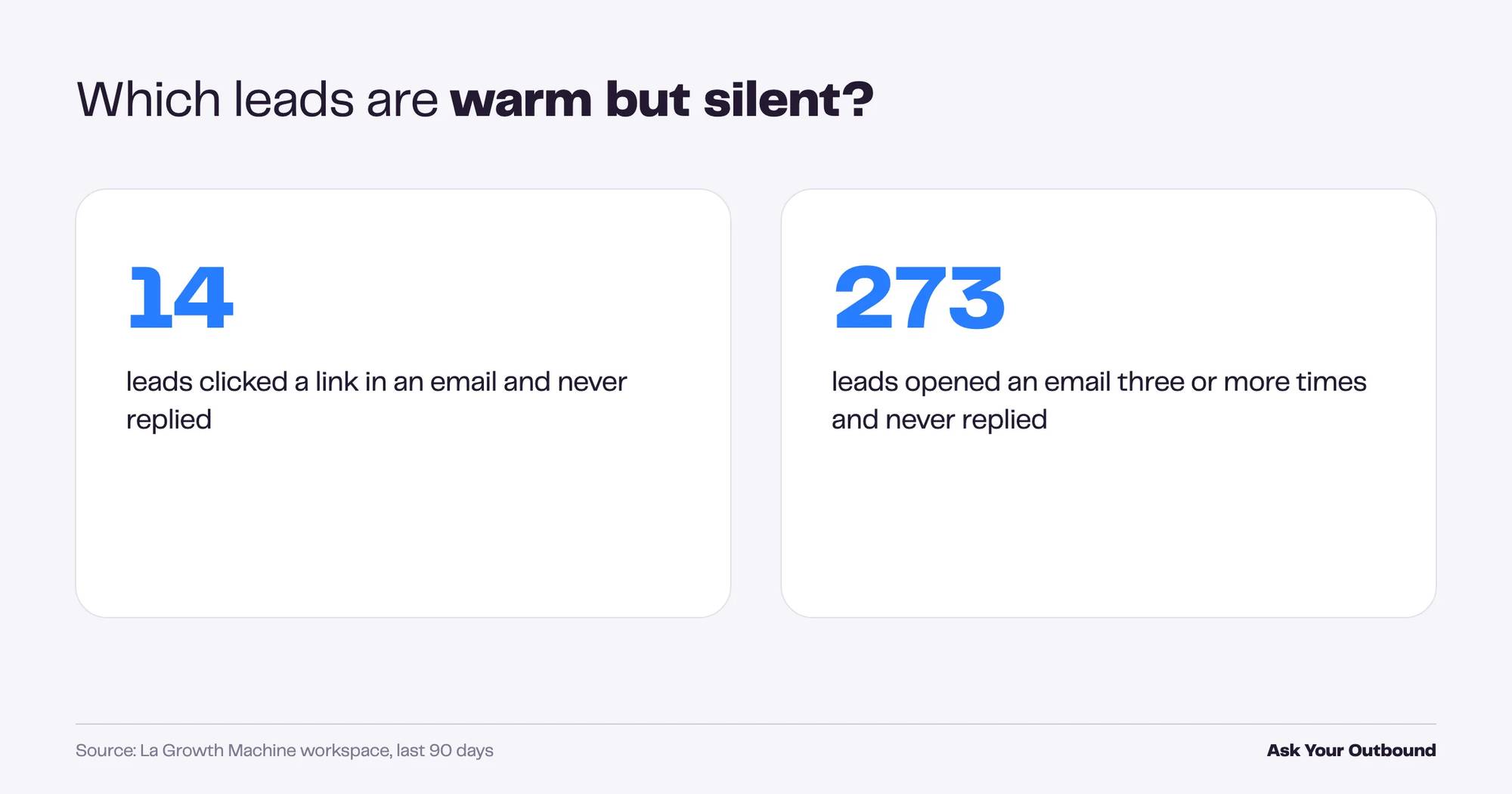
Leads who opened your emails several times or clicked a link without replying are a hand-raise you did not see. In our workspace, 273 leads opened three or more times without replying in the last 90 days, and 14 clicked a link and went silent.
Prompt
Find leads from the last 90 days who never replied but either clicked a link or opened my emails three or more times.
Give me the counts for each group and the list with their campaign.
What we got
What to do with it
The 14 clickers go to a rep today, by phone or by LinkedIn. The 273 repeat openers go into a short, different sequence. Both lists can be turned into an audience in La Growth Machine from the same conversation.
The prompt that ties it together
Once you have run a few of these, the most useful prompt is the one that asks what your best results have in common. The answer combines campaign, template, identity and timing into the 5% of your outreach that produces most of your pipeline.
Prompt
Looking at the last 180 days, what do my best-performing campaigns have in common?
Compare the top quartile and bottom quartile by reply rate on: templates used, sending identity, channel mix,
number of touches, weekday of first contact. Tell me what stands out and what I should test next.
This is the question no dashboard answers, because no dashboard knows which question you were going to ask. The assistant writes five or six queries, reads them together and gives you a hypothesis. You decide what to scale.
How to get started
Ask Your Outbound runs inside the La Growth Machine MCP server. Connecting it takes a few minutes and requires no code.
- In Claude: open Customize, then Connectors, and add a custom connector with the URL
https://mcp.lagrowthmachine.com. - In ChatGPT (OpenAI) and Codex: add it through OpenAI’s connectors for MCP or Codex MCP setup.
- In Claude Code, Cursor or another IDE: one command installs the MCP and the full skill library:
curl -fsSL https://raw.githubusercontent.com/LaGrowthMachine/gtm-system/main/install.sh | sh
The MCP server itself is open source under the Apache 2.0 licence. Connecting it to your La Growth Machine account requires API access, included on Pro and Ultimate (trial included). Ask Your Outbound specifically requires Ultimate.
The full guide to the La Growth Machine MCP server covers every tool, not just this one. If you would rather start from a packaged workflow, the Claude Skills library ships ready-made analyses that call Ask Your Outbound under the hood.
Frequently asked questions
Do I need to know SQL to use Ask Your Outbound?
No. You write the question in plain language and the assistant writes and runs the query. You can ask to see the query if you want to check it, and most GTM Engineers do the first few times. After that, you stop looking.
Can the assistant modify my data through Ask Your Outbound?
No. Ask Your Outbound is read-only and scoped to your workspace. Other tools in the La Growth Machine MCP server can create audiences or pause campaigns, and those actions ask for confirmation before they run.
Which plan includes Ask Your Outbound?
Ultimate. The trial is an Ultimate plan, so it is available from your first day. On Pro, support can open a one-month test on request.
How much history do I need for the numbers to mean something?
About 30 days and a few hundred contacted leads per segment you want to compare. Below 30 leads per group, the assistant should tell you the result is not reliable. If it does not, ask it to add the floor.
Does it work with ChatGPT or only with Claude?
Both, and any other assistant that supports the Model Context Protocol. The connector URL is the same. The quality of the analysis depends more on how precisely you phrase the question than on which assistant runs it.
Start with one prompt
Pick the prompt that matches a decision you have to make this week. Run it. Read the caveat before you read the number.
Then change one thing in your outreach and run the same prompt in 30 days. That loop is what Ask Your Outbound is for: a question, a number, a change, the same question again. The AI handles the query and the judgment stays with you.