
TL;DR
LinkedIn Sales Navigator is a powerful tool for B2B sales and marketing professionals to generate leads and close deals on LinkedIn. It offers advanced search filters, prospect lists, InMail messaging, and interaction tracking. While it has a cost (€79.99/month for basic), its features can significantly boost prospecting efficiency and ROI. It integrates well with CRMs and tools like LaGrowthMachine for a comprehensive multi-channel strategy. Key features include advanced search, AI-driven recommendations, InMail for direct outreach, real-time updates, and CRM integration. The article also details how to use its advanced Boolean search capabilities and outlines a 4-step process for effective prospecting: profile optimization, prospect research, engagement, and performance tracking.
LinkedIn Sales Navigator is the ideal tool for LinkedIn users who want to generate more leads and sales. With a substantial database at your disposal, it has become an indispensable tool for sales professionals and growth marketers.
How does LinkedIn Sales Navigator work? What are its functionalities? What is its price? Is the investment worth it?
In this article, we will present everything you need to know about LinkedIn Sales Navigator and how it can help you boost your prospecting efforts.
Why use LinkedIn Sales Navigator?
If you are a B2B sales professional or an expert in LinkedIn growth hacking, you already know that prospecting on the platform is one of the best ways to generate qualified leads.
Using Sales Navigator means benefiting from the most advanced features to increase your prospecting efficiency on the social platform. Among them:
- Advanced Search: Target prospects based on specific criteria (location, company size, industry, etc.) and never miss out on qualified leads.
- Prospect Lists: Create prospect lists and organize your prospecting according to your sales objectives.
- InMail Messages: Send private messages directly to your prospects, even if you don’t share any common connections.
- Interaction Tracking: Stay informed about your prospects’ activity with your company (profile views, website visits, etc.).
In summary, LinkedIn Sales Navigator is an indispensable tool for anyone looking to make the most of this professional network. If you are looking for new clients and want to optimize your prospecting, this is the tool for you!
And for more advanced users, you can use Sales Nav for an LinkedIn ABM strategy. We won’t go into detail in this article, but don’t forget to check out the linked article if you want to learn more!
Sales Navigator also works very well with LaGrowthMachine! Indeed, there is a workflow for our clients that allows them to automatically generate highly qualified B2B leads.
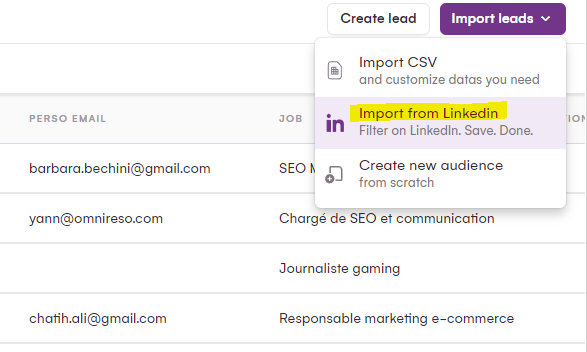
1. You build your prospect lists using the targeting power of Sales Navigator.
2. You import your prospects into LaGrowthMachine to send them messages and follow up later… The tool will automatically enrich data to find important prospecting information – including your prospect’s email.
3. With this information, you can now create multi-channel prospecting sequences until your lead responds.
4. All that’s left is to close the deal, and you’re done!

Bonus tip: if you wish, you can even sync LaGrowthMachine with your CRM. As soon as a lead responds, it will appear in your CRM with the correct qualification based on the action they took.
Obtiens 3,5 fois plus de leads !
But that’s not all! LinkedIn Sales Navigator serves as a powerful toolkit for growth hackers, offering a suite of features designed to enhance your prospecting efforts and drive exponential growth.
Let’s examine its key components.
Advanced Search: Precise Targeting at Scale
Sales Navigator unlocks numerous opportunities through its advanced search capabilities. It’s like having a sophisticated search engine that helps you find the exact type of people you’re looking for for your business.
This function allows you to filter your search based on specific criteria. This could be industry, job titles, and company size. For example, if you’re looking for potential clients in the tech sector who hold leadership positions, Sales Navigator helps you quickly identify and connect with them.
- Refined Filters: Use search criteria such as industry, job titles, and company size.
- Custom Criteria: Tailor your searches to find prospects based on precise attributes, improving relevance.
- Practical Example: Suppose you’re marketing an innovative SaaS solution. By searching for CTOs in tech companies with 100-500 employees, you streamline your outreach to a receptive audience.
Smart Recommendations: AI-Driven Insights for Prospecting
Imagine having a virtual assistant that studies your preferences and recommends connections that align with your goals. LinkedIn Sales Navigator acts as this virtual assistant, leveraging artificial intelligence to suggest leads based on your previous searches and activities.
This feature helps you stay ahead of the curve by presenting you with potential leads you might not have discovered otherwise. It’s like having a knowledgeable colleague constantly pointing you toward promising prospects.
- Artificial Intelligence: Utilize AI algorithms to receive prospect suggestions based on your search history.
- Time Savings: Discover new leads that match your objectives, minimizing search time.
- Application in Action: If you’re promoting a financial consulting firm, Sales Navigator might recommend CFOs in financial companies, expanding your potential client base.
InMail Engagement: Personalized Outreach Made Easy
Imagine having a personalized way to initiate conversations with individuals who could be key contacts for your business growth. LinkedIn Sales Navigator offers this possibility through InMail. This feature allows you to contact people even if you are not yet connected with them on the platform.
This is particularly advantageous for initiating targeted dialogues with potential clients or partners.
- Direct Messaging: Engage with prospects directly via InMail, even if they are not connected on LinkedIn.
- Personalized Conversations: Customize messages based on each prospect’s profile and preferences.
- Real-World Use: Imagine you’re pitching an innovative AI product. InMailing personalized content to AI directors highlights your expertise and their relevance.
Strategic Approach Insights: The Advantage of Real-Time Information
Keeping up with your connections is crucial for successful networking. LinkedIn Sales Navigator provides insights into updates and changes in your prospects’ career paths. This could include job changes or company updates.
You can adapt your prospecting strategies and interactions based on available information. This allows you to build genuine relationships and offer relevant solutions more effectively.
- Timely Updates: Receive alerts on prospect changes, such as career moves or company evolutions.
- Strategic Approach: Leverage updates to create relevant touchpoints and build authentic connections.
- Applied Scenario: When promoting HR solutions, an announcement of a new HR manager presents a unique opportunity to discuss solutions within their new organization.
CRM Integration: Seamless Collaboration and Data Management
Imagine harmonious collaboration between your LinkedIn network and your Customer Relationship Management (CRM) platform. LinkedIn Sales Navigator makes this a reality by integrating with popular CRMs like Salesforce, HubSpot, and Microsoft Dynamics.
This integration streamlines your workflow by facilitating information exchange between platforms. This allows you to manage your leads and prospects effectively. You can also categorize and track interactions with accounts, enabling a holistic approach to relationship nurturing.
- Platform Synchronization: Integrate LinkedIn Sales Navigator with CRMs such as Salesforce, HubSpot, and Microsoft Dynamics.
- Efficient Workflow: Facilitate data transfer between platforms, centralizing lead management.
- Practical Use: If you’re targeting a diverse set of prospects, CRM integration ensures a consistent strategy across your team’s interactions.

What is the Price of LinkedIn Sales Navigator?
The real question is: is Sales Nav profitable? Sales Navigator costs €79.99 per month for its basic version and €134.99 per month for its advanced version. There are also annual plans, with a 17% discount if you pay upfront.
These prices may seem a bit high, but they will be largely offset by the results you can achieve. Used correctly, it will ensure better qualified lead generation and more effective prospecting thanks to the software’s advanced features.
Below are the current prices for Sales Navigator:


If you’re looking for the best ROI, don’t hesitate to take advantage of the promotional offers regularly provided by LinkedIn. It’s also possible to subscribe to more advantageous plans from certain authorized LinkedIn resellers.
LinkedIn offers you the opportunity to benefit from a one-month free trial period to test all the tool’s features.
How to use LinkedIn Sales Navigator for prospecting?
As you can see, LinkedIn Sales Navigator is a powerful tool that can help you find new prospects and better understand the needs of your target market. However, there are a few key steps to follow in its management to achieve the best possible results.
Step 1: Optimize Your Profile
First, you need to create a complete and attractive profile on LinkedIn. Your profile should highlight your professional experience and achievements. It should also be well-written and updated regularly. Furthermore, you must ensure your profile is optimized for search engines so that potential prospects can find you easily.

Step 2: Prospect Research
Once your profile is live, you can start using LinkedIn Sales Navigator for prospecting.
Begin by searching for prospects based on criteria such as location, industry, or job title. You can also use LinkedIn Sales Navigator’s advanced search functions to refine your search and find even more relevant prospects.
You can then search for accounts (search by company) or prospects (search by job title, for example, all restaurant managers in Bordeaux). The approach is slightly different, but both aim for the same goal: acquiring new clients.
Once you have a list of potential prospects, it’s time to move on to the next step: engagement.

Step 3: Engage with Your Prospects
There are several ways to engage prospects on LinkedIn. The first is to send a message directly through the tool. You can also use LinkedIn Sales Navigator’s prospect follow-up feature. This will allow you to track your prospects’ activities and respond to new messages.
Finally, you can also use the tool to find groups on LinkedIn related to your target market and participate in discussions. Groups are an excellent way to engage prospects, build long-term relationships, and improve customer conversion.

Step 4: Track Your Performance
Once you’ve started engaging prospects, it’s important to track your campaign’s performance. Another advantage of LinkedIn Sales Navigator is that it offers a wealth of statistics and data you can use to monitor prospect engagement, conversion rates, and return on investment.
By following these steps, you’ll be able to use LinkedIn Sales Navigator to its full potential for generating new leads.

Bonus Steps: LinkedIn Search
There are various ways to use LinkedIn search for prospecting purposes. Let’s see how it works.
Classic LinkedIn Search
With the classic search method, you simply enter a keyword into the LinkedIn search bar and perform the query.
Then, whether you’re working with classic LinkedIn or Sales Navigator, you’ll have the option to modify certain filters (disclaimer: you have many more filters in LinkedIn Sales Navigator).
But if you want a very detailed answer, you’ll likely need to use LinkedIn’s Boolean search.
Advanced Boolean Search
LinkedIn Sales Navigator allows you to implement search techniques that can refine your approach with extreme precision. There are many operators you can use to tailor a very specific query… and thus a very precise answer!
Targeted Search with Main Keywords
- Enter the Main Keyword: Start by entering your main keyword into the search bar, for example, “SEO consultant.”
- Precise Results: This simple search narrows down results to individuals exclusively working in the specified profession. ]
Exclusive Search with the NOT Operator
- Keyword with NOT: Extend your search prowess by using the boolean operator NOT. For example, “SEO consultant NOT agency”
- Exclusivity: This technique targets a specific subgroup, such as SEO consultants rather than SEO professionals in a broader sense. ]
Strategic Choices with the OR Operator
- Choose Multiple Keywords: Optimize your search by entering multiple keywords separated by OR, such as “SEO OR SEA OR SMO.”
- Select Sectors: This approach helps you choose between different sectors, such as various online marketing fields. ]
Precise Targeting with Additional Keywords (AND)
- Add Keywords: Similar to choice-based search, use the AND operator with multiple keywords, such as “SEO AND SEA AND SMO.”
- Improve Precision: This advanced method allows you to target prospects who meet multiple criteria, ensuring a highly precise targeting strategy. ]
Conclusion
So, should you invest in LinkedIn Sales Navigator? The answer largely depends on your company, your budget, and the scale of growth you want to achieve.
If you want to improve your lead generation process on LinkedIn and take your sales to the next level, it is undoubtedly an option to consider.
However, if you are still a bit hesitant, know that there are many ways to use LinkedIn for prospecting without spending a dime.
Thank you for reading our article! Do you have any questions about using LinkedIn Sales Navigator? Feel free to share them in the comments below.