

Automation is rewriting the rules of sales engagement. As teams race to keep up with digital-first buyers, the challenge is no longer just to “do more,” but to work smarter—leveraging the best tools and integrations to build real relationships, at scale.
For HubSpot users, the stakes are even higher: you’re sitting on a goldmine of Inbound leads, but turning that data into meaningful, multichannel conversations is easier said than done.
Learn how to sync, automate, and personalize every touchpoint—on LinkedIn and email without lifting a finger, drawing on a recent webinar with Bastien Paul, co-founder at Hublead, an extension that brings HubSpot data directly into your LinkedIn workflow.
Automate to engage: The common challenges
“50% of inbound leads never get contacted.”
That’s the stat Bastien Paul (Hublead) dropped and it hits hard.
That number is staggering and it’s not just a problem of scale. Let’s break down the root causes:
- Slow responses: When leads do get contacted, it’s often too late. The delay kills momentum, and the opportunity slips away.
- Channel blindness: Many teams automate emails but ignore LinkedIn, missing out on a platform where response rates can be dramatically higher.
- Manual overload: Sales reps still spend hours copying data, switching tabs, and chasing replies, instead of closing deals.
If you recognize these symptoms, you’re not alone. But you’re also leaving pipeline on the table.
We will demonstrate how to:
- Sync Inbound leads from HubSpot to La Growth Machine (LGM)
- Segment leads into cold, warm, and hot audiences
- Automate LinkedIn connection requests and emails for instant engagement
- Deliver value up front, helping leads qualify themselves with targeted resources
The result? More conversations, higher trust, and a system that works for you 24/7.
The benefits of faster, smarter engagement
When you automate intelligently, the payoffs are immediate and compounding.
Short-term wins:
- Leads understand your product sooner, enabling better discovery calls.
- More touchpoints = higher trust and conversion rates.
- Sales cycles shrink as manual busywork disappears.
Long-term wins:
- Your LinkedIn connections will keep seeing your posts—free retargeting, every time you publish.
As Bastien points out:
“You have different ways to engage with your audience on LinkedIn with your Inbound leads.”
With La Growth Machine, you can natively retarget any lead who interacts on LinkedIn, whether they like, comment, or register for an event, even if it’s hosted by a competitor. It’s a powerful way to amplify your reach, especially if you’re regularly publishing content that speaks directly to your ICP.
Combined with contact updates based on product usage (via tools like HubSpot and Amplitude), you unlock the ability to deliver outreach that feels truly personal. Because in the end, it’s not about chasing clicks, it’s about building real relationships.

Step-by-step guide: Connect, enrich, and automate
Let’s move from theory to practice. Here’s how to build an automated, multichannel engagement engine using HubSpot, Make, and LGM.
1. Syncing HubSpot & La Growth Machine using Make
Start in HubSpot by creating a list—filter by the “Life Cycle Stage” property and select “Lead.”
This identifies everyone who’s filled out a form or otherwise entered your funnel.
Next, jump into Make. Use the “Watch contact added to a list” module to monitor your new HubSpot list.
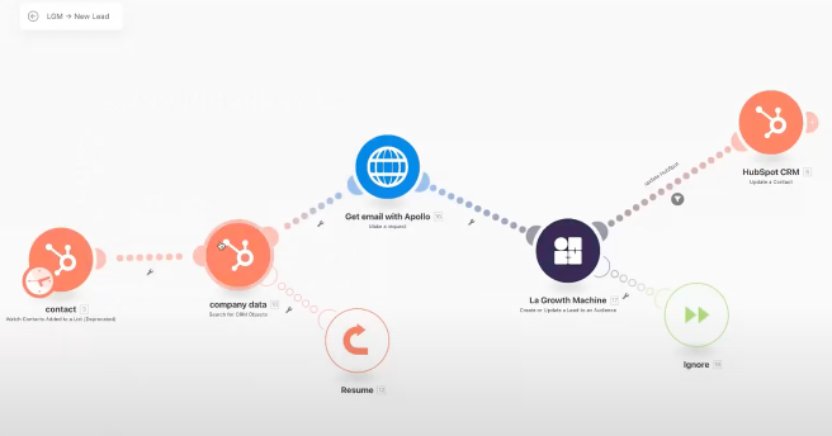
By the end of this stage, you have a dynamic feed of fresh, qualified contacts—ready for the next step in your workflow.
2. Enrich your leads
Now, use Make’s “CRM objects” features to find the associated company for each contact. Why is this important? Bastien explains:
“It’s useful to fill in inside LGM and to have the identity of the contacts in the company.”
With this enrichment, you’re no longer just working with an email—you have company names, LinkedIn URLs, and more. If you’re missing data, you can integrate third-party providers like Apollo, or leverage LGM’s own enrichment (saving time and money).
“If you do not want to pay for different tools, you can enrich directly with LGM—it saves you a lot of time and money.”
With LGM’s Waterfall Enrichment feature, you can even enrich leads after launching your campaign, maximizing your chances to get a reply by pulling data from up to 7 providers.
3. Segment leads into different audiences with LGM and Make
Not all leads are created equal. Segmenting your list lets you tailor your approach at every stage of the funnel:
- Lead: Just signed up or filled a form.
- MQL (Marketing Qualified Lead): Connected their Hublead to HubSpot (adapt this step to your own product).
- PQL (Product Qualified Lead): Hit the paywall or reached a usage milestone.
- Customer: Converted and onboarded.
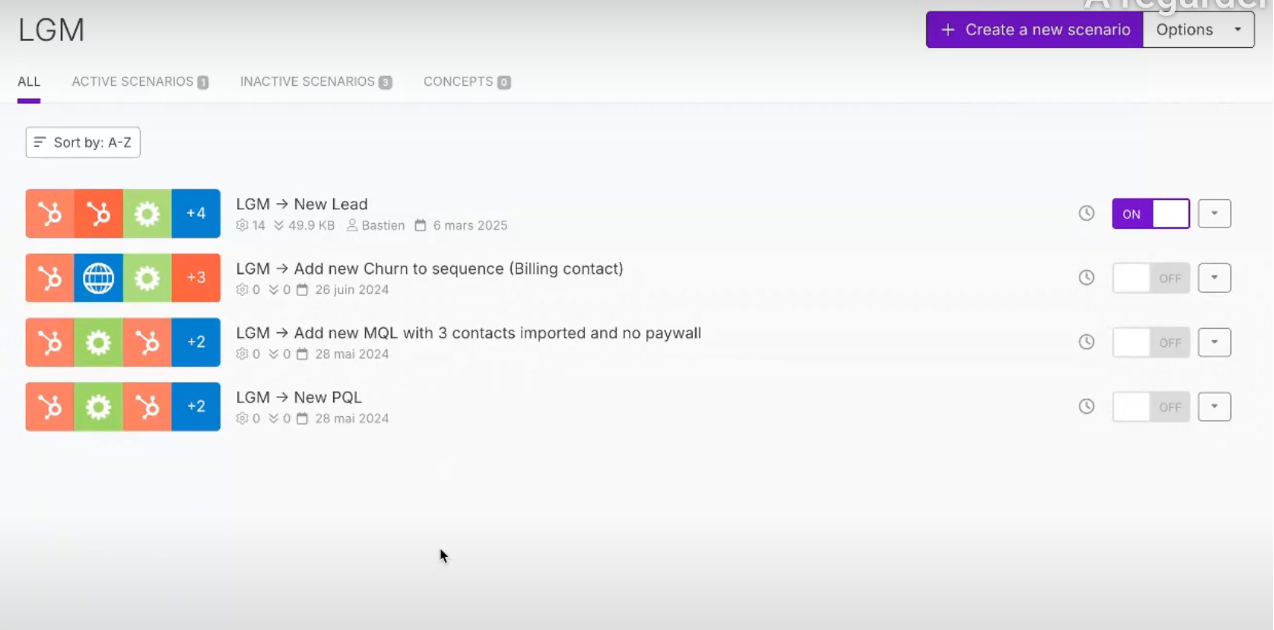
As Bastien puts it:
“At each stage of the funnel, you really need to understand what the user needs.”
- Top of the funnel => MQLs might need social proof, reassurance, and technical documentation.
- Middle of the funnel => Moving from MQL to PQL? Focus on features, use cases, and solutions to their problems.
- Bottom of the funnel => For PQLs, it’s about subscription details, pricing, and onboarding.
This segmentation allows you to push different content and workflows to each audience, maximizing relevance and conversion.
More relevance = more replies. Simple as that.
4. Setting up automated LinkedIn + email sequences
Let’s say you want to focus on new MQLs. The first step isn’t to pitch,it’s to warm up the lead.
Visit their profile, wait a few days, or use LGM to automatically like or view their recent activity.
As Eloise, Community Builder from LGM notes:
“Social warming is not being too spammy, it’s really about building trust and becoming a familiar face. Your leads will really be more likely to answer your connection request.”
Once warmed, send a connection request with a personalized note tailored to their funnel stage. Share resources or relevant content. Often, you don’t even need to pitch. They’re already assessing your product.
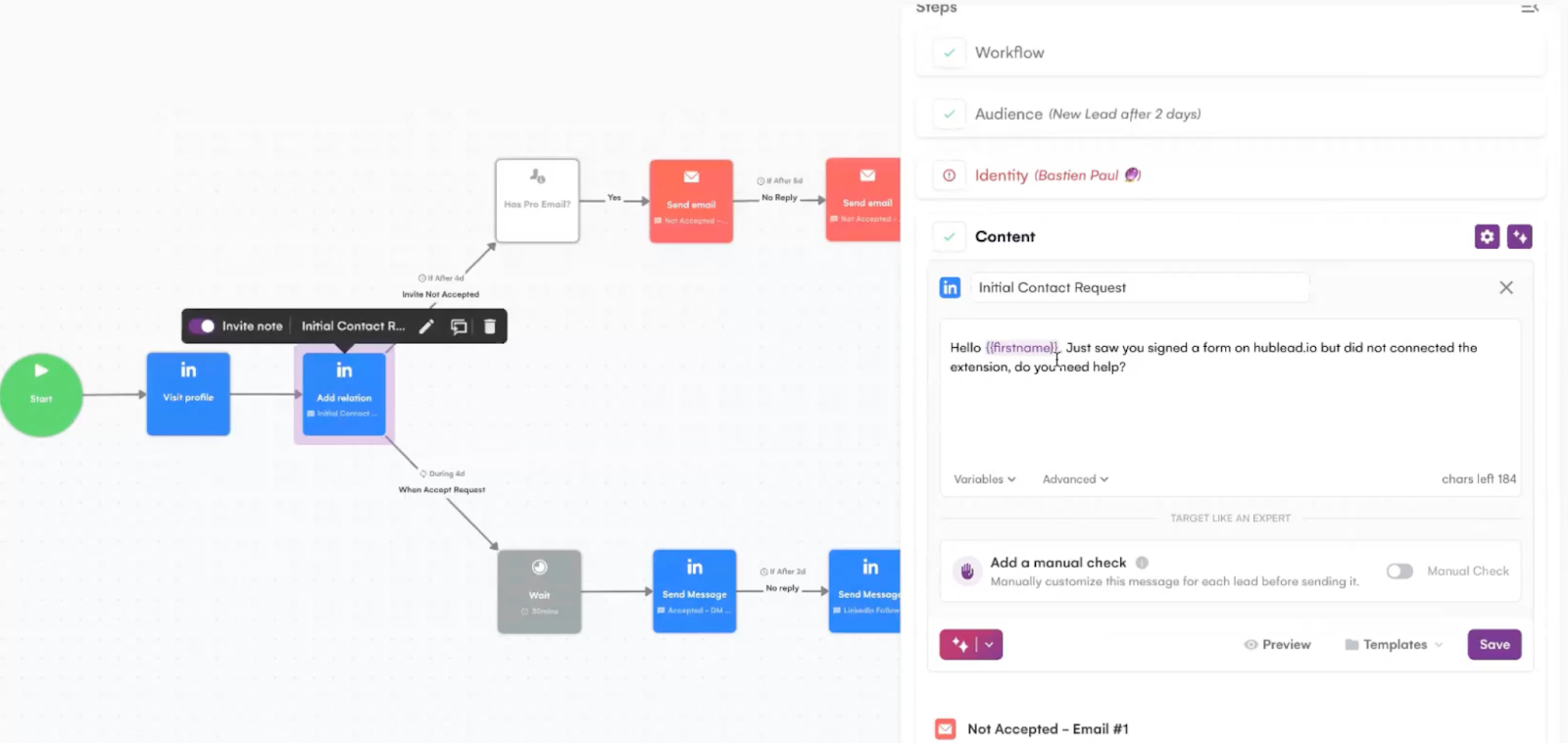
“You can deliver resources that are interesting to them at the moment because they are already assessing your product—you don’t even need to pitch them.”- Bastien Paul
5. Personalizing messages with LinkedIn intent
When your sequence is live, personalization becomes your superpower.
With LGM you can:
- Use Voice Notes, recorded in your own voice and augmented with AI, for a unique touch.
“Voice notes are really useful if you want to reactivate an old lead. I am using it all the time and I really get a high reply rate because it’s very differentiating.” – Bastien Paul
- Trigger sequences based on real LinkedIn behavior—if someone likes, comments, or registers for an event, you can follow up instantly.
- Use “Real Chat Mode” in LGM to mimic natural human behavior, e.g., sending three short messages in a row with a short delay, just like a real conversation.
The result? A system that’s responsive, human, and always relevant.
Takeaways
For HubSpot users, the future of sales engagement is clear:
Automate intelligently, personalize thoughtfully, and engage across every channel your leads care about.
Instead of losing half your Inbound leads to silence, you can now move fast, build trust, and convert more prospects—without sacrificing the human touch.
“Automation isn’t about doing less. It’s about freeing you up to do what matters most—building real relationships and closing real deals.” – Bastien Paul
Want to see these strategies in action?
Catch the full webinar replay with Bastien Paul and discover how top-performing teams are transforming their engagement with LinkedIn, email, and HubSpot automation.