


LinkedIn voice notes that say every lead's name
Record once. AI says each name in your voice.
- No phone needed
- Your own voice

10,000+ GTM teams run their outreach on La Growth Machine



 Use case€1.2Mqualified pipeline with multichannel outreach
 InvoxUse case€430kpipeline from one LinkedIn + email campaign
 Kodiak HubUse case$500kin pipeline generated with La Growth Machine
 Use case30 to 35%of pipeline now from outbound, up from ~10%
 Use case12%of replies converted
 UtilaUse case15%+reply rate across campaigns
How teams use voice notes on LinkedIn

Follow up with your voice
No reply 3 days after your first message? Send a 25-second voice note.
Add a Send Voice step after the “not replied” condition. La Growth Machine sends it from your LinkedIn, in the same conversation, at the right time. Your follow-up sounds like you, not like a sequence.

Record once, send to every lead
Start from the template “LinkedIn Only - 3 Follow-ups (+ Voice)”.
Record in your browser, listen, save. You don't need your phone, and you never redo a note for each prospect. Turn a text step into a voice step in one click, and reuse your recordings in your other campaigns.

Each lead hears their own name
“Hello Sarah”, “Hallo Jonas”, “Bonjour Emma”, then your message.
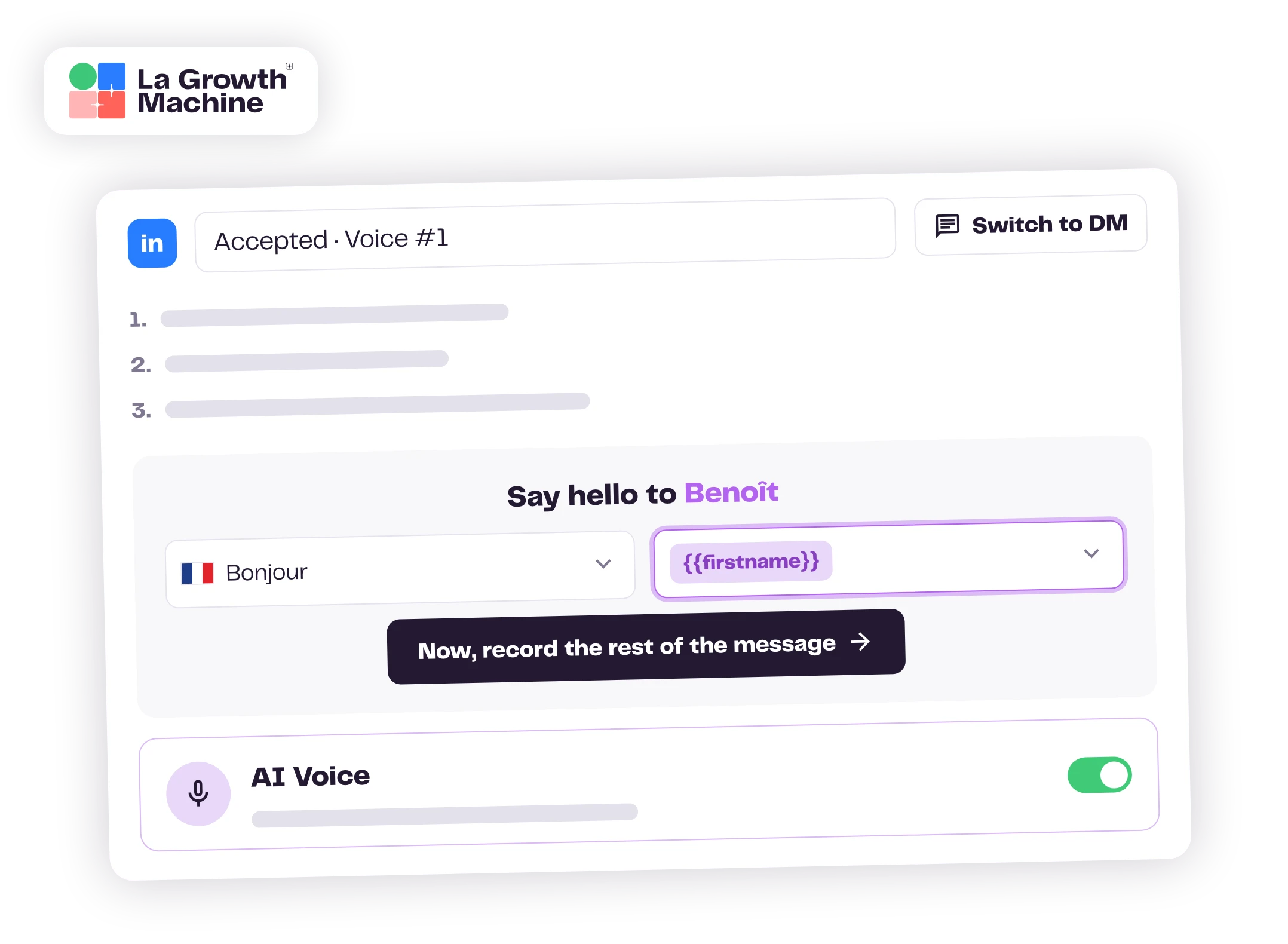
Turn on AI Voice and pick a greeting in your lead's language. AI says it with their first name, in a clone of your voice, then plays your recording. You hear the full message on a sample lead before you launch.
task_altWe clone nothing until you confirm you have the rights to the voice.

Say thanks the moment they accept
“Hello Jonas, thanks for connecting. Saw you're hiring in Berlin…”
Put the voice step right after the invitation. La Growth Machine waits 30 minutes after they accept, then sends it. Your voice note lands while your name is still fresh.
AI says the first words. The rest is you.
You record your pitch yourself, once.
- task_altConsent before any cloning
- headphonesFull preview before launch
- toggle_onAI Voice is optional
“We were drawn initially by that AI voice memo tool, that's years ahead of other tools.”
Everything a voice step can do
See everything voice notes do expand_more
dashboard_customizeSequences
- Campaign templates marked “+ Voice”, for LinkedIn alone or LinkedIn and email
- A Send Voice step anywhere in your own LinkedIn sequence
- Turn a text message step into a voice step in one click, and back with “Switch to DM”
- Sent to your 1st-degree connections, 30 minutes after they accept your invitation when the step follows the invite
micRecording
- Record in your browser with your microphone, up to one minute
- Listen before you save
- Reuse a recording from your other campaigns
auto_awesomeAI Voice
- Greetings in your lead's language (Hello, Bonjour, Hallo, Hola…)
- Address each lead by first name (“Hello Sarah”), by title and last name (“Hello Mr Smith”), or by title alone
- Your voice is cloned from your recording; AI only says the greeting
- A consent box to tick before anything is generated
- A preview of the full message, filled in with a sample lead
call_splitFollow-up
- “Voice message replied” and “not replied” conditions
- No answer? Switch to an email or a call task in the same sequence
- Replies land in your La Growth Machine inbox, in the lead's thread
hubWorkflows
- The La Growth Machine node for n8n sends a LinkedIn voice note from any workflow, in an existing conversation
Your first voice note in three steps
14 days, no credit card.
Or add Send Voice right after the invite.
Turn on AI Voice, record, listen.

We've got you.
Your performance is our retention plan. Our team answers fast when you need help, and growing teams get their own Outreach Expert to review their campaigns and send a quarterly report with the actions that matter.
Talk to our teamYour voice, in every follow-up
Record once, and let each lead hear their name.
Frequently asked questions
Which plans include voice notes? Can I try them for free? add
Voice notes come with every La Growth Machine plan, through the templates marked “+ Voice”, AI Voice included. You can try them during the 14-day free trial. Adding a Send Voice step to your own sequences, and sending voice notes from n8n, start on the Pro plan.
Which part of the message does the AI generate? add
Only the intro: a greeting followed by the lead's first name, their title and last name, or their title alone. The rest is your own recording, the same for every lead. La Growth Machine clones your voice from that recording to say the intro, then joins the two.
Will it sound like me? add
Most of what your lead hears is your own recording. AI only reads the first words, in a clone of your voice. Play the preview on a sample lead before you launch. If you'd rather not use AI, turn AI Voice off and every lead gets your recording as is.
Do I need to give consent before my voice is cloned? add
Yes. Before anything is generated, you confirm that you have the rights or consents to upload and clone the voice sample, and that you won't use the generated audio for illegal, fraudulent or harmful purposes.
Which languages can the greeting use? add
You pick the greeting in your lead's language, such as Hello or Hey, Bonjour or Salut, Hallo, Hola. Record the rest in any language: it's your own voice.
How long should a voice note be? add
We recommend around 30 seconds: long enough to sound personal, short enough to be heard to the end. You can record up to one minute.
Do I need the LinkedIn mobile app? add
No. On LinkedIn, voice notes are recorded in the mobile app, one at a time. In La Growth Machine, you record with your microphone in your browser, and the voice note goes out from your sequence to your 1st-degree connections.
When should I send a voice note? add
Two moments work well: right after a lead accepts your invitation, as a thank-you, and as a follow-up when a text message got no reply. Teams also use them to share a case study, invite a lead to a webinar or restart a quiet conversation.
I duplicated a campaign that uses AI Voice. What do I need to do? add
Record the message again in the new campaign and confirm the AI consent once more, so the voice notes go out. You can still pick a recording from your other campaigns.
How is this different from tools that read the whole message with AI? add
Here, AI only says the greeting and the name. You record your pitch once, in your own voice, so every note still sounds like you. It's part of a LinkedIn and email sequence, with “replied” and “not replied” conditions to decide what happens next.
Why send voice notes from a sequence rather than from the LinkedIn app? add
You record once instead of once per lead, the voice note goes out 30 minutes after each acceptance or after a silence, and the next step follows on its own: an email, a call task or another message. Replies land in your La Growth Machine inbox.