

TL;DR
A multi-channel sales sequence is not just sending a LinkedIn message before an email – it is a coordinated flow of touchpoints across channels, wired together with conditional logic that adapts to each prospect’s behavior in real time.
Building a high-performing sequence requires five elements: the right channel order (LinkedIn-first vs email-first), precise timing with 2-3 day delays, real personalization from enriched data, conditional branches (if accepted, if replied, if no response – switch channel), and clear stopping rules.
This guide covers a complete step-by-step process: from building your enriched ICP list with waterfall enrichment, to writing LinkedIn and email touchpoints, setting up conditional logic, and configuring daily limits that protect deliverability.
You will also find 3 ready-to-use sequence templates – LinkedIn-first (7 touches, 14 days), email-first (5 touches, 12 days), and high-value accounts (10 touches with voice message) – plus how La Growth Machine automates the entire flow with a visual sequence builder, conditional logic UI, Social Warming, and a unified inbox.
Most sales teams still think of a “multichannel sequence” as sending a LinkedIn message and then following up by email. That is not a multichannel sequence. A real multichannel sequence is a coordinated set of touchpoints across LinkedIn and email — wired together with conditional logic that responds to prospect behavior in real time. If someone accepts your connection request, the sequence adapts. If they reply on email, it stops. If they go cold after three touches, it switches channels.
The architecture of that sequence matters as much as the copy inside it. You can write the best cold message in your market and still get zero replies if you send it at the wrong time, through the wrong channel, to someone who already engaged with you elsewhere. Pipeline does not come from one clever line — it comes from the right structure, the right timing, and the right branching logic working together.
This guide walks you through how to build that structure from scratch: how to order your channels, write the touchpoints, set up conditional branches, and configure the delays that keep you in front of prospects without burning them out.
Sample 6-Step Multichannel Sequence at a Glance
Before going deeper into each element, here is a concrete sequence overview you can use as a starting point:
| Step | Channel | Action | Timing | Goal |
|---|---|---|---|---|
| 1 | Profile visit | Day 1 | Warm up visibility | |
| 2 | Connection request (with note) | Day 2 | Open the relationship | |
| 3 | Follow-up message (if accepted) | Day 4 | Start a conversation | |
| 4 | Cold intro email | Day 5 | Reach if not on LinkedIn | |
| 5 | Follow-up #1 | Day 8 | Reinforce value prop | |
| 6 | Voice message or final message | Day 12 | Last high-touch attempt |
This is a 6-touch, 12-day sequence. It uses LinkedIn first to warm the prospect up before hitting the inbox, and it switches channels when LinkedIn engagement stalls. You will customize it based on your ICP, but this structure gives you a solid baseline.
The Anatomy of a High-Performing Multichannel Sequence
Five elements determine whether a sequence books meetings or burns your sender reputation.
Channel order. The choice between leading with LinkedIn or email is not arbitrary. LinkedIn-first works when your prospects are active on the platform and their inboxes are saturated. Email-first works for non-LinkedIn audiences — finance, legal, healthcare — where executives do not check LinkedIn regularly. Getting the order wrong means you are spending engagement budget in the wrong place.
Timing. Two to three days between touchpoints is the standard for outbound. Too fast feels aggressive. Too slow, and the prospect forgets the previous touch. Delays also depend on the action: a connection request acceptance can trigger a same-day or next-day follow-up, while a cold email should breathe for at least 48 hours before a follow-up lands.
Message personalization. Personalization at scale is not about inserting a first name. It means using variables that reflect the prospect’s actual situation: their company growth signal, a recent hire, a funding round, a job change. Every touchpoint in your sequence should carry at least one specific signal that proves you did not copy-paste from a template.
Conditional branches. This is where most manual sequences fall apart. If a prospect accepts your LinkedIn connection request, they should not receive a cold email acting as if you have never met. If they reply on any channel, every other touchpoint should stop. Conditional logic is what turns a sequence into a real conversation flow rather than a broadcast list.
Stopping rules. Know when to stop before you start. A reply on any channel stops the sequence. A meeting booked stops the sequence. An opt-out stops the sequence. Beyond those triggers, set a hard cap: after 6-8 touchpoints with no response, move on. Persistence beyond that threshold generates unsubscribes, not deals.
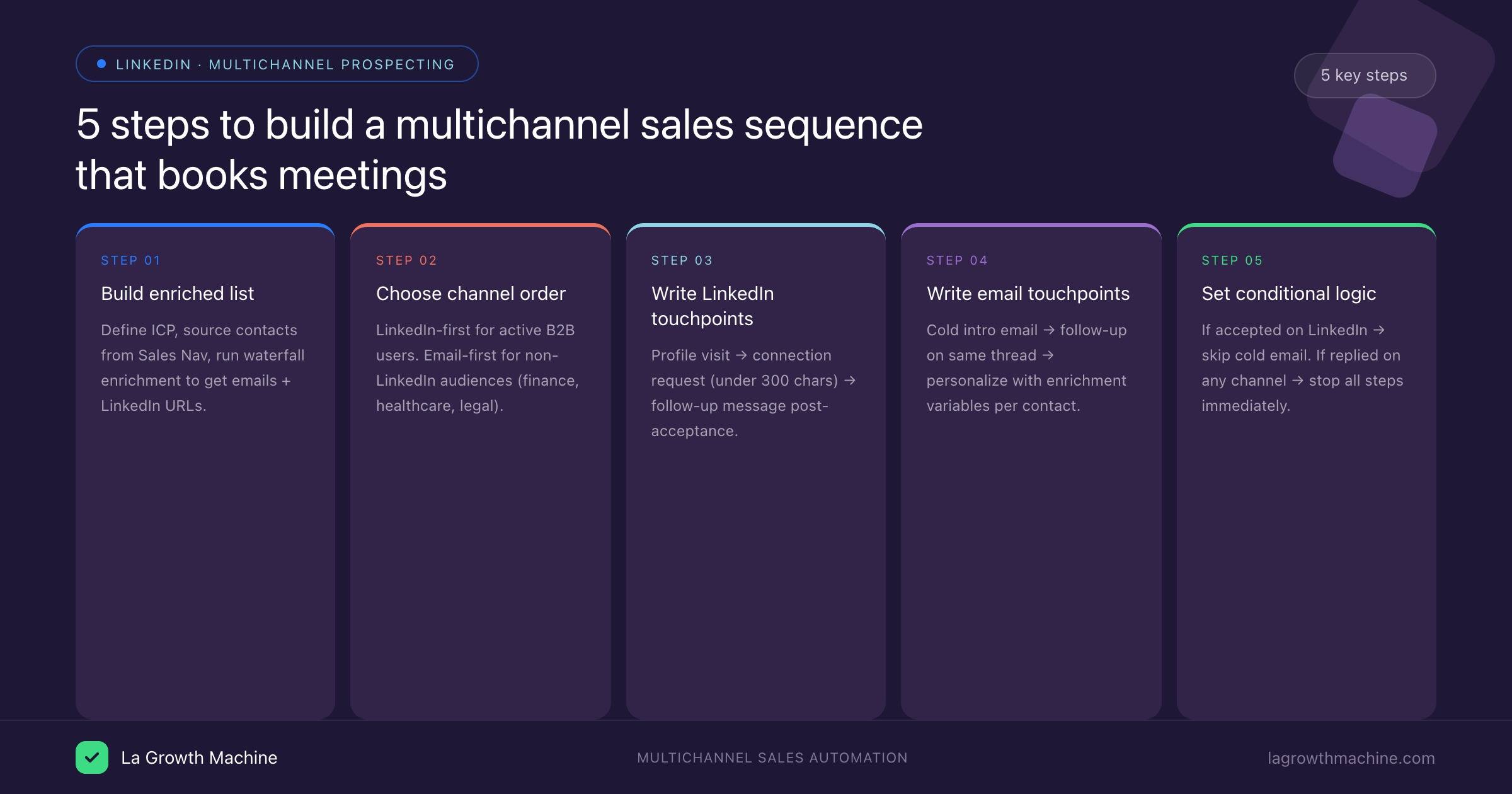
Step-by-Step: Building Your LinkedIn + Email Sequence
Step 1 — Define Your ICP and Build Your Enriched List
The sequence architecture only works if it runs on clean, enriched data. A list of names and company names is not enough — you need email addresses, LinkedIn URLs, seniority, company size, and at least one personalization signal per contact.
Start by defining your ICP with precision: industry, company size, job title, geography, and any trigger event that makes them ready to buy (funding, headcount growth, new market entry). Then build your list from a source that reflects those criteria — Sales Navigator, a data provider, or a list from your CRM.
From there, run waterfall enrichment. That means routing each contact through multiple enrichment providers in sequence, stopping when you have a valid email and LinkedIn URL. Tools like Clay let you build that waterfall logic visually, pulling from a dozen different data sources and falling back gracefully when one returns nothing.
The cleaner and more enriched your list, the more your conditional logic can do. If you are missing LinkedIn URLs, you cannot run LinkedIn-first sequences. If you are missing emails, you cannot fall back to email when LinkedIn stalls. Invest in the data layer before you invest in the copy.
Step 2 — Choose Your Channel Order (LinkedIn-First vs Email-First)
LinkedIn-first works when:
- Your prospects are VP or C-suite at B2B tech companies
- Their inbox open rates are below 30%
- You have strong profile credibility (good headshot, clear value prop in banner and headline)
- Your network has mutual connections with the prospect
Email-first works when:
- Your prospects are not heavy LinkedIn users (finance, healthcare, government)
- You have a strong domain reputation and deliverability infrastructure
- The prospect’s email address is verified and professional
When in doubt, run both in parallel as an A/B test on a segment of 50-100 contacts. Look at connection acceptance rate versus email open rate within the first three days. Let the data decide the order for the full sequence.
Step 3 — Write Your LinkedIn Touchpoints
LinkedIn messages must be short, specific, and conversational. The platform punishes broadcast behavior — if your message reads like a marketing email, acceptance rates drop and your LinkedIn Safety Score takes a hit.
Profile visit. No message needed. A profile visit from a relevant professional triggers curiosity and often a return visit. It is a passive warm-up touch that takes seconds to set up in automation.
Connection request. Keep the note under 300 characters. Lead with a specific reason for connecting — not a pitch. “Saw you’re scaling your outbound team at [Company] — working on something similar at my end, would love to connect” is better than “I’d like to add you to my network.”
Follow-up message (post-acceptance). This is your first real conversation opener. Reference the connection acceptance, ask a single question tied to their business context, and make it genuinely easy to reply. Avoid attachments, links, and anything that looks like a sales deck in disguise.
The goal of every LinkedIn touch is to start a conversation, not close a deal. If you try to move too fast on LinkedIn, you lose the channel entirely.
Step 4 — Write Your Email Touchpoints
Email is where you can go deeper. Longer messages, links to case studies, and more structured value propositions all perform better in the inbox than on LinkedIn.
Subject line. Specificity wins over cleverness. “[Company]’s outbound pipeline” outperforms “Quick question” every time. Avoid spam trigger words, keep it under 50 characters, and make it look like it came from a human.
Body copy. Follow the three-sentence rule for cold emails: one sentence on why you reached out, one on the problem you solve, one on the ask. Personalize the first sentence with a signal from your enrichment data. The ask should be low-friction — “15-minute call” or “would this be relevant to you?” rather than “book a demo.”
Follow-up. Thread your follow-up on the same email thread. Keep it short — two to three sentences. Add one new piece of value (a stat, a case study reference, a relevant insight) rather than just bumping the thread.
Personalization variables. Use your enrichment data to populate variables like {{companygrowthsignal}}, {{recenthire}}, or {{fundinground}}. Make sure every variable has a fallback so that missing data does not produce broken sentences.
Step 5 — Set Your Conditional Logic
Conditional logic is the engine that makes a multichannel sequence intelligent rather than mechanical. Here are the core branches to build:
- If LinkedIn connection request accepted: skip the cold email intro and go straight to a LinkedIn follow-up message
- If email reply received: pause all remaining steps and move contact to “replied” pipeline stage
- If LinkedIn message reply received: same as above, pause all steps
- If email opened 3+ times without reply: flag as hot lead for manual follow-up
- If no response after 4 LinkedIn touches: switch to email-only track
- If contact unsubscribes from email: remove from all LinkedIn touchpoints as well
The logic tree should be built before you write a single message. Map it out as a flow diagram first — who receives what, under what conditions, and what triggers a branch or a stop.
Step 6 — Set Delays and Daily Limits
Delays protect deliverability and engagement quality. Too many messages too fast trains spam filters and LinkedIn’s algorithm to flag your account.
Between touchpoints: 2-3 days minimum for email steps, 1-2 days for LinkedIn steps after a trigger event (like an acceptance).
Daily LinkedIn limits: Keep connection requests at 20-30 per day. LinkedIn’s algorithm is sensitive to volume spikes. If you are starting a new campaign or warming a new LinkedIn account, start at 10-15 per day and ramp up over two weeks.
Email sending volume: Cap new sender domains at 50-100 emails per day during the first 30 days of warmup. Use a dedicated subdomain for outbound ([email protected], not [email protected]) to protect your main domain reputation.
Send windows: Schedule messages for Tuesday through Thursday, 8am-10am in the prospect’s timezone. Avoid Mondays (inbox overload) and Fridays (low engagement).
3 Multichannel Sequence Templates
Template 1: LinkedIn-First (7-Touch, 14 Days)
Built for B2B SaaS, tech, and consulting audiences where LinkedIn is the primary professional network.
- Day 1 — LinkedIn: Profile visit
- Day 2 — LinkedIn: Connection request with short personalized note
- Day 4 — LinkedIn: Follow-up message (if accepted) OR email intro (if not accepted after 48h)
- Day 6 — Email: Cold intro email with case study reference
- Day 8 — Email: Follow-up thread (2-3 sentences, new value add)
- Day 11 — LinkedIn: Voice message or final message (if connected)
- Day 14 — Email: Final breakup email (“should I close your file?”)
Conditional logic: if accepted on LinkedIn before Day 4, skip the Day 6 cold email and engage on LinkedIn first. If replied on any channel before Day 14, stop all remaining steps.
Template 2: Email-First (5-Touch, 12 Days)
Built for non-LinkedIn audiences or buyers with verified high-quality email addresses.
- Day 1 — Email: Personalized cold intro
- Day 3 — Email: Follow-up #1 (same thread, short)
- Day 5 — LinkedIn: Connection request (parallel touch for recognition)
- Day 8 — Email: Follow-up #2 with new angle or social proof
- Day 12 — Email: Final email with clear CTA and opt-out path
Conditional logic: if email reply received, stop. If LinkedIn accepted, add a brief LinkedIn message acknowledging the connection before any further email touches.
Template 3: High-Value Accounts (10-Touch Full Multichannel with Voice Message)
Built for strategic accounts, enterprise targets, or deals above €20K ACV where investment per contact justifies premium effort.
- Day 1 — LinkedIn: Profile visit + follow company page
- Day 2 — LinkedIn: Connection request with highly personalized note referencing a specific trigger
- Day 4 — LinkedIn: Message after acceptance (if accepted) OR email intro (if pending)
- Day 5 — Email: Personalized cold email with custom insight or mini-audit
- Day 7 — LinkedIn: Voice message (30-60 seconds, name + context + single question)
- Day 9 — Email: Follow-up with case study or relevant benchmark data
- Day 11 — LinkedIn: Comment on a recent post from the prospect (manual, not automated)
- Day 12 — Email: Follow-up referencing the LinkedIn engagement
- Day 15 — LinkedIn: Final message
- Day 18 — Email: Breakup email with clear next step option
This template requires stronger personalization infrastructure and more manual review at steps 11-12. Reserve it for accounts in your top 10% by potential ACV.
How La Growth Machine Makes This Easier
Building a multichannel sequence manually across LinkedIn and email requires jumping between tools, manually tracking who replied where, and hoping your conditional logic holds up in a spreadsheet. La Growth Machine collapses all of that into one platform.
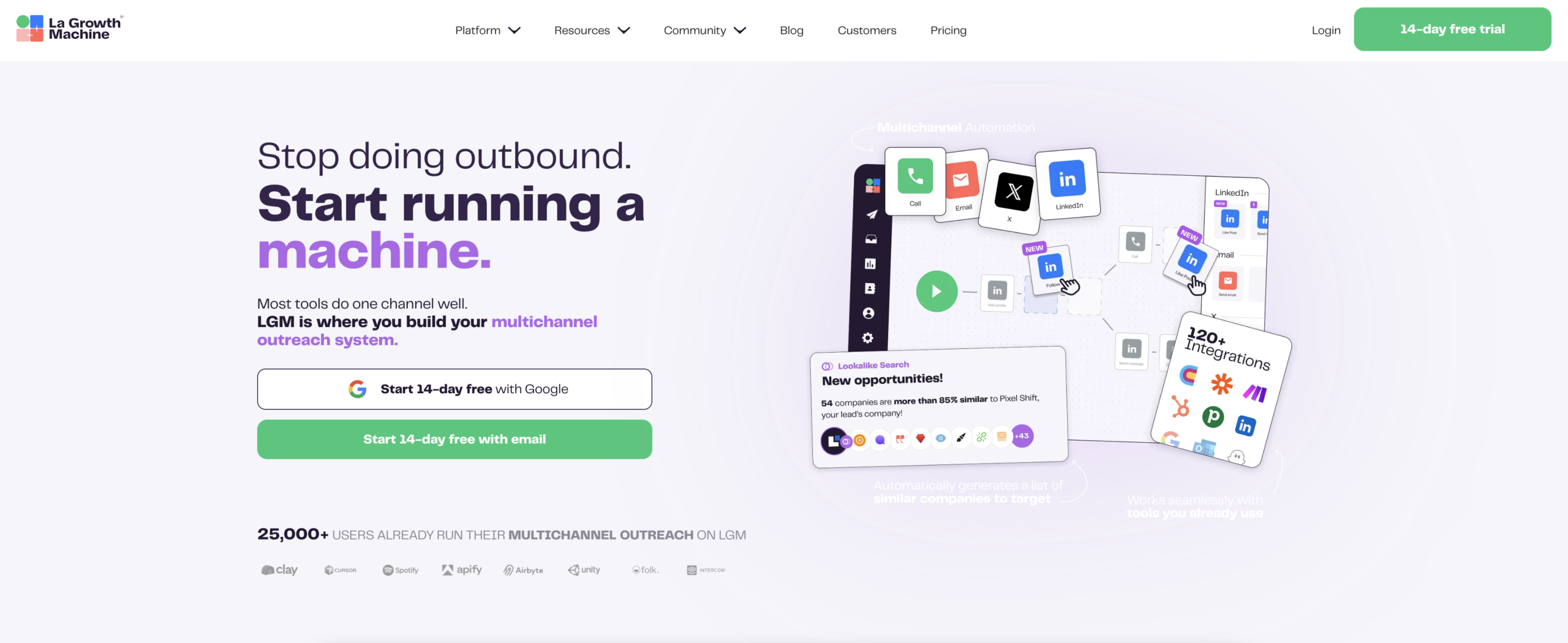
The visual sequence builder lets you drag and drop LinkedIn and email actions into a timeline, set delays between each step, and see the full flow at a glance. You can build any of the three templates above in under 20 minutes without writing a line of code. Actions include profile visits, connection requests, messages, voice messages (on Ultimate), email sends, and follow-ups — all configurable from the same interface.
Conditional logic is built directly into the sequence builder as branch nodes. You set the condition (if accepted, if replied, if email opened, if no action after X days) and connect it to the next action with a visual line. The sequence adapts automatically as prospects move through the flow — no manual checking, no CSV exports to update.
Social Warming is LGM’s built-in LinkedIn account health feature. It simulates realistic LinkedIn activity on your connected account — profile visits, feed engagement, endorsements — to maintain a healthy Safety Score before and during active campaigns. This lets you run higher-volume sequences without triggering LinkedIn’s spam detection.
The unified inbox shows every reply — LinkedIn messages and emails — in a single feed, tagged by lead and campaign. Your sales team replies from one place regardless of which channel the prospect used, and the sequence stops automatically when a reply is detected.
LGM pricing starts at Basic (60 euros/month per identity), Pro (120 euros/month per identity), and Ultimate (180 euros/month per identity), which includes voice messages and advanced sequence features. All plans include a 14-day free trial.
FAQ
What is the ideal length for a multichannel outbound sequence?
For most B2B audiences, 6-8 touchpoints over 12-18 days hits the right balance between persistence and respect. High-value enterprise accounts can justify up to 10 touches over 21 days. Anything beyond that without a reply produces diminishing returns and damages sender reputation.
Should I always use both LinkedIn and email in the same sequence?
Not necessarily. If your ICP has low LinkedIn activity, a pure email sequence with 4-6 touches is often more effective than splitting effort between channels. Use multichannel sequences when you have data showing that your prospects are active on both platforms.
How many LinkedIn connection requests can I send per day safely?
For established LinkedIn accounts, 20-30 connection requests per day is a safe range. For new accounts or accounts that have been flagged, start at 10-15 per day and warm up gradually over two to four weeks. La Growth Machine’s Social Warming feature helps manage this automatically.
What should I do when someone accepts my LinkedIn connection but does not reply to my message?
Follow up with a second message that takes a different angle — different question, different value prop, different format. If that gets no response after 3-4 days, move to email. A connection acceptance signals interest; it just means the message did not land yet.
How do I personalize at scale without spending hours on each contact?
Use enrichment tools to pull personalization signals automatically at the data layer. Tools like Clay can pull in company growth data, LinkedIn activity, tech stack signals, and recent news for each contact. Map those signals to variables in your sequence templates. You get specific, relevant personalization without manual research per contact.
What metrics should I track on my multichannel sequences?
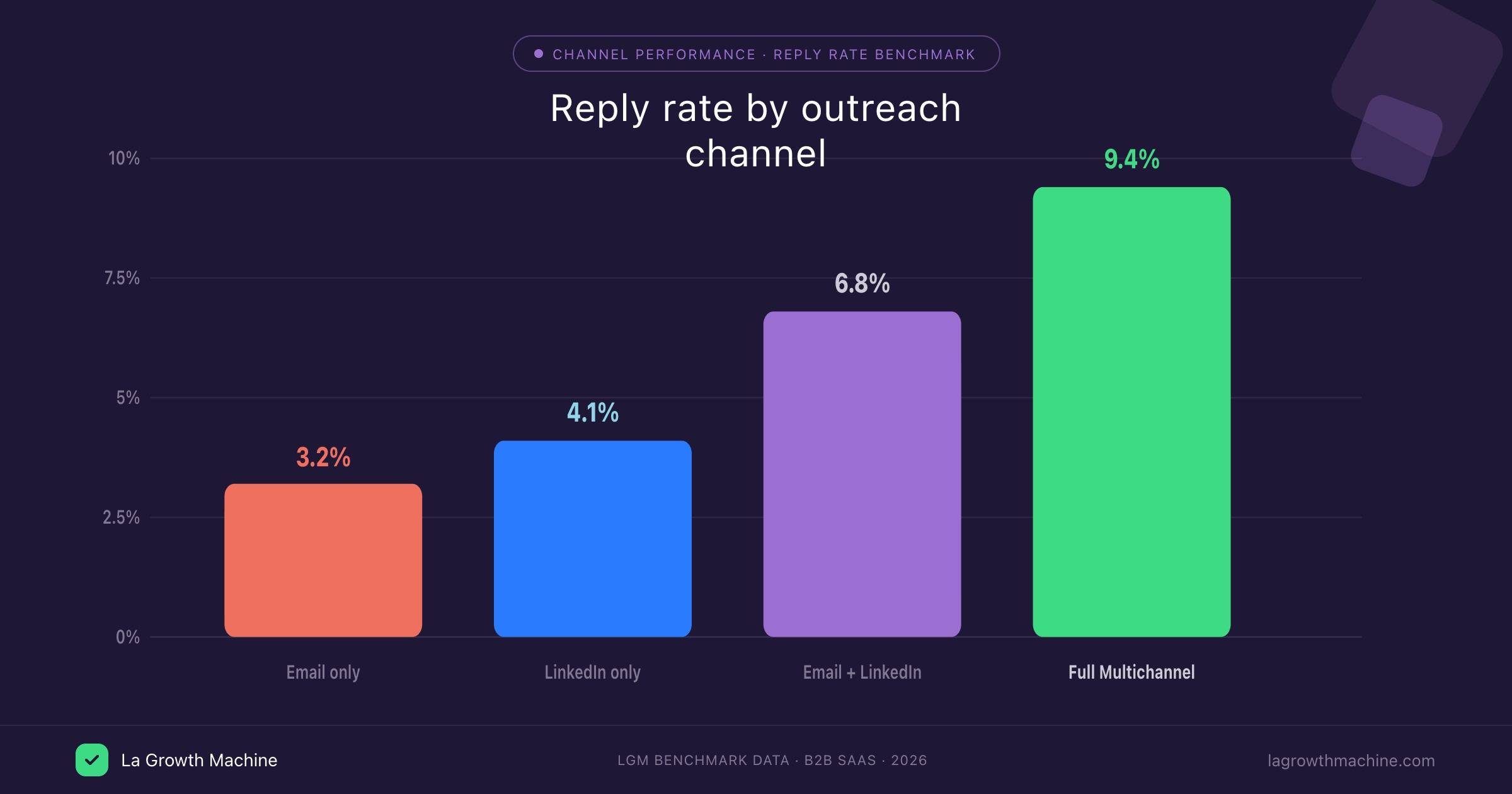
Track connection acceptance rate (LinkedIn), email open rate, reply rate per channel, sequence-level reply rate, and meetings booked rate. A healthy multichannel sequence targeting a good-fit ICP should produce 15-25% connection acceptance, 35-50% email open rate, and 5-10% overall reply rate. If you fall significantly below those benchmarks, audit your ICP targeting before changing the copy.
Conclusion
A multichannel sales sequence that books meetings is not a collection of copy-pasted messages thrown across two platforms. It is an architecture: a defined channel order, tight timing, real personalization, conditional branches that adapt to behavior, and clear stopping rules. Build those five elements correctly and your sequence does the work of a full-time SDR — consistently, at scale, without burning contacts.
The fastest way to build and run that architecture is La Growth Machine. The visual sequence builder, conditional logic UI, Social Warming, and unified inbox give your team the infrastructure to run LinkedIn + email sequences without the manual overhead. Start your 14-day free trial and build your first sequence today.