

TL;DR
Running LinkedIn and email outreach from two separate tools creates fragmented data, no conditional logic, and double the cost.
Native multichannel platforms like La Growth Machine let you build one sequence that runs across both channels, with shared context and automatic conditional logic.
The proven sequence structure: LinkedIn visit on Day 1, connection request Day 2, LinkedIn message Day 4, email Day 7, email follow-up Day 10 – with each channel playing a distinct role.
Use conditional logic to stop sequences on reply, skip redundant steps when prospects connect, and sync everything to your CRM automatically for full pipeline visibility.
Most outbound teams run LinkedIn and email like two separate campaigns. One SDR handles LinkedIn connection requests in the morning. Another fires off email sequences in a different tool. Neither channel knows what the other is doing.
The result: a prospect gets a LinkedIn message on Tuesday and a cold email on Wednesday that references nothing from Tuesday. No shared context, no conditional logic, no coordination. It reads like two strangers contacted the same person by coincidence.
This is not multichannel outreach. It is single-channel outreach done twice, from two dashboards, by two people (or one person doing double the work). The good news: there is a better way to run this, and it does not require more headcount or more budget.
| Approach | Setup | Data sync | Reply rate lift | Complexity |
|---|---|---|---|---|
| LinkedIn only | One tool, one login | N/A | Baseline | Low |
| Email only | One tool, email provider | N/A | Baseline | Low |
| Manual dual-channel | Two tools + spreadsheet | Manual / none | +10-15% | High |
| Native multichannel (La Growth Machine) | One platform, one workflow | Automatic, real-time | +30-40% | Low-Medium |
Why simultaneous multichannel outreach works
There is a psychological principle at work here: familiarity breeds trust. When a prospect sees your name on LinkedIn and then receives a well-timed email from you, the second touchpoint lands differently. You are not a stranger anymore. You are someone they have already encountered.
This is the familiarity effect, and it compounds across touchpoints. Research consistently shows that multichannel sequences significantly outperform single-channel approaches. The lift comes from two things: higher visibility (you appear in more places) and smarter timing (you reach prospects where they are most active on a given day).
The mechanics matter too. In a native multichannel platform, the channels share context. If a prospect accepted your LinkedIn connection request, the system knows. The next step can be a LinkedIn message instead of a cold email intro. If they replied to your email, the system stops the sequence. No duplicate follow-ups, no awkward cross-channel contradictions.
This is what separates running LinkedIn and email simultaneously from just running both channels at once.
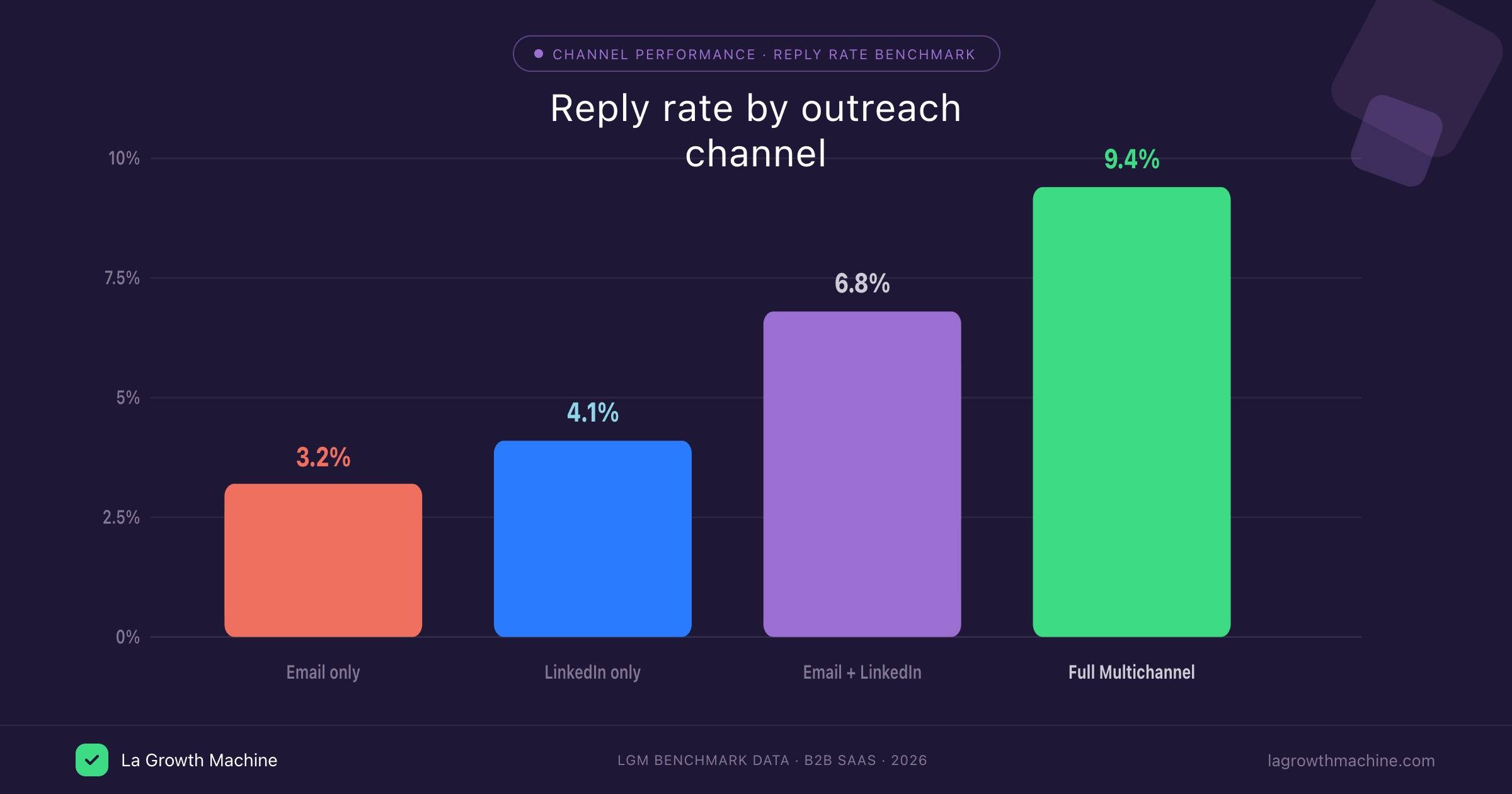
The 3 ways teams try to do this (and why 2 of them fail)
Method 1: Two separate tools
The most common approach: use one dedicated LinkedIn outreach tool and a separate cold email tool, then try to coordinate manually. You export a list from one, import it to the other, and hope the timing roughly aligns.
The problems surface fast. You have fragmented data: each tool only knows what happened inside it. There is no conditional logic between channels (tool A has no idea what happened in tool B). You pay for two platforms, two seats, two sets of integrations. And when a prospect replies in one channel, you still have to manually pause the other sequence.
This approach can work for a handful of prospects. At 50+ contacts per week, it breaks.
Method 2: Manual coordination via spreadsheet
Some teams skip the dedicated tools and go fully manual: a shared spreadsheet, manual LinkedIn messages, and emails sent one by one or through a basic email client. This is the lowest-cost option and it scales to exactly zero.
Beyond 20 prospects, you lose track of who got what message, who replied where, and who needs a follow-up. The spreadsheet becomes a liability, not an asset. There is no reply detection, no sequence logic, no reporting.
Method 3: Native multichannel platform (La Growth Machine)
This is how it should work. La Growth Machine lets you build one sequence that runs across both LinkedIn and email from a single workflow. You define the steps, the timing, and the conditions. The platform handles execution across both channels and syncs everything in real time.
One workflow. One unified inbox. Conditional logic built in. CRM sync on both channels. This is what running LinkedIn and email simultaneously actually looks like when it works.
See the multichannel outreach features to understand how La Growth Machine handles cross-channel execution.
Step-by-step: running LinkedIn + email outreach simultaneously with La Growth Machine
Step 1: Import your prospect list and run waterfall enrichment
Start by importing your prospect list into La Growth Machine. You can import from a CSV, from LinkedIn Sales Navigator directly, or from your CRM. Once imported, run waterfall enrichment: the platform attempts to find a verified email address for each contact by cascading through multiple enrichment sources automatically.
The enrichment logic works like this: start with a LinkedIn URL, find the associated company domain, then verify an email address. La Growth Machine’s waterfall enrichment runs this cascade automatically, so you start your campaign with the highest possible email coverage without manually checking each contact.
Tools like Clay integrate directly with La Growth Machine if you prefer to enrich your leads upstream before importing. Either way, you want verified emails before the sequence starts.
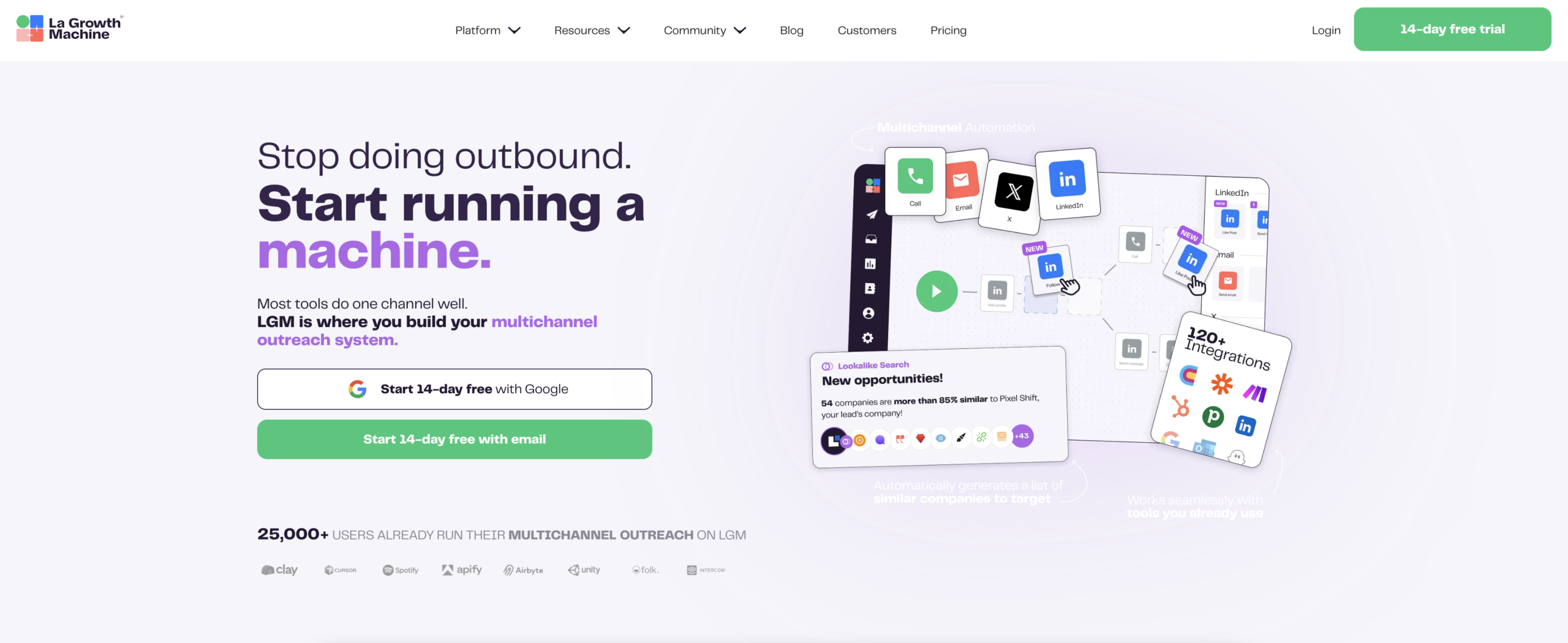
Step 2: Build your multichannel sequence
This is where the real work happens. In La Growth Machine’s sequence builder, you design the full timeline across both channels.
A typical LinkedIn + email sequence looks like this:
- Day 1: LinkedIn profile visit (warms up the contact before any message)
- Day 2: LinkedIn connection request (no note, or a very short personalised note)
- Day 4: LinkedIn message (only sent if the connection was accepted)
- Day 7: Email (sent if no reply received on LinkedIn within the window)
- Day 10: Email follow-up (sent if Day 7 email received no reply)
The spacing matters. You are not doubling up on the same day. LinkedIn acts as the warm-up, email acts as the follow-through. Each step has a clear role.
Step 3: Write channel-specific messages
LinkedIn and email are different contexts. A LinkedIn message that works looks very different from a cold email that works.
On LinkedIn, keep it short and direct. You have limited attention and the format rewards brevity. Three to four sentences maximum. Get to the point immediately. No walls of text, no long company intros.
On email, you have more room. Prospects expect slightly more context in an inbox. You can add a relevant data point, a specific reason for reaching out, or a short case study reference. Still keep it under 150 words for the first email.
Write the messages for each channel separately. Do not copy-paste the same script across both. The platform supports full personalisation variables (first name, company, role, custom attributes) in both channels.
Step 4: Set conditional logic
This is where La Growth Machine separates itself from basic sequencing tools. You can define conditions that change what happens next based on real-time signals.
Key conditions to set:
- If connected on LinkedIn: skip the cold intro in the email, reference the LinkedIn connection instead
- If replied on LinkedIn: stop the entire sequence immediately, move the lead to your active conversations
- If replied anywhere: the platform automatically stops further steps to prevent follow-up after a response
- If email bounced: flag the lead for manual review, do not continue the sequence
These conditions run automatically. You do not have to check each lead manually. The sequence self-adjusts based on what actually happened.
Step 5: Monitor everything from your Unified Inbox and sync to CRM
Once the sequence runs, all replies across both channels land in La Growth Machine’s Unified Inbox. LinkedIn messages and email replies in one place. You can reply directly from the inbox without switching tools.
The platform syncs activity to your CRM (HubSpot, Pipedrive, Salesforce) automatically. Every touchpoint, reply, and sequence step gets logged against the contact record. Your CRM reflects what actually happened across both channels, not just email opens.
This is how you maintain visibility and control without monitoring two separate dashboards.
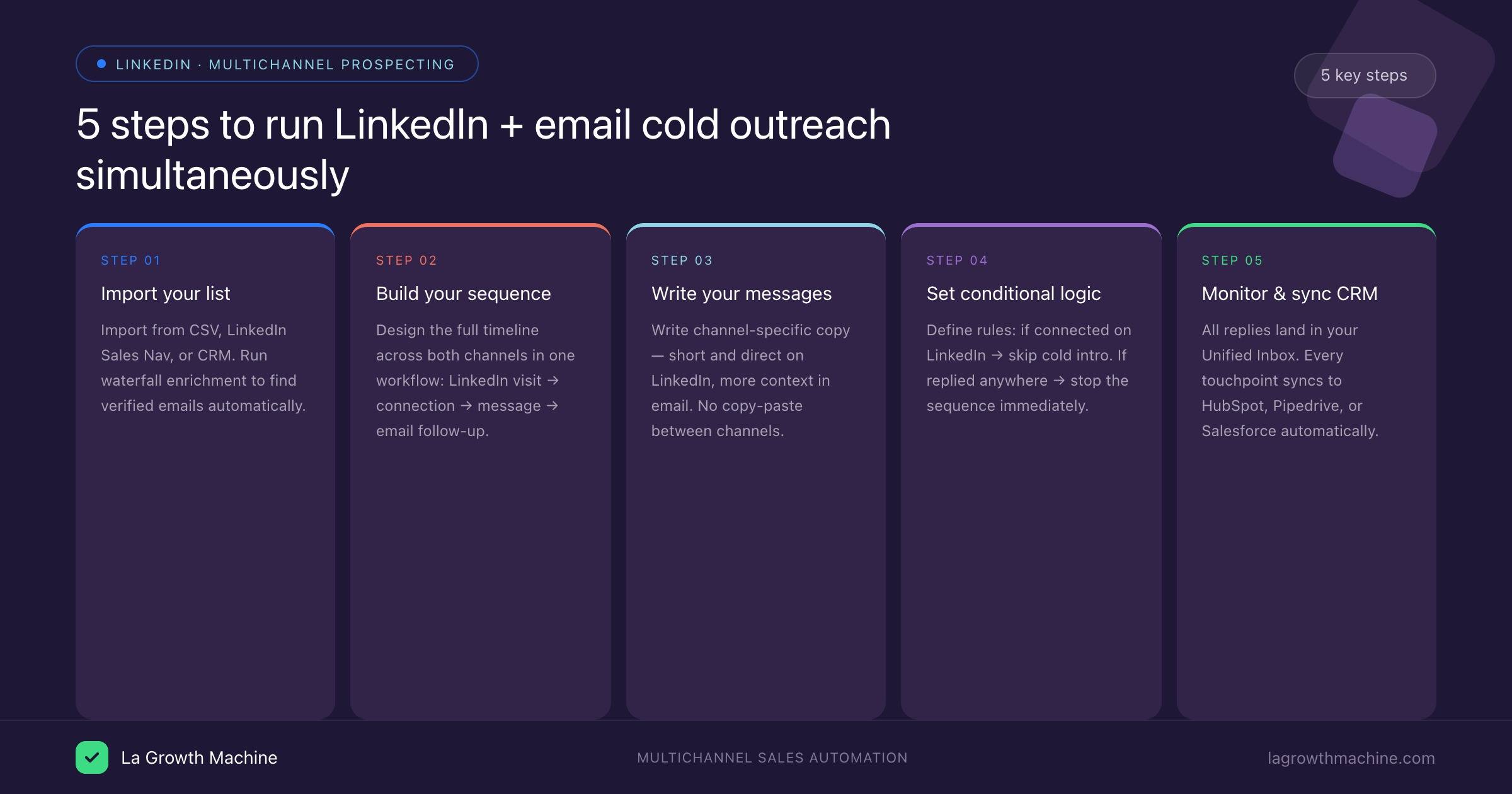
Timing and sequencing best practices
Spacing between channels is not arbitrary. The goal is to create familiarity without creating friction. Here are the principles that hold up across most B2B contexts:
Use LinkedIn as a warm-up, not a redundant channel. The profile visit and connection request happen before any substantive message. By the time you send a LinkedIn message or email, the prospect has seen your name at least once. That changes the open rate and the response rate.
Do not send the same message on both channels. If your LinkedIn message and your email say the same thing, you have not created a multichannel sequence. You have created double the noise. Each channel should add new information or a new angle.
Respect channel-specific timing. LinkedIn messages tend to perform better Tuesday through Thursday, between 9am and 12pm in the prospect’s timezone. Emails follow similar patterns but have more tolerance for Monday sends. Build time-of-day windows into your sequence settings.
Keep the full sequence under 14 days for TOFU prospects. Longer sequences see diminishing returns quickly. If someone has not responded in 10-14 days across both channels, they are not interested right now. Let it go. Re-activate in 60-90 days with a fresh angle.
Limit total touchpoints to 4-6 across both channels. More than six steps starts to feel like harassment, not outreach. Four well-spaced, channel-appropriate messages will outperform eight aggressive follow-ups every time.
FAQ
Can I run LinkedIn and email outreach simultaneously without a LinkedIn premium account?
You do not need LinkedIn Premium or Sales Navigator to run a multichannel sequence in La Growth Machine. A standard LinkedIn account works. Sales Navigator gives you better search and audience targeting upstream, but the actual outreach execution works on any account type. La Growth Machine also manages sending limits to protect your account.
What happens if a prospect replies on LinkedIn but not email?
If you have set up conditional logic correctly, the sequence stops automatically when any reply is detected on any channel. The lead moves to your Unified Inbox, where you can manage the conversation. No further automated follow-ups go out until you manually re-engage.
How many prospects can I run in a sequence at once?
La Growth Machine sets daily sending limits to protect your LinkedIn account health and email deliverability. Typical safe limits are 20-30 LinkedIn actions per day per identity and 150-200 emails per day per email address. You can scale by adding additional identities (seats) to your account.
Do I need to connect my email provider?
Yes. You connect your Gmail, Outlook, or custom SMTP address to La Growth Machine. The platform sends emails from your actual email address, which protects deliverability and maintains the sender reputation you have already built.
Can I integrate La Growth Machine with my CRM?
Yes. La Growth Machine integrates natively with HubSpot, Pipedrive, and Salesforce. All sequence activity, replies, and contact updates sync automatically. You can also use Zapier to connect to other CRMs or tools in your stack.
Is La Growth Machine safe to use for LinkedIn outreach?
La Growth Machine builds LinkedIn safety into the platform architecture. It respects daily action limits, randomises sending times, and uses cloud-based infrastructure rather than browser extensions (which are riskier for LinkedIn accounts). The LinkedIn safety approach is a core part of the product, not an afterthought.
Conclusion
Running LinkedIn and email cold outreach simultaneously is not complicated. It requires the right architecture: one platform, shared context between channels, conditional logic that responds to real-time signals, and a Unified Inbox that keeps your team coordinated.
The gap between teams doing this well and teams running two siloed tools is measurable in pipeline. Not in open rates. In meetings booked and deals closed.
La Growth Machine is built specifically for this workflow. The sequence builder, waterfall enrichment, conditional logic, and Unified Inbox are all designed to run LinkedIn and email as a single coordinated outreach motion, not two parallel experiments.
If you want to see how it runs in practice, start a 14-day free trial. No credit card required. See La Growth Machine pricing to compare plans: Basic at €60/month, Pro at €120/month, and Ultimate at €180/month per identity.