


La Growth Machine MCP: run your outreach from the chat
Stats, replies and campaigns from Claude or ChatGPT.
- Official
- Open source
Server URL:
10,000+ GTM teams run their outreach on La Growth Machine



 Use case€1.2Mqualified pipeline with multichannel outreach

 InvoxUse case€430kpipeline from one LinkedIn + email campaign

 Kodiak HubUse case$500kin pipeline generated with La Growth Machine

 Use case30 to 35%of pipeline now from outbound, up from ~10%

 Use case12%of replies converted

 UtilaUse case15%+reply rate across campaigns
What you can ask your assistant
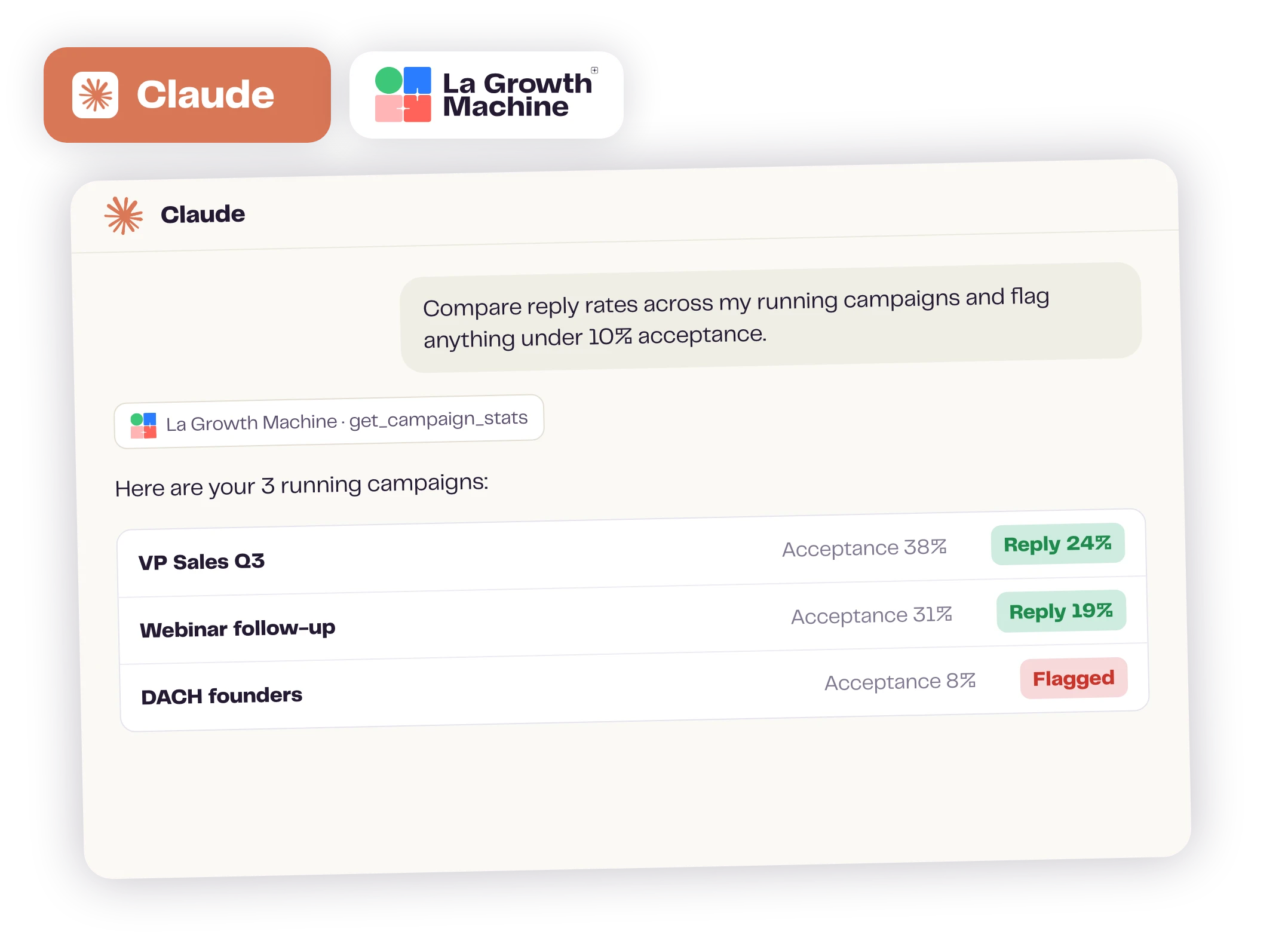
Your reporting, in plain words
Tell me which campaigns are working well, and what I need to do.
Your assistant pulls acceptance, reply and conversion rates for each campaign from your own account. Every number comes from your history, and you can open each call to see the request behind it.
LGM Analysis Agent answers any question about your activity: messages sent, acceptances, replies, opens, clicks, conversions and CRM syncs.
Clear your inbox from the chat
Get all of the responses that haven’t been replied to yet, and suggest a response.
Your assistant lists the conversations waiting for you, reads each thread and drafts an answer. You get one draft per lead, ready to go out from your own LinkedIn or email.
task_altNothing is sent until you approve it in the chat, by default.
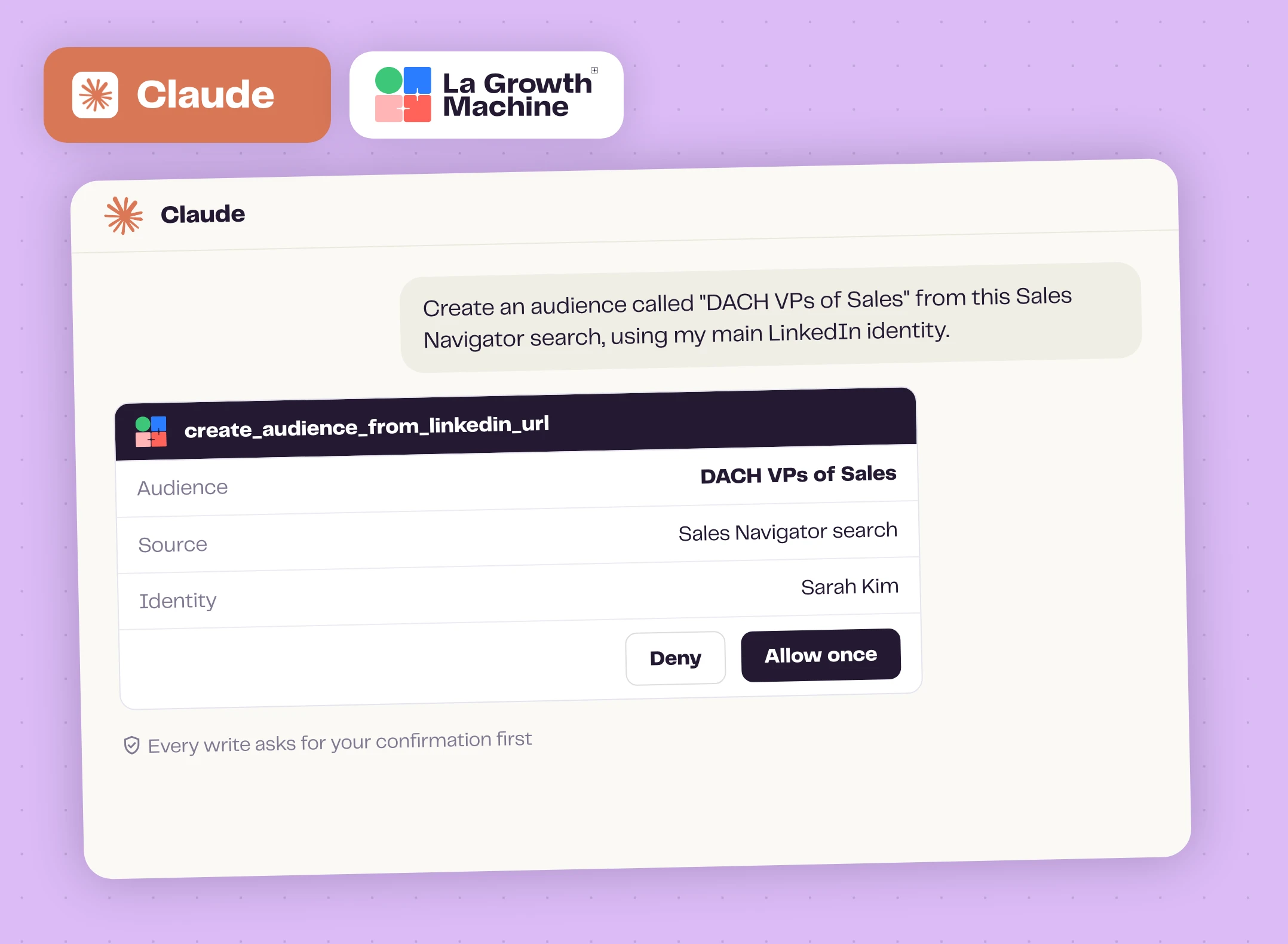
Push the leads you found into La Growth Machine
Add these 30 people to my audience “VP Sales DACH”.
Your assistant creates or updates each lead with what you have: name, company, LinkedIn URL, email. It can also build an audience straight from a Sales Navigator search or a post’s commenters. No CSV to export.
task_altIt asks before writing to your account, by default, and can skip leads you already contacted.
Launch a campaign from a conversation
Duplicate my best campaign, attach my “VP Sales DACH” audience and launch it.
Your assistant copies your campaign or a template from our catalog, sets the audience and the sending identity, then launches it. You get a running campaign, and you pause or resume it later in one sentence.
task_altThe launch waits for your OK, by default.
The custom messages your campaigns wait for
Write the custom messages my campaigns are waiting for.
Your assistant lists the custom messages waiting, with each lead’s company and role, and writes them with you, or rewrites a step of a duplicated sequence. La Growth Machine sends each one at the campaign’s next slot.
task_altEach message waits for your OK before it goes out, by default.
campaigns our customers launch is now built from the chat.
Your assistant asks before it acts
Nothing goes out without your explicit consent.
- task_altAsks before it sends or launches
- tollShows the credit cost first
- lockStores none of your data
“We can approve each message that Claude automatically proposed to us. […] So far, it’s the best possible setup that we have.”
Everything the MCP can do
50 tools: 24 that read, 26 that act on your account.
See all 50 tools expand_more
campaignCampaigns
- List your campaigns, read their steps and messages
- Start from your best campaign or a template from our catalog
- Write or rewrite any LinkedIn or email step, subject line included
- Pick the audience and sending identity before launch
- Turn settings on or off: auto-enrichment, out-of-office, CRM sync
- Launch, pause, resume or rename a campaign
groupLeads and audiences
- Build an audience from a LinkedIn or Sales Navigator search, a post or an event
- Read every lead's full record
- Add or update a lead, see everything that happened with them
- Tag a lead Interested, Not interested, Wrong target or Call booked
- Find a pro email, a phone number or fresh LinkedIn data, cost shown first
- Read any LinkedIn post: text, author and reactions
forumReplies and inbox
- See who is waiting for your reply, unread or starred
- Search the whole inbox and read full threads
- Reply on LinkedIn (text, or voice from an audio file) or by email, from your own identity
- Snooze, archive or bring back a conversation
callCalls and custom messages
- See the calls to make and the custom messages waiting
- Log a call's outcome, or write the custom message and let the campaign send it
query_statsAnalytics
- Read acceptance, reply and conversion rates for each campaign
- LGM Analysis Agent (
ask_your_outbound): ask anything of your outreach activity, read only
manage_accountsAccount and API
- See your identities, team members and credit balance
- Save the tone, language and signature of each identity
- Work across every client workspace, with the workspaces feature
- Reach any documented endpoint of our public API
Connect your assistant in a few clicks
Works with Claude, ChatGPT, Claude Code, Cursor, Codex and any MCP client. Sign in with your La Growth Machine account.
Server URL:
 ClaudeWeb, Desktop, mobile
Customize Connectors search “La Growth Machine” or paste the URL
https://mcp.lagrowthmachine.com ChatGPTDeveloper mode
Settings Apps add this URL with OAuth
https://mcp.lagrowthmachine.comRun the command sign in on first use
claude mcp add --transport http --scope user LaGrowthMachine https://mcp.lagrowthmachine.comAdd the URL as a remote MCP server sign in
https://mcp.lagrowthmachine.comFull setup guide13 free skills to start with

We've got you.
Not just a tool: an outreach expert who works with you every quarter. They review your campaigns, find the meetings you're missing and meet you to act on them. Included in Pro and Ultimate plans, from 3 identities.
Meet your expertYour outreach, one message away
Connect your assistant, then ask for your first report.
Frequently asked questions
Is there an official La Growth Machine MCP server? add
Yes: https://mcp.lagrowthmachine.com, built and run by La Growth Machine, open source under Apache 2.0. Some directories list community or third-party servers for La Growth Machine that ask for an API key or a specific plan. They are not ours: the official server only needs your sign-in.
Which plans include the MCP? Can I use it during the free trial? add
The MCP is included in the Pro and Ultimate plans and in the 14-day free trial. LGM Analysis Agent, the analysis of your full outreach activity, is part of the Ultimate plan.
Does it only read, or can it create and launch campaigns? add
Both. It reads your stats, leads and conversations, and it acts: builds audiences, duplicates a campaign or a template, sets its audience and identity, writes the messages, launches, pauses and resumes, replies on LinkedIn or by email. Of its 50 tools, 24 read and 26 act.
Will my assistant send or change things without me? add
Not by default. Every tool that acts is flagged as a write, so Claude and ChatGPT ask for your approval before sending a message, editing or launching a campaign. Enriching a lead shows its credit cost first and needs a second confirmation. You can also choose to always allow a tool: your call.
How do I install it? Do I need an API key or an admin? add
No API key and no code. In Claude, add the connector and sign in. In ChatGPT, developer mode must be on: on Business and Enterprise plans, a workspace admin turns it on. In Claude Code, one command. In Cursor or Codex, add the server URL, then sign in.
Is my data safe? What does the server keep? add
The server keeps no copy of your data: it reads it on demand, only in the workspaces you can access. Sign-in is OAuth 2.1, with no API key. Stats and the LGM Analysis Agent only read, and writes ask you first, by default. Analytics log the tool name, never your content. The code is open source (Apache 2.0) on GitHub.
Does it use credits? add
Connecting the MCP and running your campaigns from it uses no credits. Credits work as in the app: when you ask your assistant to enrich a lead or read a LinkedIn post, it shows the cost first. Credits are included in your plan, and you can top up from €5.
What is the LGM Analysis Agent? add
A read-only MCP tool that answers any question about your outreach activity: messages sent, acceptances, replies, opens, clicks, conversions and CRM syncs. We asked “Should we add a note to our LinkedIn invites?”: 20% of our leads replied without a note, 13% with one. It's part of the Ultimate plan.
Why use the official La Growth Machine MCP rather than a community server? add
It's built and maintained by La Growth Machine, and its 50 tools follow the product. You sign in with OAuth, with no API key to paste: community servers often ask for one. Your assistant asks before every write, by default. It's open source.
What can it do that a generic LinkedIn or email MCP can't? add
It sends from your own identities: LinkedIn messages and voice notes, and email. It runs your multichannel campaigns, clears your inbox and answers questions about your outreach activity with the LGM Analysis Agent, all inside your La Growth Machine account.
Does it work for a team or an agency? add
Yes. Each team member connects with their own La Growth Machine account and only reaches the workspaces they can access. With the workspaces feature, one connection reaches every client workspace: tell your assistant which client you're working on.