


Get started
The reply stage is where your outreach either converts or gets wasted. The lead already responded, what happens next comes down to keeping them warm and answering in a way that moves them forward. The easy "interested" replies are simple to answer. Objections and curious-but-noncommittal ones tend to get pushed down the list, even though they're often the biggest opportunity, since writing a good, non-pushy answer for each one just takes real time. Left too long, they go cold, and the pipeline you paid to create slips away one unanswered message at a time.
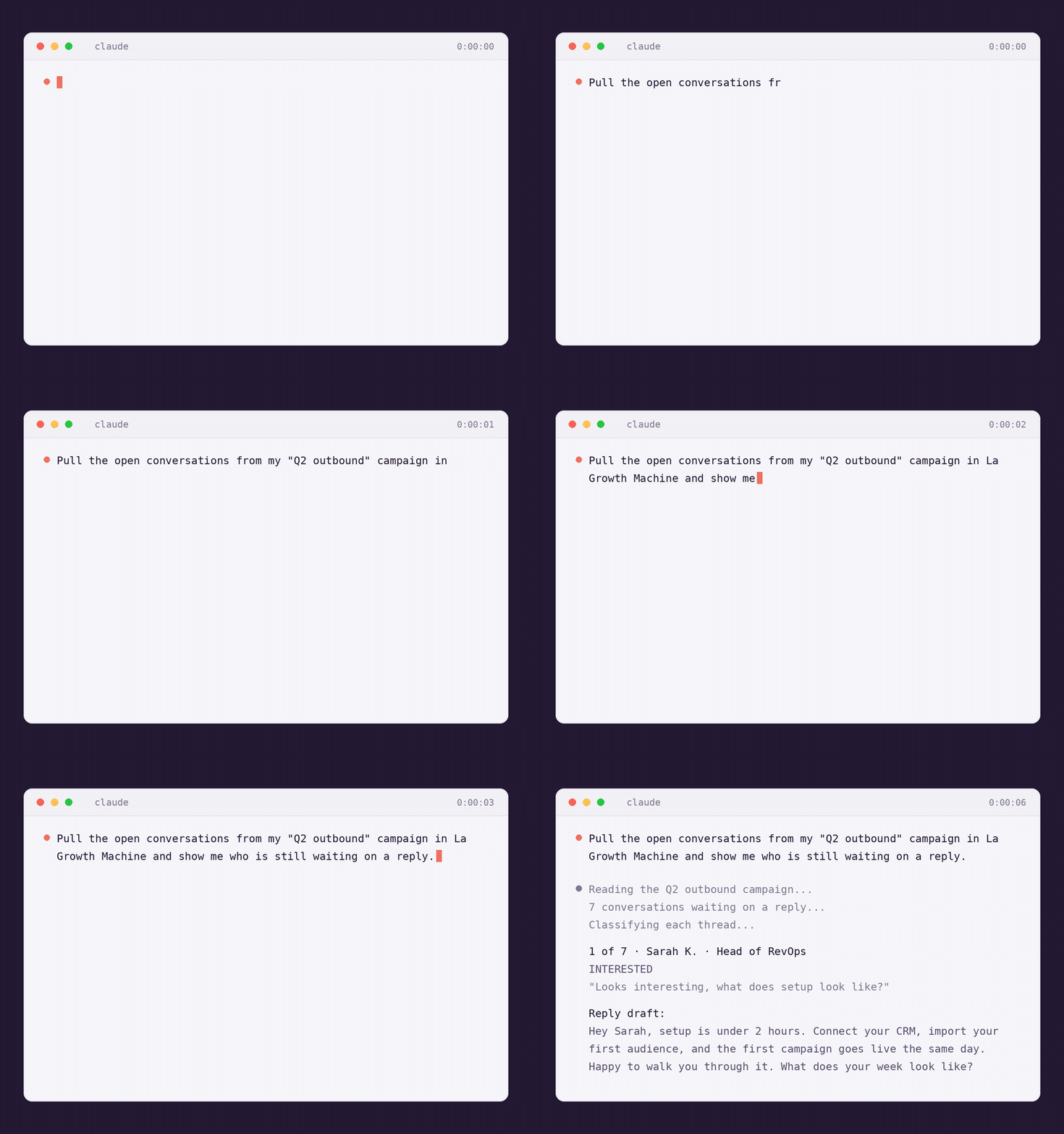
Reply Draft Assistant takes the per-reply effort off your plate. Point Claude at the replies your prospects sent: your La Growth Machine inbox, a campaign, or a thread you paste. It reads each full conversation, tells you what the reply is, and drafts the right answer in the lead's own tone. You review the batch and approve. Claude sends each one natively, in the right thread, on the right channel.
- See every reply classified by intent: interested, objection, curious, wrong fit, and more
- Get one draft per reply, built on the full thread and matched to the lead's tone and wording
- Review the batch in one place, without opening your inbox
- Approve, and Claude sends each answer natively via LinkedIn or email
Run your first reply queue
Bring your replies to Claude
Claude needs the conversations in front of it before it can do anything. Start by asking it to pull the replies that are waiting on you. Two ways, pick what fits your stack:
- Copy a LinkedIn or email exchange straight into the chat
- Or export your conversations to a CSV and hand it over
- Zero setup, works with any tool you reply from
- Claude pulls your whole inbox or a single campaign on its own
- It sends each approved reply natively, in the right thread
- Best to run it every morning.
Install the MCP
What you'll get: Claude lists the conversations waiting on you and starts reading the full threads, one by one.
Claude classifies, then drafts each one
Each reply is classified first: interested, objection, curious, wrong fit, auto-reply, and more. You see the category and the quoted last message before anything is written. Then each one is drafted on the full thread and matched to how the lead writes, their tone, their wording, the length they use, so the answer sounds like you and not a template. A self-check runs before you ever see it: one question max, no marketing-speak, no broken links.
Claude moves through the batch the same way: an objection gets a calm, non-defensive answer, a "wrong contact" reply gets a short redirect, a cold one gets parked. The drafts come pre-checked, ready to review.
Review, then send your way
You approve every send. Read the batch, tweak any draft in plain words ("make it shorter", "drop the call ask"), Skip the ones you want to handle yourself, and approve the rest. With the LGM MCP connected, Claude sends each approved answer natively, in the original thread, on the right channel. No copy-paste, nothing leaves until you say so.
Bonus: give it a campaign.md so replies stay on-brand
Want every draft aligned with one campaign? Drop a small campaign.md file next to the skill: the objective, the persona, the tone you use, the next step you push for. Claude reads it before drafting, so the answers match the campaign instead of sounding generic. Update the file once, and every reply follows.
persona: Architect, a RevOps / GTM Engineer who owns the stack
tone: peer to peer, direct, short sentences, no hype
next_step: a 20-minute comparison call
notes:
- Talk like a colleague, never like a sales pitch
- One question max per reply
- If they mention a competitor, ask about CRM sync at deal level
Prompts to try on your replies
Copy one, swap in your campaign or paste your thread, and send it to Claude.
One queue, your rules
- →Narrow the scope: "reply only to the objections from my Q2 campaign"
- →Set the tone once: keep a
campaign.mdper campaign so every draft stays on-brand - →Run it every morning: with the MCP connected, clear the overnight replies before 9am
Clear your first reply queue
Get the skill and point it at your inbox. You approve every send.
Get the skill