

TL;DR
– Most teams treat LinkedIn and email as separate motions, which creates fragmented data and no clear pipeline attribution. La Growth Machine solves this with a single coordinated platform.
– Scalable multichannel prospecting requires four non-negotiable building blocks: a unified enriched prospect database, a sequence builder with conditional logic, a Unified Inbox, and automatic CRM sync with HubSpot, Pipedrive, or Salesforce.
– Personalization at scale is possible through variables, liquid syntax, and AI-generated opening lines — you keep editorial control while the manual work disappears.
– The biggest mistakes when scaling outreach are sending the same message across channels, compressing touchpoint timing, skipping enrichment, and delaying CRM sync. Fix the system, not the volume.
Most sales teams are running LinkedIn and email as two separate motions. LinkedIn lives in one tab, email in another. Replies land in different inboxes. Attribution is guesswork. And when leadership asks which channels are actually generating pipeline, no one has a clean answer.
That’s not a resource problem. It’s a systems problem.
Scaling multichannel prospecting isn’t about doing more across more channels. It’s about building a coordinated system where every touchpoint is intentional, every reply is captured in one place, and every booked meeting traces back to the sequence that generated it.
This guide breaks down exactly how to build that system.
What “Multi-Channel Prospecting at Scale” Actually Means
The term gets misused constantly. Running LinkedIn outreach on Monday and email blasts on Friday is not multichannel prospecting. It’s two separate prospecting motions with no connection between them.
True multichannel prospecting at scale means:
- Coordinated sequences: LinkedIn and email (and optionally voice or Twitter/X) run in a single sequence, with each touchpoint informed by what happened on the previous channel.
- Unified tracking: every interaction, reply, and conversion is logged in one system, not scattered across three platforms.
- CRM sync: your CRM reflects the reality of your outreach pipeline automatically, not because a rep manually updated a field.
- Conditional logic: if a prospect accepts your LinkedIn request, they get a different follow-up than someone who never responded. The sequence adapts in real time.
Without these four elements, you’re not doing multichannel prospecting. You’re doing multichannel outreach, which is a much weaker version of the same idea.
The difference shows up in your numbers. Coordinated multichannel sequences consistently generate more booked meetings than single-channel approaches, not because you’re sending more messages, but because the sequencing creates familiarity across touchpoints before the ask ever arrives.
The 4 Building Blocks of Scalable Multichannel Prospecting
1. A unified prospect database (enrichment + deduplication)
The foundation of any multichannel system is a clean, enriched prospect list. If your data is fragmented across spreadsheets, LinkedIn exports, and your CRM, you’ll spend more time cleaning data than generating pipeline.
A unified prospect database means:
- Every contact has a LinkedIn URL, a verified email, and ideally a phone number
- Duplicates are removed before the sequence starts, not after replies land
- Enrichment happens automatically, not manually
The standard enrichment waterfall works like this: start with a LinkedIn URL, use it to find a verified email, then find a phone number if voice is part of your sequence. Tools like Clay are built specifically for this kind of enrichment workflow. You connect multiple data sources (LinkedIn, Clearbit, Hunter, etc.) and run them in sequence until you have a complete contact record.
La Growth Machine handles enrichment natively inside the platform. Import a list with LinkedIn URLs and LGM automatically finds verified email addresses before the sequence begins. This means you start every campaign with clean data, not a list that’s 40% incomplete.
Deduplication is equally important. Running the same prospect through two different sequences because they appeared on two different lists is a fast way to damage your sender reputation and confuse prospects who receive contradictory messages. Build deduplication into your import process, not as an afterthought.
2. A multichannel sequence builder with conditional logic
A sequence builder without conditional logic is just a drip campaign. Real multichannel sequences branch based on prospect behavior.
The logic looks like this:
- Day 1: LinkedIn profile visit
- Day 3: LinkedIn connection request
- Day 6: If accepted, send LinkedIn message. If not accepted, switch to email.
- Day 9: Follow-up email
- Day 12: If no reply, voice message or final LinkedIn touch. If replied, move to CRM as active opportunity.
This kind of branching logic is what separates a coordinated prospecting system from a batch-and-blast approach. Each path is personalized to what the prospect actually did, not what you assumed they would do.
Building this manually across separate tools is technically possible but operationally painful. You’d need to track LinkedIn activity in one tool, email replies in another, and manually update your CRM to reflect which path each prospect is on. That’s not scalable.
3. A unified inbox (all replies in one place, regardless of channel)
When a prospect replies on LinkedIn, it lands on LinkedIn. When they reply to an email, it’s in your email client. When they respond to a voice message, it might be a callback to a number your team monitors inconsistently.
Without a unified inbox, replies fall through the cracks. A prospect who replied on LinkedIn two days ago might receive an email follow-up that ignores their response entirely. That’s not just inefficient. It’s damaging to the relationship you were trying to build.
A unified inbox aggregates all replies across all channels into a single view. Your team sees every conversation, regardless of where it started, and can respond without switching between platforms. This is especially important when you’re running sequences across 500 or more prospects simultaneously.
La Growth Machine’s Unified Inbox pulls together LinkedIn messages, email replies, and voice message callbacks into one interface. When a prospect replies on any channel, the sequence pauses automatically and the conversation appears in your inbox ready for a human response. No manual follow-up required.
4. A CRM sync that doesn’t require manual work
Manual CRM updates are the tax your team pays for not having proper integrations. Reps who spend 30 minutes per day updating fields in HubSpot or Salesforce are not doing outbound. They’re doing data entry.
CRM sync in a scalable multichannel system means:
- Contact records are created automatically when a prospect enters a sequence
- Activity is logged per touchpoint (LinkedIn visit, email sent, reply received)
- Deal stages update based on prospect actions (replied, booked a call, etc.)
- No manual field updates required from reps
This isn’t just a time-saving feature. It’s what makes attribution possible. When you can trace a booked meeting back to the specific sequence, touchpoint, and channel that generated it, you can make intelligent decisions about where to invest your outreach budget.
How to Build Your Multichannel Prospecting System with La Growth Machine (5 steps)
La Growth Machine is built specifically for this use case: coordinated multichannel sequences with unified inbox management and native CRM sync. Here’s how to build the system from scratch.
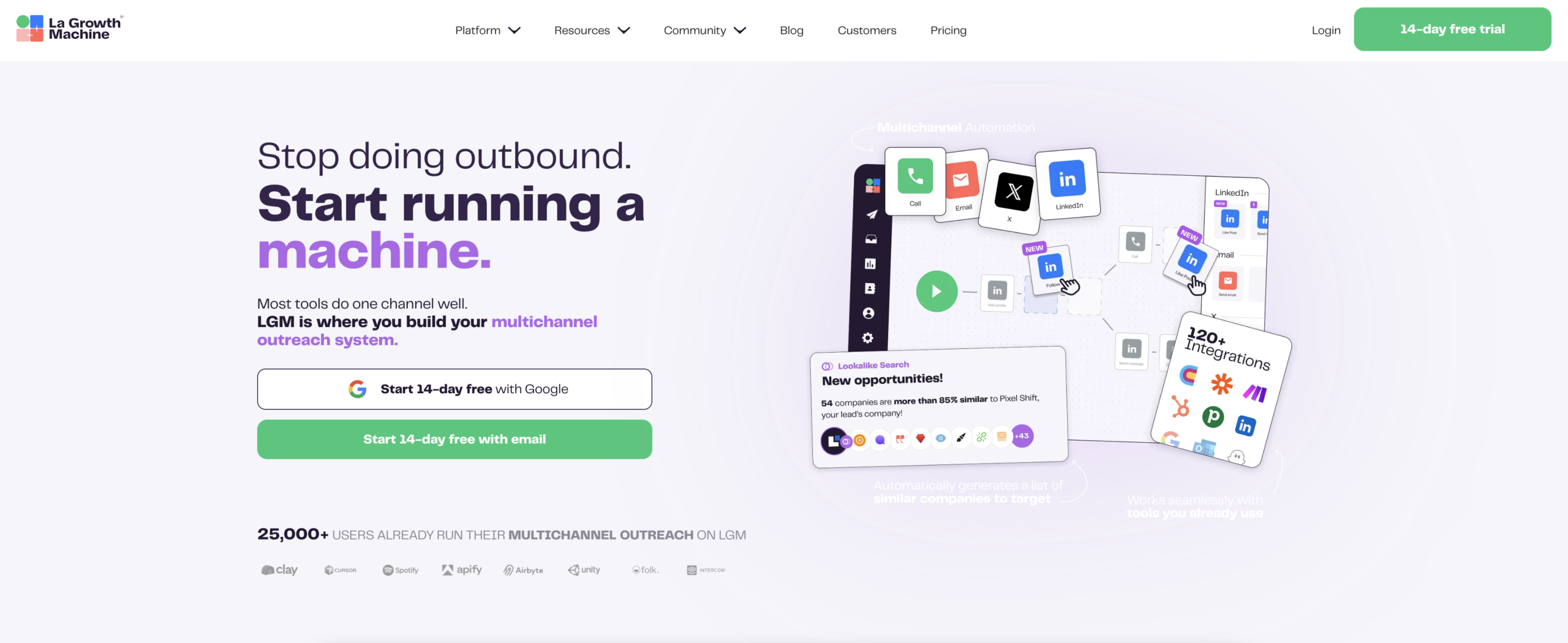
Step 1: Import and enrich your list (waterfall enrichment)
Start by importing your prospect list into La Growth Machine. You can import from CSV, LinkedIn Sales Navigator, or directly from your CRM.
Once imported, LGM runs waterfall enrichment automatically:
- LinkedIn URL is used to identify the profile
- LGM finds a verified email address linked to that profile
- If a phone number is available and you’re running voice steps, it surfaces that too
This enrichment happens before the sequence starts, so every prospect enters your campaign with a complete contact record. You’re not guessing which email address is correct or manually looking up phone numbers.
If you’re pulling from a more complex data source or need custom enrichment logic (firmographic data, tech stack, intent signals), this is where Clay fits naturally upstream. Build your enriched list in Clay, export it with all the fields you need, and import directly into La Growth Machine.
Step 2: Build a multichannel sequence
Inside La Growth Machine’s sequence builder, you design your campaign as a visual workflow. Drag and drop actions: LinkedIn profile visit, LinkedIn connection request, LinkedIn message, email, voice message, Twitter/X follow.
A typical sequence for a cold outreach campaign looks like this:
- Day 1: LinkedIn profile visit (generates a notification the prospect may notice)
- Day 3: LinkedIn connection request with a short personalized note
- Day 6: LinkedIn message (if connected) or email (if not connected)
- Day 9: Follow-up email
- Day 12: Voice message or final email
Each action has a configurable delay. You set the timing, and LGM handles execution across all channels simultaneously, respecting daily limits to protect your LinkedIn account and email sender reputation.
Step 3: Set conditional logic
This is where the system becomes genuinely multichannel rather than just multi-step.
In La Growth Machine, you add condition branches directly in the sequence builder:
- If LinkedIn request accepted: proceed with LinkedIn message on Day 6
- If LinkedIn request not accepted after 3 days: switch to email path
- If email opened but no reply after 5 days: send a follow-up email
- If reply received on any channel: exit sequence, move to Unified Inbox
These conditions run automatically. You don’t need to monitor each prospect manually to decide which path they should take. The system reads their behavior and adapts in real time.
This conditional logic is also where you separate warm prospects from cold ones. Someone who accepted your LinkedIn request and opened your first email is in a different buying stage than someone who has received three touchpoints with no engagement. Your sequences should treat them differently.
Step 4: Manage replies in the Unified Inbox
Once sequences are running, all replies appear in La Growth Machine’s Unified Inbox regardless of channel. A LinkedIn reply and an email reply from the same prospect are threaded together so you have full context before you respond.
The inbox also shows you where each prospect is in the sequence, what actions have been taken, and what’s scheduled next. If you reply to a prospect and want to pause their sequence, you do it directly from the inbox with one click.
This is where team coordination matters. If multiple reps share a prospect pool, the Unified Inbox prevents two reps from responding to the same prospect independently. One conversation, one owner, one thread.
Step 5: Sync everything to your CRM automatically
La Growth Machine integrates natively with HubSpot, Pipedrive, and Salesforce.
When you connect your CRM, every prospect imported into LGM creates or updates a contact record in your CRM automatically. As the sequence progresses, each activity is logged: LinkedIn visit on Day 1, connection request sent on Day 3, email delivered on Day 6, reply received on Day 9.
When a prospect replies and enters the conversation stage, you can trigger a deal creation in your CRM automatically. When a meeting is booked, you update the deal stage. All of this happens without any manual input from your reps.
The attribution chain is clean: prospect entered LGM on this date, from this list, through this sequence, booked a meeting on this date, became an opportunity in the CRM on this date. You know exactly which sequences are generating pipeline and which ones need to be rethought.
For more complex workflows (enrichment triggers, multi-team routing, custom field mapping), Zapier connects LGM to virtually any tool in your stack.
How to Scale Without Losing Personalization
The most common objection to scaling outreach is that personalization suffers. If you’re sending 500 sequences simultaneously, how do you make each message feel relevant?
The answer is variables and conditional copy, not manual rewriting.
La Growth Machine supports custom variables for any field in your contact record: first name, company name, job title, industry, LinkedIn headline, recent post topic, and any custom attribute you’ve added during enrichment. A message like “Hey {{firstname}}, I noticed {{companyname}} recently expanded into {{new_market}}” pulls from enriched data automatically.
For more advanced personalization, LGM supports liquid syntax, which lets you write conditional copy blocks:
` {% if industry == “SaaS” %} We work with a lot of SaaS companies in the {{company_size}} range… {% elsif industry == “Services” %} For professional services firms, the challenge is usually… {% endif %} `
This means one template can generate meaningfully different messages for different segments, without creating separate sequences for each one.
LGM’s AI copywriting feature takes this further. Based on a prospect’s LinkedIn profile and your campaign brief, it generates personalized opening lines at scale. You review and approve before sending. The human judgment stays in the loop. The manual work disappears.
The rule of thumb: personalize the opening and the relevance hook. The rest of the message can be templated. A prospect who receives a message that references their specific role and a pain point relevant to their industry will not notice (or care) that the rest of the message is structured similarly to what you sent 300 other people.
Common Mistakes When Scaling Multichannel Outreach
Scaling amplifies both good processes and bad ones. These are the mistakes that most damage pipeline and sender reputation at scale.
Sending the same message across every channel
LinkedIn and email are different mediums. A 300-word email reformatted as a LinkedIn message reads as lazy and gets ignored. Write channel-native copy: shorter on LinkedIn, more structured in email, conversational in voice. Your sequence builder should have different message templates per channel, not copied content.
No cool-down between touchpoints
Hitting a prospect with a LinkedIn request on Monday, an email on Tuesday, and a follow-up on Wednesday is not multi-channel. It’s multi-channel pressure. Build breathing room into your sequences. Three to five day gaps between touchpoints give prospects time to process and respond. Sequences with compressed timing generate spam reports, not meetings.
Skipping enrichment
Launching a sequence on a half-enriched list means some prospects receive LinkedIn messages (because you have their LinkedIn URL) while others receive nothing because you’re missing their email and they didn’t accept your connection request. Enrichment is not optional. It’s the prerequisite for multichannel to actually work.
No CRM sync from day one
Waiting until a prospect replies to add them to your CRM means you lose all the activity data from the sequence. The LinkedIn visit, the connection request, the email opens: all of that context is useful when a rep picks up the conversation. Sync from day one, not when it becomes convenient.
Treating every prospect the same regardless of engagement
If someone has received five touchpoints with no engagement, sending a sixth is unlikely to change the outcome. Build exit conditions into your sequences: after X touchpoints with no engagement, move the prospect to a re-engagement list for Q2 rather than continuing the same sequence. This protects your sender reputation and keeps your active sequences focused on engaged prospects.
FAQ
How many channels should a multichannel prospecting sequence include?
Start with two: LinkedIn and email. These two channels cover the majority of B2B decision-makers and give you enough branching logic to run genuinely coordinated sequences. Add voice as a third channel once you have a team member who can handle callbacks consistently. Twitter/X works for specific niches (tech founders, investors) but should not be a default channel for most teams.
How do I avoid LinkedIn account restrictions when scaling outreach?
LinkedIn enforces daily limits on connection requests, messages, and profile visits. La Growth Machine’s safety settings automatically cap daily activity per identity to stay within LinkedIn’s acceptable range. The standard safe limits are roughly 20 to 30 connection requests per day and 80 to 100 profile visits. If you need to scale beyond one identity, LGM supports multiple identities from the same account, each with its own daily limits.
What’s the right sequence length for cold outreach at scale?
Six to eight touchpoints over 15 to 20 days is the standard for cold outreach. This gives you enough attempts to establish familiarity without becoming intrusive. If a prospect hasn’t responded after eight touchpoints, they’re either not in-market or your messaging isn’t resonating. Move them to a re-engagement list rather than continuing the same sequence indefinitely.
How do I measure the performance of my multichannel sequences?
Focus on pipeline-level metrics, not vanity metrics. The metrics that matter are: replies that converted to calls (reply-to-meeting rate), calls that converted to opportunities (call-to-opportunity rate), and sequences that contributed to closed revenue (sequence-to-revenue attribution). La Growth Machine’s analytics dashboard shows sequence-level performance, and native CRM sync means you can track these numbers all the way through the funnel.
Can I run multichannel prospecting with a small team?
Yes. A two-person sales team can run effective multichannel sequences at scale if the system is set up correctly. The Unified Inbox and automatic CRM sync eliminate most of the administrative work. One person can manage a sequence of 300 to 500 active prospects simultaneously if reply management is centralized. Scale the list size based on your team’s capacity to handle replies and follow-up conversations, not based on your capacity to send messages.
Conclusion
Multichannel prospecting at scale is a systems problem, not a volume problem. The teams booking the most meetings aren’t the ones sending the most messages. They’re the ones running coordinated sequences where each touchpoint builds on the last, every reply is captured in one place, and every booked meeting traces back to the sequence that generated it.
The four building blocks are non-negotiable: a unified, enriched prospect database; a sequence builder with conditional logic; a unified inbox for reply management; and CRM sync that works without manual input.
La Growth Machine is built to connect all four of these pieces in a single platform. Import your list, build your sequence, manage replies in the Unified Inbox, and sync automatically to HubSpot, Pipedrive, or Salesforce. No glue code, no manual updates, no attribution gaps.
If you’re ready to build this system for your team, start a 14-day free trial of La Growth Machine. No credit card required. Your first sequence can be live in under an hour.