

TL;DR
Phantombuster offers 130+ cloud automations at $69/month while Texau provides 180+ at $79/month.
– Phantombuster delivers 14-day trial with LinkedIn scraping and multi-step workflows
– Texau includes desktop app option with multi-platform scraping and OpenAI integration
– Phantombuster excels at cloud execution and mature documentation with active community
– Texau offers more total automations with workflow builder for complex sequences
– Both integrate with HubSpot and Salesforce but serve technical growth teams
Phantombuster and Texau are both cloud-based automation platforms designed to help sales teams, marketers, and growth professionals scrape data and automate repetitive tasks across social media and web platforms. But which one actually fits your workflow?
Phantombuster vs. Texau: side-by-side comparison table
| Feature | Phantombuster | Texau | La Growth Machine |
|---|---|---|---|
| Starting price | $69/month | $79/month | €50/user/month (annual) |
| Free trial | Yes, 14 days | Yes, 14 days | 14 days (no credit card required) |
| Key features | 130+ automations, cloud execution, LinkedIn scraping, multi-step workflows | 180+ automations, cloud + desktop app, multi-platform scraping, workflow builder | LinkedIn + Email sequences, enrichment, warmup, AI voice |
| Integration options | HubSpot, Salesforce, Pipedrive, Zapier, Make, Google Sheets | HubSpot, Pipedrive, Close CRM, Zapier, Make, Google Sheets, OpenAI | Native: HubSpot, Salesforce, Pipedrive + API |
| Support options | Email, chat, documentation, priority support (Pro+) | Email, chat, documentation, priority support (Teams+) | Email, chat, knowledge base, dedicated strategist (4+ seats) |
| Best for | Sales teams, marketers, recruiters seeking easy-to-use cloud automation | Growth teams, agencies needing flexibility with desktop app and advanced workflows | Scaling teams needing multichannel automation |
This comparison breaks down everything you need to know: features, pricing, ease of use, integrations, and real user feedback. We’ll also introduce La Growth Machine as another option if you’re looking for a platform focused on sales outreach rather than just data extraction.
Phantombuster vs. Texau: quick overview
Here’s what each tool brings to the table.
Phantombuster

Phantombuster is a cloud-based automation platform that’s been around since 2016. It extracts data and automates actions across LinkedIn, Instagram, Twitter/X, Facebook, Google Maps, and more. The platform offers 130+ pre-built automations (called “Phantoms”) that let you scrape leads, send connection requests, extract profile data, and build multi-step workflows without writing code.
Main selling point: Automation library with cloud execution that runs 24/7, even when your computer is off.
Starting price: $69/month (Starter plan)
Texau
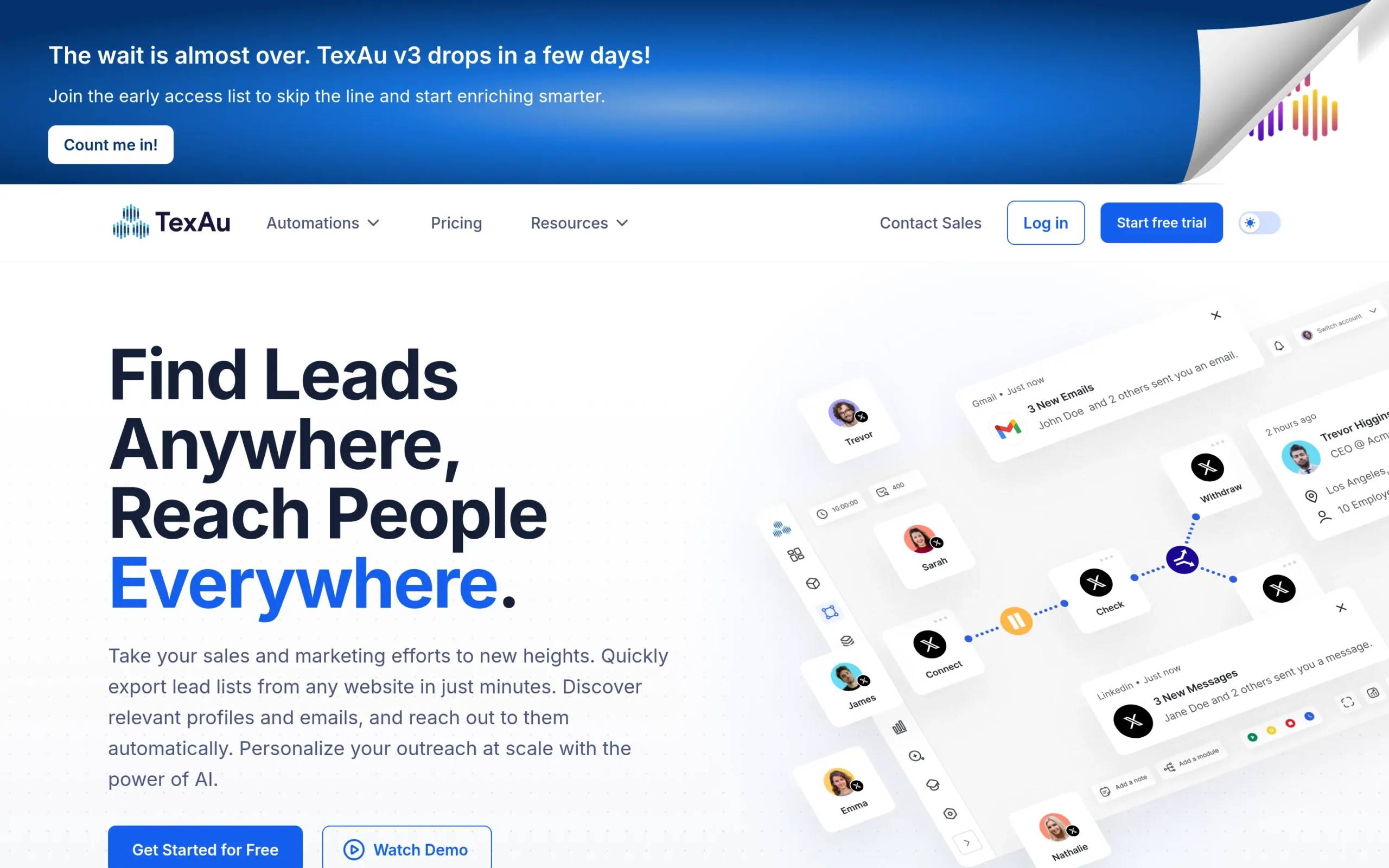
Texau is a growth automation platform that helps businesses automate lead generation and data extraction across multiple platforms. It offers 180+ automations (called “Spices”) and workflow builders (called “Recipes”) that let you chain tasks together. Texau provides both a cloud-based version and a desktop app, giving you flexibility in how you run your automations.
Main selling point: Dual deployment options (cloud and desktop) with extensive automation library and bi-directional webhooks.
Starting price: $79/month (Starter plan)
Phantombuster vs. Texau: head-to-head comparison
Here’s how these tools stack up across the areas that matter most.
Features & capabilities
Phantombuster:
Phantombuster offers 130+ pre-built automations covering LinkedIn, Sales Navigator, Instagram, Twitter/X, Facebook, Reddit, and Google Maps. You can automate connection requests, message sequences, profile scraping, data extraction from searches, and multi-step workflows. The platform runs entirely in the cloud, so your automations execute on schedule without needing your computer on. It includes built-in safety features like human-like pacing and rate limits to help reduce the risk of account restrictions.
Texau:
Texau provides 180+ automations across similar platforms: LinkedIn, Twitter, YouTube, Google, Reddit, Quora, Pinterest, Medium, Yellow Pages, Slack, and Product Hunt. The standout feature is deployment flexibility. You can run automations via their cloud platform or use the desktop app to execute tasks from your own IP address, which saves on proxy costs. Texau also offers conditional filtering, hyper-personalization, bi-directional webhooks, and multi-account management.
Winner: Texau for sheer versatility. Running automations locally via desktop app plus broader platform coverage gives it an edge, especially for users who want more control over their execution environment.
Ease of use
Phantombuster:
Phantombuster is designed with simplicity in mind. The interface is clean, and you can launch a pre-built automation in minutes by filling in required fields. Documentation and tutorial videos guide you through setup. Most users report getting their first workflow running within 30 minutes. There’s a learning curve when combining multiple automations into complex workflows, but the basics are straightforward.
Texau:
Texau also uses a no-code approach. The dashboard provides quick access to automations (Spices) and workflows (Recipes). However, several reviews mention that creating complex recipes with multiple Spices has a steeper learning curve than expected. The terminology (Spices and Recipes) takes some getting used to. Once you understand the system, it becomes more intuitive, but initial setup may require more time than Phantombuster.
Winner: Phantombuster for faster time to first result. Its simpler terminology and more polished onboarding make it easier for beginners to get started.
Pricing & value
Phantombuster:
- Starter: $69/month ($56/month billed annually), 20 hours/month execution time, 5 automation slots, 500 email credits, 10,000 AI credits
- Pro: $159/month ($128/month billed annually), 80 hours/month execution time, 15 automation slots, 2,500 email credits, 30,000 AI credits
- Team: $439/month ($352/month billed annually), 300 hours/month execution time, 50 automation slots, 10,000 email credits, 90,000 AI credits
All plans include unlimited users, access to all 130+ automations, CRM integrations (HubSpot, Salesforce, Pipedrive), and priority support on higher tiers. Offers a 14-day free trial with no credit card required.
Texau:
- Starter: $79/month, 30 hours/month execution time, 500 email enrichment credits, 5 automation slots
- Teams: $199/month, 100 hours/month execution time, 2,500 email enrichment credits, 3 workspaces, 15 automation slots
- Agency: $459/month, 250 hours/month execution time, 6,000 email enrichment credits, 10 workspaces, 25 automation slots
All plans include desktop app access, webhook and API access, CRM integrations, and priority support on higher tiers. Offers a 14-day free trial with no credit card required.
Winner: Phantombuster for entry-level pricing. At $69/month vs. $79/month, and with more execution time (20 hours vs. Texau’s quoted 30 hours but conflicting reports), Phantombuster offers better value at the starter level. For scaling teams, both are comparable, though Texau’s desktop app adds value if you want to avoid proxy costs.
Integrations
Phantombuster:
Integrates with HubSpot (bi-directional), Salesforce, Pipedrive, Slack, Zapier, Make, n8n, Google Sheets, Hunter, and lemlist. Data can be exported to CSV or Google Sheets. API access available on all plans.
Texau:
Integrates with HubSpot, Pipedrive, Close CRM, GoHighLevel, lemlist, Mailshake, Snov.io, Instantly, Salesforce, Google Sheets, Zapier, Make, Slack, and OpenAI. Offers bi-directional webhooks and full API access.
Winner: Tie. Both tools offer solid integration ecosystems. Texau has bi-directional webhooks, which helps advanced users, but Phantombuster’s native CRM integrations are equally robust.
Platform support & automation variety
Phantombuster: Covers 15+ platforms including LinkedIn, Instagram, Twitter/X, Facebook, Google Maps, Reddit, Product Hunt, and more.
Texau: Covers 10+ platforms including LinkedIn, Twitter, YouTube, Google, Reddit, Quora, Pinterest, Medium, Yellow Pages, Slack, and Product Hunt. Also supports TikTok and GitHub scraping.
Winner: Phantombuster edges slightly ahead with broader platform coverage, particularly for social media platforms like Instagram and Facebook.
Phantombuster vs. Texau: pros and cons
Phantombuster strengths & weaknesses
Pros:
- Clean, user-friendly interface with minimal learning curve
- 130+ pre-built automations covering major platforms
- Cloud-based execution runs 24/7 without needing your computer on
- Safety features with human-like pacing and rate limits
- Native CRM integrations with HubSpot, Salesforce, and Pipedrive
- Excellent documentation and responsive support
Cons:
- Execution time-based pricing can be confusing for new users
- Some users report occasional bugs in specific automations
- Customization options are limited compared to coding-based solutions
- Higher-tier plans can get expensive as you scale
User Rating:
- G2: 4.4/5 (based on 112+ reviews)
- Capterra: 4.5/5 (based on 63+ reviews)
Texau strengths & weaknesses
Pros:
- 180+ automations across diverse platforms
- Desktop app option lets you run tasks from your own IP (no proxy needed)
- Bi-directional webhooks and API access on all plans
- Multi-account management and workspace features
- Conditional filtering and hyper-personalization capabilities
- Access to both premium and basic automations (Spices)
Cons:
- Steeper learning curve, especially for building complex workflows
- Mixed reviews on customer support responsiveness
- LinkedIn automations have been retired (as of 2025, Texau V3 in development)
- Some users report occasional errors and slow error logging
- UI/UX feels less polished than Phantombuster
User Rating:
- G2: Rating not accessible (reviews present but rating blocked)
- Capterra: 4.0/5 (based on 20 reviews)

Which should you choose?
Here are the key factors to help you decide between Phantombuster and Texau:
Choose Phantombuster if:
- You want a clean, intuitive interface with minimal setup time
- You need reliable 24/7 cloud execution without managing desktop apps
- You’re focused primarily on LinkedIn automation, Sales Navigator, and major social platforms
- You value documentation and responsive customer support
- You’re new to automation and want pre-built templates that work out of the box
Choose Texau if:
- You need flexibility to run automations locally via desktop app to save on proxy costs
- You want access to niche platforms like Yellow Pages, TikTok, or GitHub
- You’re comfortable with a learning curve in exchange for more customization
- You need bi-directional webhooks and advanced conditional filtering
- You’re managing multiple client accounts and need workspace management features
Looking for another option? Consider La Growth Machine
If Phantombuster and Texau don’t quite fit what you’re looking for, La Growth Machine takes a different approach. Our platform focuses on multichannel sales automation, combining LinkedIn, email, Twitter/X, and calls into one seamless workflow, designed for teams that want to scale personalized outreach without sacrificing authenticity.
What La Growth Machine does
La Growth Machine is an all-in-one multichannel prospecting platform built for B2B sales teams, growth marketers, and agencies. Unlike Phantombuster and Texau, which focus primarily on data extraction and social media automation, our platform handles the entire outbound sales process: finding leads, enriching contact data, running personalized multichannel outreach sequences, and managing conversations in a unified inbox.
Core differentiators:
Multichannel by design: Combine LinkedIn (messages, connection requests, voice notes), email, Twitter/X, and manual call tasks in one sequence. You’re not just scraping data, you’re running full outreach campaigns that adapt based on how prospects respond.
LinkedIn Voice Messages with AI: Stand out with authentic voice messages sent automatically through LinkedIn. Our AI can clone your voice to personalize at scale, doubling response rates compared to text-only outreach.
Advanced Lead Enrichment:Waterfall email enrichment uses 9 providers with double verification to find verified emails. Enrich profiles with phone numbers, Twitter handles, company data, and more, all within the platform.
Social Warming: Automatically like posts and follow prospects before reaching out, building familiarity and trust that makes your connection requests far more likely to be accepted.
Lookalike Search & Opportunities Flow: Provide the name of your best client, and our platform finds similar companies using AI. When a prospect replies positively, we automatically generate a list of similar opportunities for you to explore.
Unified Multichannel Inbox: Manage all LinkedIn messages, emails, and conversations in one thread per lead, regardless of channel. No more switching between platforms to track responses.
How we compare
Where La Growth Machine excels:
Outreach-first approach: Phantombuster and Texau are built for data extraction and task automation. Our platform is built for running outbound sales campaigns that get replies. Every feature is designed to increase response rates and start conversations.
Native multichannel sequences: Both Phantombuster and Texau can chain automations together, but you’re typically building workflows across different platforms. La Growth Machine natively supports multichannel sequences where LinkedIn, email, and Twitter work together in one campaign with conditional logic based on engagement.
Conversation management: Phantombuster and Texau don’t have built-in inboxes. Once you’ve automated the outreach, you’re managing responses in LinkedIn and your email client separately. Our Multichannel Inbox consolidates everything into one view, grouped by lead.
Email deliverability features: With Inbox Rotation, you can send emails from multiple addresses to improve deliverability, avoid spam filters, and protect sender reputation. This is critical for scaling email outreach, something neither Phantombuster nor Texau focuses on.
Voice personalization at scale: While Phantombuster and Texau can scrape and automate, our LinkedIn Voice Messages with AI voice cloning let you send personalized audio messages at scale, a unique feature that significantly boosts engagement.
Pricing
La Growth Machine offers straightforward, transparent pricing with no hidden fees:
- Basic Plan: €50/month per identity (LinkedIn + Email channels, 250 enriched leads/month, AI voice messages, AI copywriting)
- Pro Plan: €100/month per identity (adds Twitter/X, calls, Social Warming, Inbox Rotation with 5 email addresses, Lookalike Search, Multichannel Inbox)
- Ultimate Plan: €150/month per identity (adds CRM sync with HubSpot/Pipedrive, advanced integrations, webhooks, dedicated support)
All plans start with a 14-day free trial, no credit card required.
Worth considering if
Your goal is starting conversations, not just scraping data: If you need to generate qualified meetings and build pipeline, not just extract information.
You want true multichannel outreach: Combine LinkedIn, email, and Twitter in one campaign with intelligent sequencing based on engagement.
You need to scale email safely: Inbox Rotation and deliverability features protect your sender reputation as you grow.
You value personalization:Social Warming, Voice Messages, and Lookalike Search help you stand out and connect authentically at scale.
Phantombuster vs. Texau: FAQs
Can Phantombuster and Texau both automate LinkedIn outreach?
Phantombuster can automate LinkedIn connection requests, messages, profile visits, and data extraction. Texau previously offered LinkedIn automation but has retired LinkedIn features as of 2025, with Texau V3 in development. Check their current status before committing if LinkedIn is your primary focus.
Which tool is better for scraping data from multiple platforms?
Both tools excel at multi-platform scraping. Phantombuster covers 15+ platforms including LinkedIn, Instagram, Facebook, Twitter/X, and Google Maps. Texau covers 10+ platforms with some unique options like TikTok and GitHub. Phantombuster has broader social media coverage, while Texau offers niche platform support.
Do I need technical skills to use these tools?
No, both Phantombuster and Texau are designed as no-code platforms. You can set up automations by filling in fields and selecting options. Phantombuster is generally easier to start with, while Texau has a steeper learning curve for complex workflows but offers more customization once you learn the system.
Which tool offers better value for the price?
At the entry level, Phantombuster offers better value with a $69/month starting price vs. Texau’s $79/month, plus more execution time. For growing teams, both are comparably priced. Texau’s desktop app adds value if you want to run automations from your own IP without proxies. Consider your specific needs: cloud-only execution favors Phantombuster, while deployment flexibility favors Texau.
Conclusion
Both Phantombuster and Texau are solid automation platforms with their own strengths. Phantombuster wins on ease of use, cleaner interface, and reliable cloud execution. Texau stands out for deployment flexibility with its desktop app and broader automation library, though it comes with a steeper learning curve.
If your focus is on sales outreach rather than just data extraction, La Growth Machine takes a different approach. Our platform is built around multichannel prospecting, combining LinkedIn, email, and Twitter into sequences designed to generate conversations and fill your pipeline. With features like LinkedIn Voice Messages, Social Warming, and a Multichannel Inbox, we handle the entire outbound process, not just the data collection piece.
Whatever you choose, take advantage of free trials to test the platform with your actual workflow before committing.
Get 3.5X more leads!
Do you want to improve the efficiency of your sales department? With La Growth Machine you can generate on average 3.5x more leads while saving an incredible amount of time on all your processes.
By signing up today, you’ll get a free 14-day trial to test our tool!