

TL;DR
– On November 13, 2026, the JavaScript that linkedin.com loads in Chrome held a list of 4,934 extensions to look for.
– Only about 6 in 10 still exposed the file LinkedIn requests: 2,835 of the 4,550 we could check that day.
– The code reports what it finds to LinkedIn through a tracking event, and a second function scans the page for extension addresses.
– About 860 entries are sales and data tools, like Apollo.io, Lusha and ZoomInfo. One in three present themselves as AI tools.
– LinkedIn says, under oath, that its blocking models act on behavior, not on any particular extension.
Data checked on November 13, 2026, from the file linkedin.com loads to run this check. We update this page each time we re-check it.
On November 13, 2026, while browsing LinkedIn with the Chrome console open, we saw thousands of failed requests to chrome-extension://invalid/. They all came from one JavaScript file that linkedin.com loads. That file holds the list of extensions LinkedIn looks for in its visitors’ browsers, the topic of the BrowserGate report published in spring 2026 by Fairlinked e.V., a German association, and widely covered since.
We downloaded the file, extracted the list, and checked every extension against the Chrome Web Store and against its own code. This page shares what we found: how the check works, how many extensions it can really find, what’s on the list, what LinkedIn says about it, and what it changes when you pick tools for a sales team.
We’re La Growth Machine, an outreach platform that runs LinkedIn from the cloud, so we have a stake in this topic. We stick to the data, to LinkedIn’s own words and to what courts have said so far. The method is at the end, and you can check any extension yourself.
How LinkedIn detects a Chrome extension
LinkedIn’s page asks your browser for a file that belongs to a specific extension. If the file loads, the extension is installed. If it doesn’t, it isn’t. LinkedIn confirmed the practice on April 2, 2026, in a reply posted by its official support account on Hacker News.
It works because Chrome extensions can make some of their files available to web pages, through a setting called web_accessible_resources in their manifest. Every extension has a fixed 32-letter ID, so each of those files has a predictable address: chrome-extension://<extension ID>/<file>. The file we downloaded on November 13, 2026 (2.7 MB, served from LinkedIn’s static.licdn.com domain) pairs 4,934 extension IDs with one file each. For Apollo.io’s extension, the file is panel.html. For PhantomBuster’s, assets/buster-icon-16.png.

Here is what the code does, as we read it on November 13, 2026:
- It requests each file, either all at once or one by one with a delay between requests, and it can wait until the browser is idle.
- It only runs in Chrome-based browsers. It checks that the browser’s user agent contains “Chrome”, which is also true of Microsoft Edge, Brave and Opera. Firefox gives each installed extension a random internal address, which makes this kind of check much harder.
- It reports what it finds. The IDs of the extensions that answered are passed to LinkedIn’s tracking system in an event named
AedEvent. - A second function scans the page itself. It looks for any
chrome-extension://address in the page’s code and reports those IDs in a second event,SpectroscopyEvent. That catches extensions that add their own elements to LinkedIn pages, whether or not they’re on the list. - It leaves a trace you can see. Each failed request shows up in the console as
chrome-extension://invalid/, the masked address Chrome uses so a page can’t tell which extension was missing. To hide the noise, filter the console with-chrome-extension://invalid.
Only about 6 in 10 listed extensions can actually be found
Being on the list doesn’t mean being detectable. The check only works if the version of the extension you have installed still exposes, to linkedin.com, the exact file LinkedIn requests.
On November 13, 2026, we read the manifest of the current version of every listed extension still on the Chrome Web Store (4,550 of 4,560). 2,835 of them, 62%, exposed the requested file to LinkedIn’s pages. The other 1,715 didn’t:
| Why the file check misses | Extensions (Nov 13, 2026) |
|---|---|
| The extension exposes no file to web pages at all | 971 |
| The requested file was renamed or removed in a later version | 363 |
| The file is exposed to other websites, not to linkedin.com | 265 |
The extension uses Chrome’s use_dynamic_url option, which changes the file’s address every session | 116 |
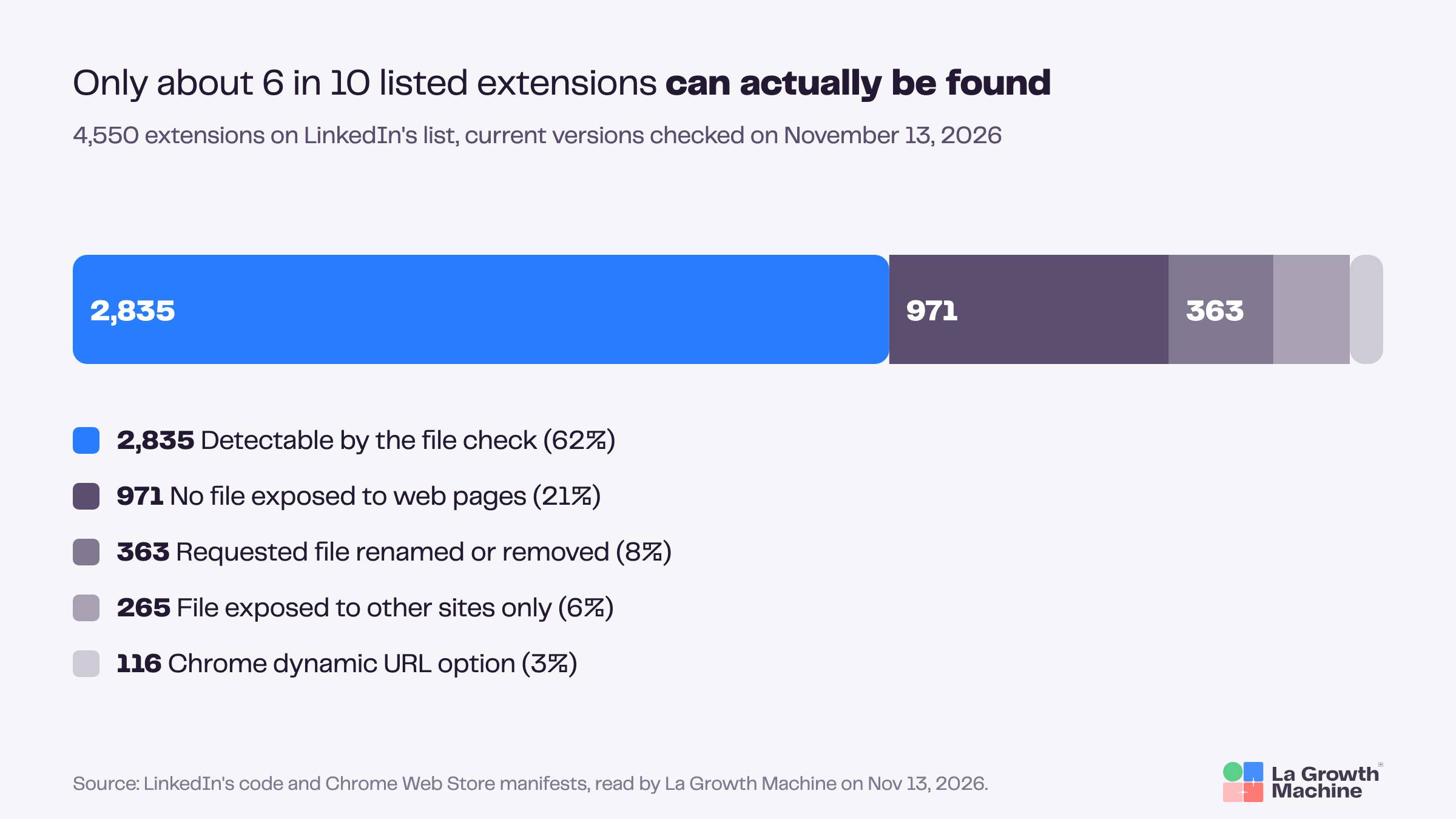
This matches what a Fortra security researcher estimated from a sample in April 2026, when he told SecurityWeek that only about 2,000 of the 6,000+ extensions listed then were detectable. Two caveats keep our number honest. People don’t always run the latest version of an extension, so some older installs may still answer. And the page scan described above can still spot an extension that adds its own elements to LinkedIn pages, even when the file check fails.
It also looks like a moving target on both sides. Between a copy of the list published on GitHub on April 16, 2026 and our file of November 13, 2026, LinkedIn changed the requested file for 125 extensions. Meanwhile, some vendors now ship file names with random prefixes that change from one version to the next.
How many extensions LinkedIn looks for, and how fast the list moves
On November 13, 2026, LinkedIn’s code looked for 4,934 Chrome extensions. Counts published at other dates differ, up and then down.
| Date | Source | Extension IDs listed |
|---|---|---|
| 2025 | An earlier version of LinkedIn’s script, per BleepingComputer | about 2,000 |
| September 2, 2025 | Public GitHub gist (user jeremy-hyde) | 1,854 |
| February 2026 | Copy of LinkedIn’s file published on GitHub (Ambushfall/detect-linkedin) | 6,153 |
| April 3, 2026 | BleepingComputer’s own test | 6,236 |
| April 16, 2026 | Copy of the list published on GitHub (appleflyerv3/LinkedIn-Extensions) | 4,278 |
| November 13, 2026 | LinkedIn’s file, downloaded by La Growth Machine | 4,934 |
These counts come from different people and methods, so read them as a trend. The churn behind it is clear, though. Of the 6,153 extensions in the February 2026 file, 2,544 were gone from the list on November 13. Between April 16 and November 13, 181 left and 837 came in. And 827 of the November IDs appear in neither the February file nor the April list.
Some IDs also outlive their extensions: 374 of the 4,934 no longer had a Chrome Web Store page on November 13, 2026, which usually means the extension was removed or replaced under a new ID.
What’s on the list, by category
Most of the extensions LinkedIn looks for aren’t sales tools. Job search and recruiting tools form the largest identifiable group, followed by writing assistants. About 860 are sales and data tools.
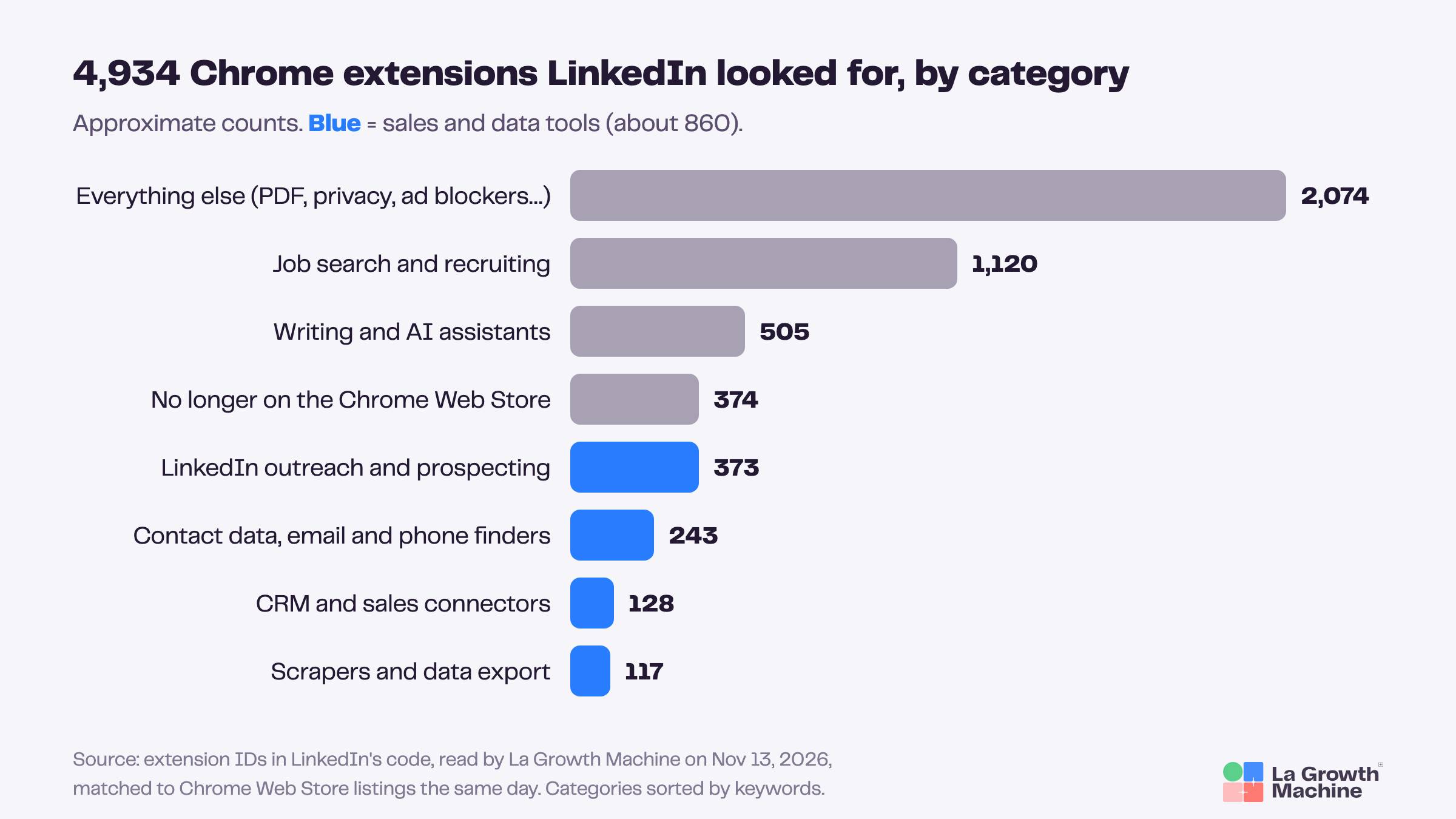
| Category (approximate) | Extensions | Examples, with users shown on the Chrome Web Store on November 13, 2026 |
|---|---|---|
| Job search and recruiting | ~1,120 | Simplify Copilot (500,000), Teal (200,000), Careerflow (200,000) |
| Writing and AI assistants | ~505 | Grammarly (40,000,000), DeepL (4,000,000), LanguageTool (2,000,000) |
| LinkedIn outreach and prospecting | ~373 | PhantomBuster (200,000), lemlist (80,000), Octopus CRM (70,000) |
| Contact data, email and phone finders | ~243 | Apollo.io (1,000,000), Lusha (400,000), ZoomInfo (300,000) |
| CRM and sales connectors | ~128 | Streak (700,000), Salesforce (400,000), HubSpot Social (20,000) |
| Scrapers and data export | ~117 | Bardeen (200,000), Thunderbit (100,000) |
| Everything else: PDF, privacy, ad blockers, productivity | ~2,074 | Adobe Acrobat (352,000,000), Malwarebytes Browser Guard (12,000,000), Loom (8,000,000) |
| No longer on the Chrome Web Store | 374 | Removed or renamed |
We sorted extensions by keywords in their store name and description, then reviewed samples by hand. Some could fit two groups, so treat the counts as orders of magnitude.
A few patterns stand out, all as of November 13, 2026:
- It’s a long tail. 1,395 of the 4,560 extensions still on the store showed fewer than 10 users, and 352 showed none. LinkedIn isn’t only watching the big tools.
- It isn’t a ban list. Adobe Acrobat and Grammarly, two of the most installed extensions in the world, are on it.
- AI is everywhere. 1,513 of the 4,560 present themselves as AI tools. Among them, about 140 write LinkedIn comments and about 150 write LinkedIn posts, with some doing both.
- Most of them work on LinkedIn. Of the 4,550 extensions whose manifest we read, 3,122 (69%) ask to run on linkedin.com specifically, and 4,131 (91%) on linkedin.com or on every site. 901 (20%) ask for access to cookies.
- Many are no longer maintained. 1,738 (38%) hadn’t been updated in more than a year.
The sales and data tools on the list
These are the best-known sales extensions in LinkedIn’s file on November 13, 2026. Being on the list says nothing about the quality of these products, and many sales teams use them every day.
| Tool | Extension ID | Users (Chrome Web Store, Nov 13, 2026) | File LinkedIn requests | File check works with the Nov 13 version |
|---|---|---|---|---|
| Apollo.io | alhgpfoeiimagjlnfekdhkjlkiomcapa | 1,000,000 | panel.html | No |
| Lusha | mcebeofpilippmndlpcghpmghcljajna | 400,000 | frame.html | Yes |
| SignalHire | aeidadjdhppdffggfgjpanbafaedankd | 400,000 | inject.js | No |
| Salesforce | jjghhkepijgakdammjldcbnjehfkfmha | 400,000 | salesforce/onboarding.html | No |
| ZoomInfo | fofjcndophjadilglgimelemjkjblgpf | 300,000 | index.html | Yes |
| RocketReach | oiecklaabeielolbliiddlbokpfnmhba | 300,000 | ui/content-script/index.js | No |
| PhantomBuster | mdlnjfcpdiaclglfbdkbleiamdafilil | 200,000 | assets/buster-icon-16.png | No |
| Kaspr | kkfgenjfpmoegefcckjklfjieepogfhg | 100,000 | assets/images/arrow.svg | Yes |
| lemlist | khnbclggeggefodgimdekejhipkeobnc | 80,000 | src/app-iframe-2.html | No |
| Octopus CRM | afahlliooeebnifondmbhcaghcapepbm | 70,000 | assets/logo.png | No |
| Dux-Soup (Legacy) | ppdakpfeaodfophjplfdedpcodkdkbal | 50,000 | fetchforwarder.js | Yes |
| Cognism (2 extensions) | idfblidcbbfkggckamnibfbngnbgjocf, pjbinjkigjcgibbafakmahamfggifapk | 30,000 and 6,000 | index.html | Yes |
| HubSpot Social | edkibgpollgbhnjalcdlpmbjmdgohjko | 20,000 | css/content-injected.css | Yes |
“No” means the version on the Chrome Web Store on November 13, 2026 doesn’t expose the requested file to linkedin.com. An older version installed on a rep’s computer may still answer, and the page scan can still spot an extension that adds its own elements to LinkedIn pages.
What LinkedIn says about it
LinkedIn doesn’t deny the check. Its official account wrote on April 2, 2026 that it looks for extensions “that scrape data without members’ consent or otherwise violate LinkedIn’s Terms of Service”. It adds that it doesn’t use this data to infer sensitive information about members, and that its Privacy Policy covers it: the policy mentions collecting information about your “web browser and add-ons”.
The rule behind the check is in LinkedIn’s User Agreement (version of November 3, 2025, section 8.2). Members agree not to use software, including “browser plugins and add-ons”, to scrape or copy LinkedIn’s data, nor bots or other unauthorized automated methods to add contacts, send messages or engage with posts. LinkedIn’s help page on prohibited software says that using such tools can lead to a restricted or closed account.
The most precise statement on restrictions comes from a court file. In a sworn statement dated February 6, 2026 and filed by LinkedIn in a German case, a LinkedIn engineering manager wrote that its blocking models act on detected automation and scraping behavior, and “do not take the use of any particular browser extension(s) into account”. As of November 13, 2026, we found no verified public case of a restriction notice citing an installed extension as the reason.
Where the legal debate stands
Fairlinked e.V. argues the check needs users’ consent under EU privacy law; LinkedIn answers that extensions openly expose these files to every website. As of November 13, 2026, no court has ruled on the practice itself: two US class actions were dismissed on September 8, 2026 for lack of standing, and the only German case, brought by the LinkedIn tool vendor Teamfluence, is about suspended accounts. We found no decision by a data protection authority or the European Commission. Worth knowing: Fairlinked’s president, Steven Morell, also runs Teamfluence, as Ars Technica reported; Teamfluence says the association is a separate organization.
What it changes for a sales team: extensions or cloud tools
Sales tools work with LinkedIn in one of two ways. Some run inside the rep’s browser through an extension, which LinkedIn’s code can see if the extension is on its list and still exposes the file, or if it adds its own elements to LinkedIn pages. Others run on the vendor’s servers from a connected account, which leaves nothing in the browser for this code to find.
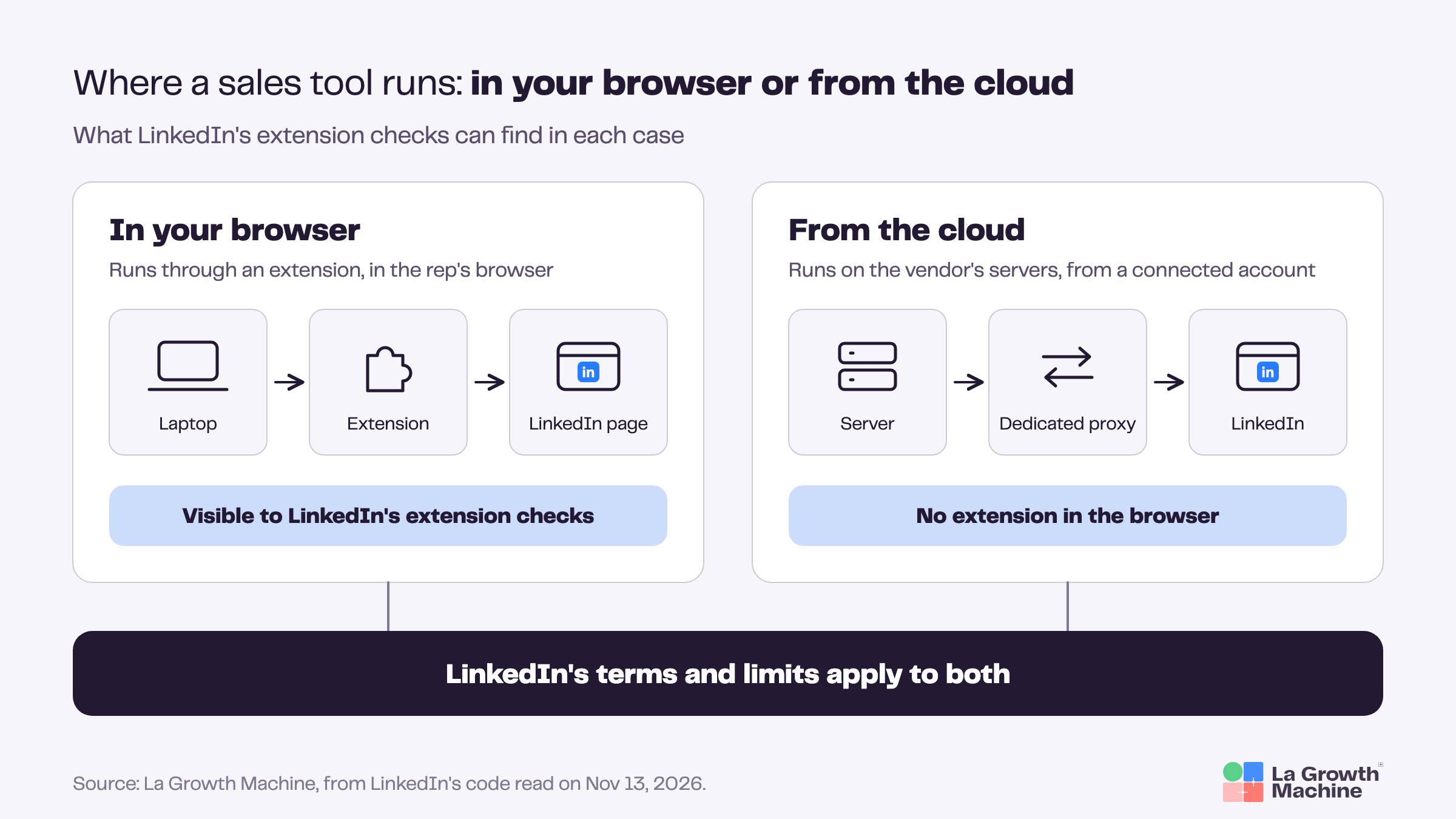
| Runs in the browser (extension) | Runs from the cloud | |
|---|---|---|
| Where LinkedIn actions happen | In the rep’s browser session | On the vendor’s servers, from the connected account |
| What LinkedIn’s extension checks can see | The extension, if it answers the file check or adds elements to the page | No extension to find |
| What LinkedIn still sees | The account’s activity and pace | The account’s activity and pace |
| What to ask the vendor | Do LinkedIn actions need the extension to run? | Where do actions come from (IP, proxy), and what limits apply per account? |
Neither model is risk-free, and a vendor that promises zero risk on LinkedIn is promising something it doesn’t control. An extension is one more signal LinkedIn can collect, while restrictions, by LinkedIn’s own account, follow behavior. So the most useful questions to a vendor are where its LinkedIn actions run and how they’re paced.
Some tools say plainly that they rely on the browser. lemlist’s help center, for example, states that its LinkedIn actions depend on “the correct browser session (cookies + the Chrome extension)” (article dated August 3, 2026).
A checklist for whoever owns the sales stack
If you’re in RevOps or SalesOps, this is a one-hour audit:
- List the extensions your reps actually run. Each rep can open
chrome://extensions. If you manage Chrome for the company, your admin console can list installed extensions across the team. - Check each ID against LinkedIn’s list. The ID is on each extension’s card in
chrome://extensions(with Developer mode on) and at the end of its Chrome Web Store URL. - Separate tools that read from tools that act. An email finder that reads a profile and a tool that sends invitations or messages don’t raise the same question.
- Ask the vendors of tools that act where their LinkedIn actions run, in the browser or from the cloud, and which limits apply per account.
- Re-check on a schedule. Hundreds of entries changed between April and November 2026. A quarterly check is a reasonable minimum.
Where La Growth Machine stands
La Growth Machine runs LinkedIn actions from the cloud, not through an extension. We also publish a small Chrome extension for importing profiles. It wasn’t on LinkedIn’s list on November 13, 2026, and it exposes no file to web pages, so the file check couldn’t find it even if it were added.
In La Growth Machine, each LinkedIn account you connect is an identity. Each identity gets a dedicated proxy, its own daily limits and its own sending hours, and if LinkedIn restricts an account, LGM automatically slows that identity down for 24 hours. None of this makes an account untouchable, because LinkedIn’s terms and limits apply to everyone. It does mean pacing is set per identity and visible in one place, which is where LinkedIn says its decisions are made. How we approach LinkedIn account safety explains the mechanism in more detail.
About our own extension, since you’d be right to ask: “La Growth Machine (Beta)” (ID bkegamhigcifephajnenpcadhkgihogj) was published on April 22, 2026. It imports LinkedIn profiles into LGM, opens in Chrome’s side panel, and doesn’t send invitations or messages. It doesn’t add any of its own elements to LinkedIn pages either, so LinkedIn’s page scan has nothing to pick up. It wasn’t in LinkedIn’s file on November 13, 2026, nor in the September 2025, February 2026 and April 2026 copies. Because the list moves, we re-check it and will update this page if that changes.
Teams that already use a contact data provider or a CRM don’t have to drop it to work this way: LGM imports leads from Clay, your CRM or a CSV file and runs the LinkedIn and email side from there.
Is your extension on the list?
Type an extension’s ID, its name or its Chrome Web Store link. The checker reads the latest list we published, so its answer stays current each time we re-check LinkedIn’s code, and it shows the date of that check.
Is your extension on LinkedIn’s list?
Paste a Chrome extension ID, its Chrome Web Store link, or type its name.
The full dataset is open on GitHub: linkedin-extension-watch, with every extension ID, the file LinkedIn requests, store data and our detectability check, under a CC BY 4.0 license. Feel free to reuse it with a link back.
To check by hand, open chrome://extensions, turn on Developer mode, and copy the ID shown on the extension's card. It's the same 32-letter string you see at the end of the extension's Chrome Web Store URL. Search for that ID rather than the name: some IDs on the list belong to extensions that no longer have a store page, so there's no name to search for.
How we built this data
- The list. On November 13, 2026, we downloaded the JavaScript file linkedin.com loads to run the check (
static.licdn.com/aero-v1/sc/h/7tp80l6fkzdh33znzfl0w5xuc, 2.7 MB, archived with its SHA-256 fingerprint) and extracted its 4,934 pairs of extension ID and requested file. The same file contains the reporting (AedEvent) and page-scan (SpectroscopyEvent) functions described above. - The store data. The same day, we read each extension's Chrome Web Store page: name, description, category, users, rating, last update, publisher. 4,560 had a page, 374 didn't.
- The manifests. The same day, we read the
manifest.jsonof the current version of 4,550 of those extensions, directly from Google's update server, to see which files they expose and to which sites. We didn't download or run the extensions themselves. - The categories. Keyword sorting on store names and descriptions, reviewed on random samples. Approximate by design.
- The open data. The resulting dataset and the scripts we used are on GitHub (linkedin-extension-watch), with a dated folder for each check.
- The comparisons. A public GitHub gist dated September 2, 2025, a copy of LinkedIn's file from February 2026 and a copy of the list dated April 16, 2026, both published on GitHub, and BleepingComputer's test of April 3, 2026.
FAQ
Does LinkedIn detect Chrome extensions?
Yes. LinkedIn's website checks whether specific Chrome extensions are installed by requesting a file each one exposes to web pages; if the file loads, the extension is there. LinkedIn confirmed the practice on April 2, 2026. On November 13, 2026, the file linkedin.com loads for this check listed 4,934 extensions, and the code reports the ones it finds to LinkedIn through a tracking event.
Can LinkedIn see every extension on its list?
No. On November 13, 2026, only 2,835 of the 4,550 listed extensions we could check (62%) still exposed the requested file to linkedin.com in their current version. The others had renamed the file, exposed nothing, restricted it to other sites, or used Chrome's dynamic URL option. A separate page scan can still spot extensions that add their own elements to LinkedIn pages.
Which sales extensions does LinkedIn look for?
On November 13, 2026, the list included about 860 sales and data tools, among them Apollo.io, Lusha, ZoomInfo, RocketReach, SignalHire, Kaspr, Cognism, PhantomBuster, lemlist, Octopus CRM, Dux-Soup (Legacy), Salesforce and HubSpot Social. With their versions of that day, the file check worked for Lusha, ZoomInfo, Kaspr, Cognism, Dux-Soup and HubSpot Social, not for the others.
Will LinkedIn restrict my account if it detects an extension?
Not for the extension alone, according to LinkedIn. In a sworn statement filed in a German court case (February 6, 2026), a LinkedIn engineering manager wrote that its blocking models act on automation and scraping behavior and don't take any particular extension into account. LinkedIn's help pages still say that using prohibited software can lead to a restriction. We found no verified public case of a restriction citing an installed extension.
Does LinkedIn detect extensions in Edge, Brave or Firefox?
LinkedIn's code runs the check when the browser's user agent contains "Chrome", which is also the case for Microsoft Edge, Brave and Opera, all built on Chromium. We found no source reporting it in Firefox or Safari as of November 13, 2026. Firefox gives each installed extension a random internal address, which makes this kind of check much harder to run.
Are cloud-based LinkedIn tools detected?
The extension checks look for files and addresses inside your browser. A tool that runs LinkedIn actions from its own servers, without an extension, leaves nothing there for them to find. That doesn't make it invisible to LinkedIn: by LinkedIn's own account, restrictions follow the account's behavior, and its limits and terms apply whatever tool you use. Ask any vendor where its LinkedIn actions run and how they're paced.
What is BrowserGate?
BrowserGate is the name Fairlinked e.V., a German association, gave to its report on LinkedIn's extension check, published in March and April 2026. It argues the check breaks EU privacy law; LinkedIn rejects the claims. Two US class actions based on it were dismissed in September 2026 for lack of standing, without a ruling on the practice itself. Fairlinked's president also runs Teamfluence, a LinkedIn tool vendor.
Is the La Growth Machine extension on LinkedIn's list?
No. "La Growth Machine (Beta)", ID bkegamhigcifephajnenpcadhkgihogj, wasn't in LinkedIn's file on November 13, 2026, nor in the earlier public copies. It exposes no file to web pages, so the file check couldn't find it even if it were added. It imports LinkedIn profiles into La Growth Machine and sends no invitations or messages; LGM's LinkedIn actions run from the cloud.
The short version
LinkedIn's code looks for thousands of Chrome extensions and reports the ones it finds. On November 13, 2026, its list held 4,934 IDs, about 860 of them sales and data tools, but only about 6 in 10 of the extensions we could check still answered the way LinkedIn expects. Being on the list isn't a verdict on a tool, and LinkedIn says its restrictions follow behavior. For the person who owns a sales stack, the useful questions are simple: what do our reps have installed, which of those tools act on LinkedIn, and do they act from the browser or from the cloud, at what pace?