
TL;DR
– An MCP server exposes tools, resources and prompts to an AI app through the Model Context Protocol, the open standard Anthropic released in November 2024.
– The problem it solves is integration math: each client and server implements MCP once, so you go from N×M custom integrations to N+M.
– The architecture is host → client → server; one host can connect to many servers at once, installed via a JSON config (Claude Code/Desktop) or the Customize panel (Claude.ai/Cowork).
– La Growth Machine ships an official MCP server so you can run multichannel outreach and read pipeline metrics straight from Claude.
Most chatbots can talk. The thing that lets one actually reach into your database, your repo, or your CRM and do something is an MCP server. It’s the connective layer between an AI model and the systems you already use.
An MCP server is a program that exposes tools, data, and prompts to an AI application through the Model Context Protocol (MCP), an open standard introduced by Anthropic in November 2024. OpenAI and Google DeepMind have since adopted it, which is why it’s becoming the default way to plug context into an LLM. This guide covers what an MCP server is, the problem it solves, how the architecture works, how to install one, and a real example of running outreach through the La Growth Machine MCP server.
The problem MCP servers solve: N×M becomes N+M
Before MCP, every AI app that wanted to talk to every tool needed its own custom integration. With N AI applications and M tools, you were looking at N×M integrations to build and maintain. That doesn’t scale. It’s the reason “connect your AI to your stack” stayed painful for years.
MCP collapses this. Each client implements the protocol once, each server implements it once, and they interoperate. You go from N×M to N+M. Build a GitHub MCP server once, and every MCP-compatible assistant can use it. Build an assistant that speaks MCP once, and it can reach every MCP server in existence.
| Approach | Integrations needed | Maintenance |
|---|---|---|
| Custom one-off integrations | N × M | Every pair breaks independently |
| Model Context Protocol | N + M | Each side implements the standard once |
This is the single most important reason MCP servers exist.
MCP architecture: host, client, server
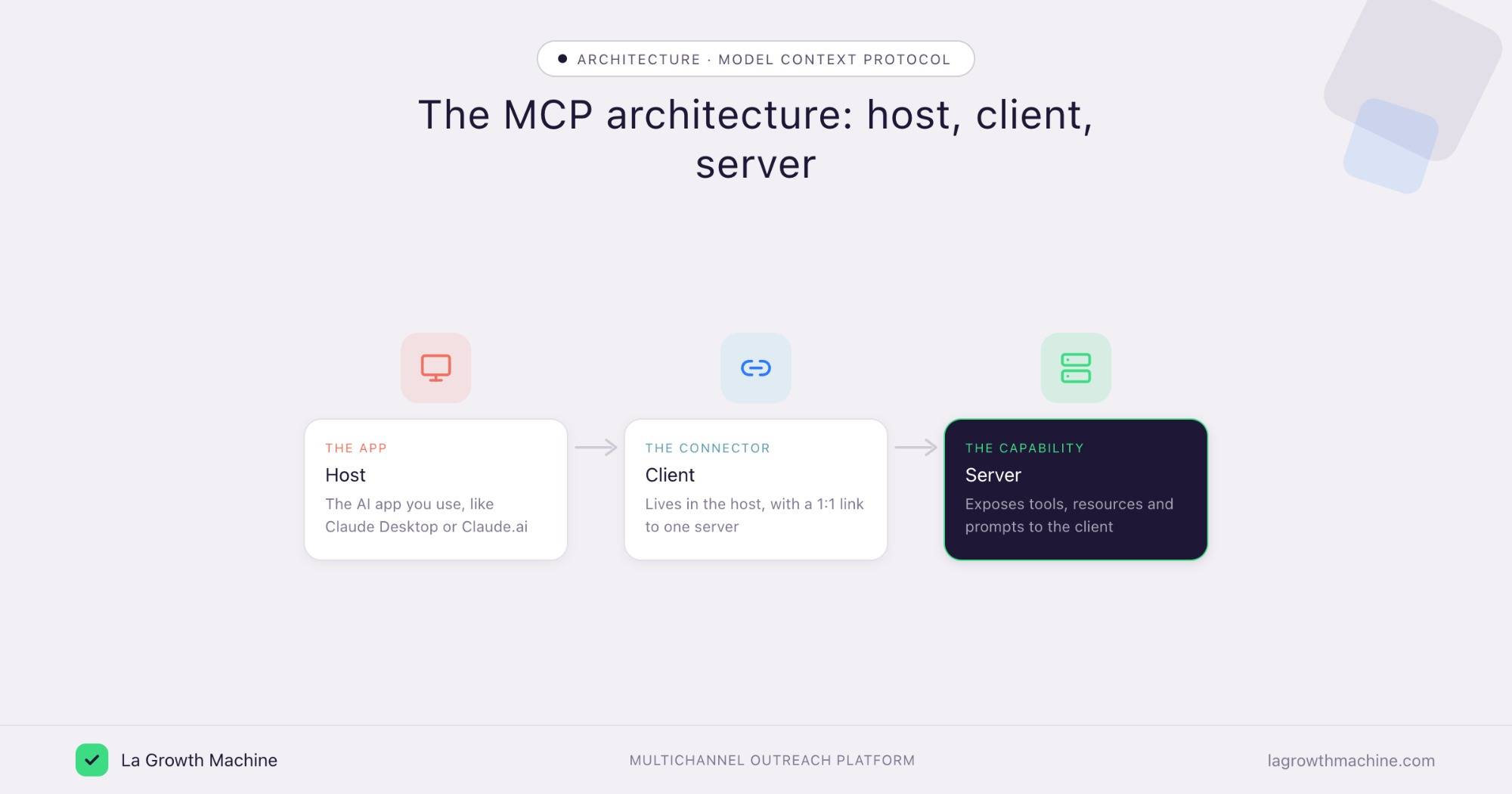
MCP uses a client-server architecture with three roles:
- Host: the AI application the user interacts with (Claude Desktop, Claude Code, Cursor, a custom agent). The host manages one or more clients.
- Client: lives inside the host and keeps a dedicated 1:1 connection to a single MCP server.
- Server: the external program that exposes capabilities (tools, resources, prompts) to the client.
A single host can run many clients at once, each connected to a different server. That’s how one assistant can reach your file system, your CRM, and your outreach platform at the same time: three servers, three clients, one host.
The three building blocks of an MCP server
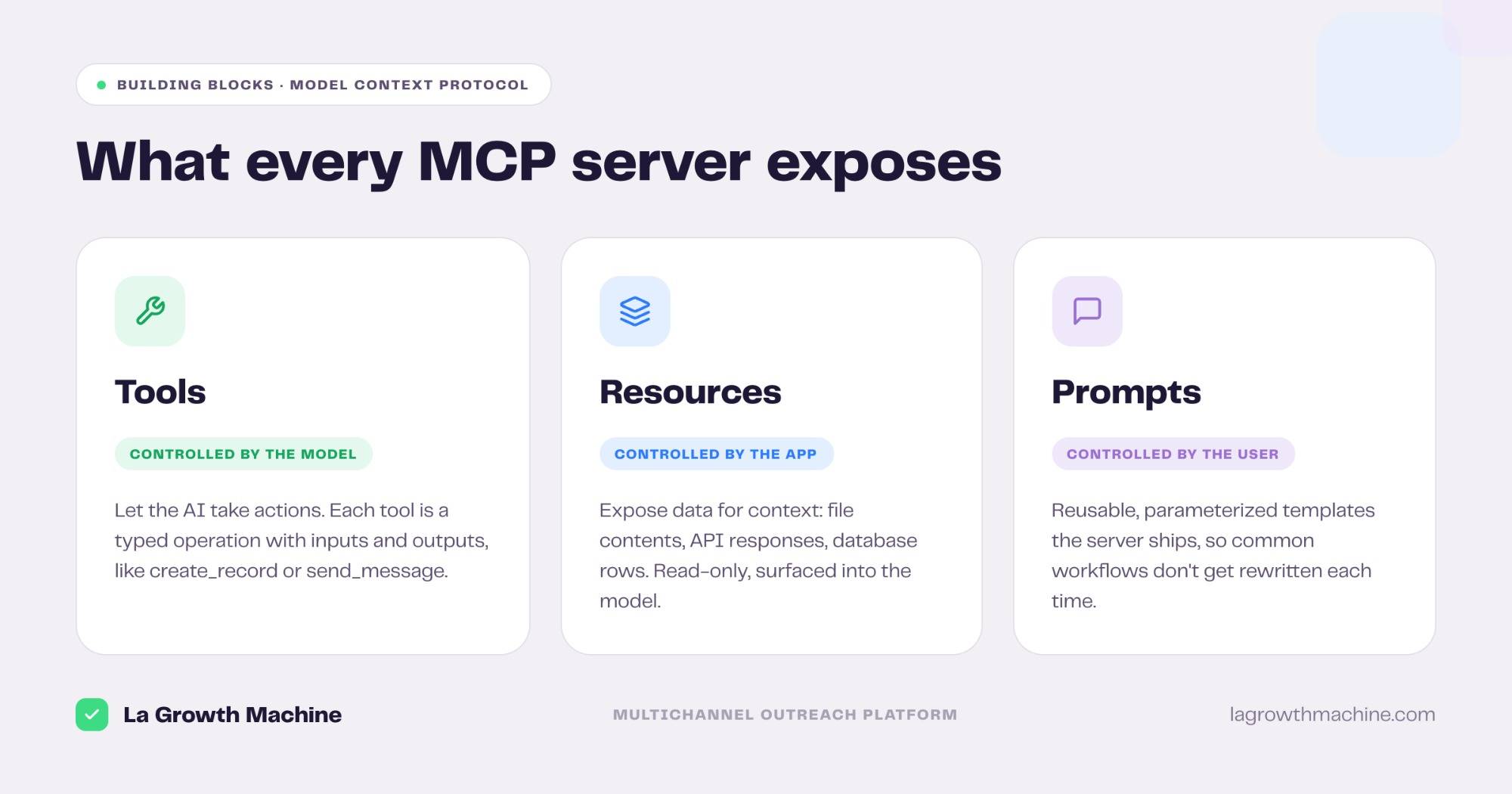
Every MCP server exposes its capabilities through three standardized primitives. Knowing these three is enough to read any MCP server’s documentation.
1. Tools
Tools let the AI perform actions. Each tool defines a specific operation with typed inputs and outputs, like create_record, send_message, or run_query. Tools are model-controlled: the assistant decides when to call one based on the task.
2. Resources
Resources expose data for context: the contents of files, API responses, database rows, anything the model needs to understand the situation. Resources are read-only context, not actions. The application decides how to surface them to the model.
3. Prompts
Prompts are reusable, parameterized templates the server author ships to standardize common workflows. They let a server say “here’s the recommended way to use me,” so users don’t reinvent the prompt each time.
| Primitive | Purpose | Controlled by |
|---|---|---|
| Tools | Take actions | The model |
| Resources | Provide context and data | The application |
| Prompts | Reusable templates | The user |
How an MCP server actually works
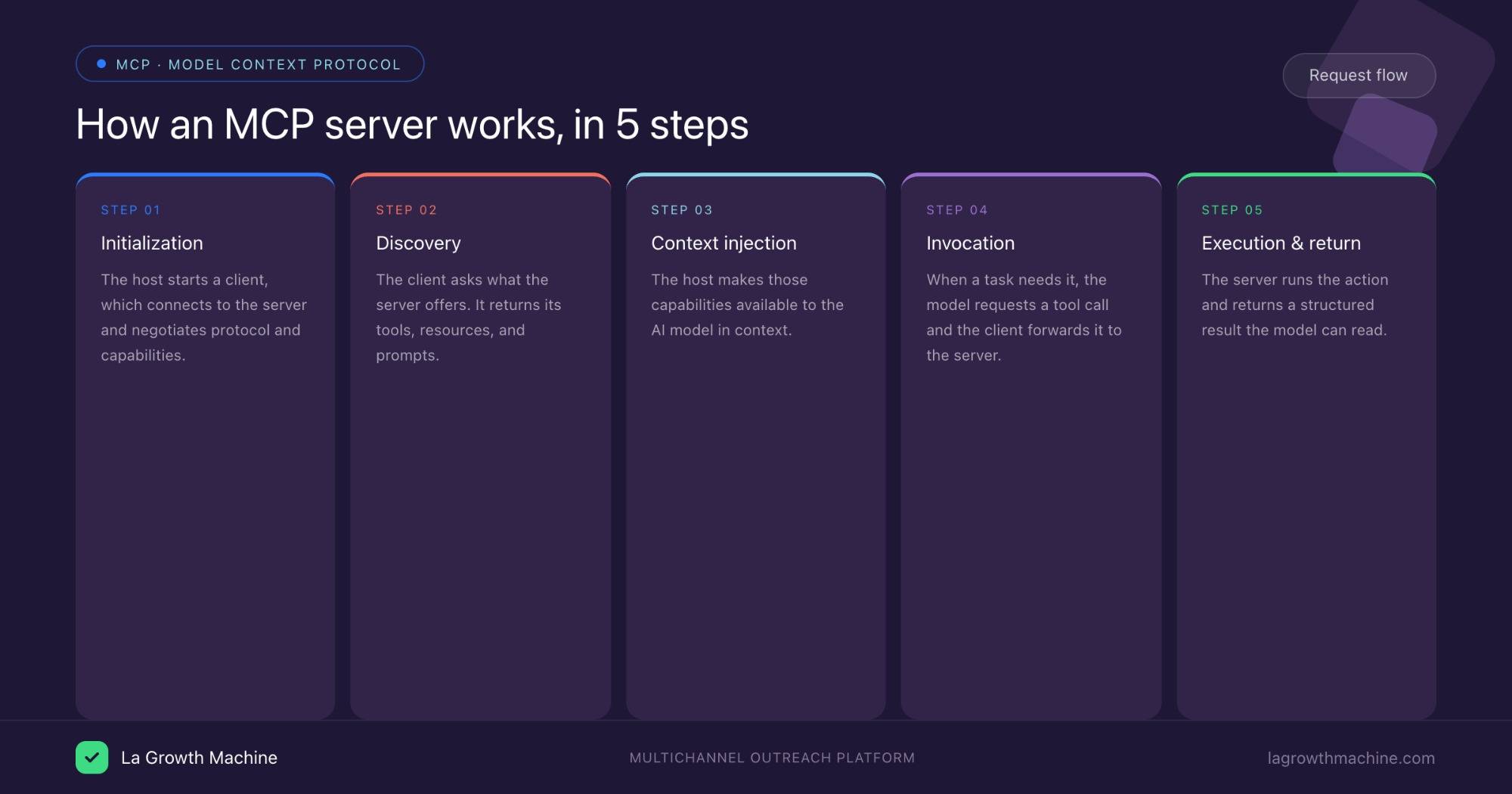
Here’s what happens, step by step, when an assistant uses an MCP server:
- Initialization: the host launches a client, which connects to the server and negotiates protocol versions and capabilities.
- Discovery: the client asks the server what it offers. The server returns its list of tools, resources, and prompts.
- Context injection: the host makes those capabilities available to the model.
- Invocation: when the task calls for it, the model requests a specific tool call. The client forwards it to the server.
- Execution and return: the server runs the operation against the underlying system, then returns a structured result the model can read.
The model gets the right data, or takes the right action, at the right moment. This is also why MCP servers measurably reduce hallucinations. The model stops guessing and starts pulling from the source of truth.
Transports: how the client and server talk
MCP servers run over two main transport mechanisms:
- stdio (standard input/output): the server runs as a local process on the same machine as the host. Fast and simple, and the common choice for local tools like a file system server.
- Streamable HTTP: the server runs remotely and communicates over HTTP. This is how hosted, cloud-based MCP servers (like a SaaS provider’s official server) connect.
You’ll pick stdio for something running on your laptop and HTTP for a remote service you authenticate into.
Types of MCP servers, with real examples
MCP servers fall into a few practical categories. Common ones include:
- File system servers: read and write local documents.
- Database servers: run queries against Postgres, SQLite, and others.
- Developer servers: GitHub for code and issues, Sentry for errors. La Growth Machine’s own gtm-system repo is a public example of GTM tooling built around this approach.
- Productivity servers: Slack for messages, Google Drive for files, calendars for scheduling.
- Cloud platform servers: Azure, Supabase, and similar, for managing infrastructure.
- GTM and sales servers: outreach platforms exposing campaign and conversation capabilities (more on that below).
Public directories like the official modelcontextprotocol/servers GitHub repo and community catalogs list hundreds of ready-to-use servers.
How to install an MCP server
There are two ways to add an MCP server, depending on which Claude you’re using.
Method 1: Config file (Claude Code and Claude Desktop)
For local and developer setups, you add the server in a JSON config file. A Claude Desktop or Cursor entry for a local (stdio) server looks like this:
{
  "mcpServers": {
    "filesystem": {
      "command": "npx",
      "args": ["-y", "@modelcontextprotocol/server-filesystem", "/path/to/dir"]
    }
  }
}
In Claude Code you can add a remote server straight from the terminal with a single command. To connect the La Growth Machine MCP, for example:
claude mcp add --transport http lgm https://mcp.lagrowthmachine.com/mcpRestart the host, and the server’s tools show up.
Method 2: Customize (Claude.ai and Claude Cowork)
If you use Claude in the browser or in Claude Cowork, you don’t touch any files. You add the server through the Customize settings, where connectors live. Open Customize, add the connector with its URL plus authentication, and approve it. This is the path for hosted, remote MCP servers, and it’s how you connect the La Growth Machine MCP server (https://mcp.lagrowthmachine.com/mcp) in a couple of clicks.
Whichever method you use, the steps are the same in spirit:
- Pick a host that supports MCP (Claude Code, Claude Desktop, Claude.ai, Claude Cowork, Cursor).
- Choose a server: official, third-party, or one you build.
- Connect it: config file for local servers, Customize connectors for remote ones.
- Authenticate with OAuth or an API key for remote servers.
- Test with a prompt that triggers one of the server’s tools.
Security: what to check before you trust a server
An MCP server can read data and take actions on your behalf, so treat it like any third-party integration:
- Permissions: grant a server only the scope it needs. A file system server pointed at your whole home directory is broader than it needs to be.
- Source trust: prefer official servers from the vendor or the well-maintained community repos. Inspect the code of anything unofficial before running it.
- Action confirmation: for servers that write (send messages, modify records), make sure the host asks for confirmation before destructive operations.
- Credential handling: remote servers should use scoped tokens (OAuth), not your raw password.
MCP is useful precisely because servers can act, which is exactly why scoping and trust matter.
A concrete use case: running outreach through the La Growth Machine MCP server
Definitions are useful, but here’s what an MCP server unlocks day to day for a GTM or sales team.
La Growth Machine is an outreach platform that connects multichannel campaign execution to proven revenue impact, and it ships an MCP server. Connect it to your AI assistant, and the contact and post-contact layer of your stack becomes something you can drive in natural language, right next to the rest of your work. It’s a practical way to bring AI into your prospecting without bolting on yet another disconnected tool.
Instead of switching tabs, a Growth Engineer or RevOps lead can ask their assistant to:
- Pull live campaign performance: “show me reply and meeting-booked rates for the Q2 campaign,” surfaced straight into the conversation as MCP resources.
- Triage the inbox: “list the conversations waiting on a reply,” then draft responses in context.
- Build an audience from a LinkedIn or Sales Navigator search, as a tool call.
- Tie outreach back to pipeline: read the numbers that actually matter, like pipeline generated and meetings booked, rather than vanity counts.
Because it speaks MCP, the La Growth Machine server sits alongside the rest of your stack, your CRM server, your database server, inside one assistant. No bespoke integration, no N×M problem. It’s the difference between reading about your outreach and operating it from the same place you do everything else.
Beyond the MCP server, La Growth Machine also ships Claude Skills, packaged workflows that teach Claude to run specific GTM tasks end to end. Skills and MCP servers complement each other: the server gives Claude the connection to your data and actions, while a skill gives it the playbook for what to do with them.
MCP server vs. API vs. plugin: clearing up the confusion
A frequent question: isn’t this just an API? Not quite.
- API: a way for software to talk to software. Powerful, but every AI app still has to integrate each API manually, with its own auth and data shapes. That’s the N×M problem again.
- Plugin: usually tied to one specific platform or model. Build a ChatGPT plugin and it works in ChatGPT, not in Cursor.
- MCP server: a standardized wrapper, often sitting on top of an existing API, that any MCP-compatible host can use. Write it once, use it everywhere.
Think of MCP as the USB-C port for AI applications: one standard connector instead of a drawer full of proprietary cables.
Frequently asked questions
Is MCP only for Claude? No. MCP is an open standard. Anthropic created it, but OpenAI and Google DeepMind have adopted it, and any host can implement it.
Do I need to be a developer to use an MCP server? To use an existing server, mostly no. Adding a connector in Customize, or a few lines to a config file, is enough. To build a new server, yes, you’ll write code (SDKs exist for Python, TypeScript, and more).
What’s the difference between an MCP client and an MCP server? The server provides capabilities (tools, resources, prompts). The client, inside your AI app, consumes them. One client connects to one server.
Are MCP servers safe? They can be, with the right scoping. Because servers can take real actions, only run trusted servers, grant minimal permissions, and require confirmation for write operations.
Can one AI assistant use multiple MCP servers at once? Yes. A host runs one client per server, so a single assistant can reach your files, your CRM, and your outreach platform at the same time.
What can an MCP server actually do? Anything its underlying system allows and its author exposes: query data, read and write files, manage code, schedule events, run an outreach campaign, surfaced through tools, resources, and prompts.