
TL;DR
– Salesforce officially supports MCP since 2025, a developer DX MCP Server and hosted MCP servers for AI assistants
– It lets an AI run SOQL queries, read and update records, and run actions in natural language, under your org permissions
– Connect via hosted servers (add as a Claude connector) or the local DX server (sf org login web)
– Pair it with the La Growth Machine MCP to run the full GTM loop: source accounts, launch outreach, log pipeline back
Salesforce officially supports the Model Context Protocol (MCP). Since June 2025, Salesforce has shipped MCP servers that let an AI assistant like Claude securely read and act on your CRM in natural language:
- run SOQL queries
- inspect object schemas
- read and update records
- execute actions
Without writing code or clicking through the UI. There are two flavors, a developer-focused DX MCP Server and hosted MCP servers for AI assistants.
This guide covers what the Salesforce MCP server does, the two server options, how to connect it (with video walkthroughs) and a concrete GTM example, pairing the Salesforce MCP with the La Growth Machine MCP to run the full outreach loop from one assistant.
New to the protocol? Start with what an MCP server is
What is the Salesforce MCP server
The Salesforce MCP server is Salesforce’s official implementation of the Model Context Protocol, the open standard that lets AI applications interact with external systems. It exposes your Salesforce org to an MCP-compatible assistant as a set of typed tools, so the AI can query and change CRM data on your behalf, with your org’s permissions and security intact.
Salesforce announced MCP support across its platform in 2025 and it’s part of a broader Salesforce and Anthropic partnership that brings trusted business context and AI actions to Claude.
It works with Claude, ChatGPT (OpenAI), and any other assistant or LLM that supports the Model Context Protocol.
What the Salesforce MCP server lets you do
The server turns your CRM into something an assistant can read and operate. In practice:
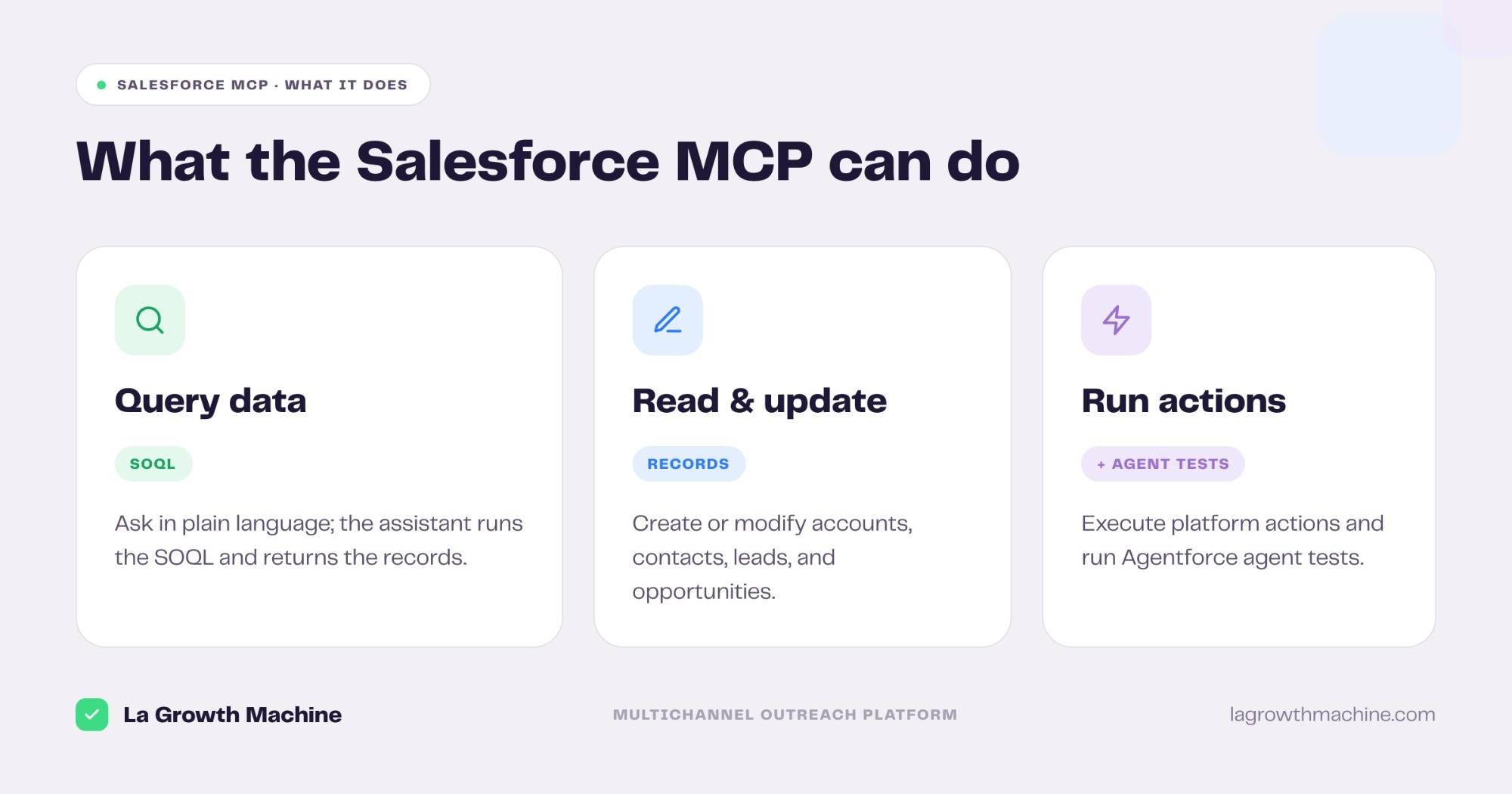
- Query data with SOQL — “list our open opportunities over $50k closing this quarter” and the assistant runs the query and returns the records.
- Read and update records — create or modify contacts, accounts, leads, and opportunities from a prompt.
- Inspect object schemas — “what fields are required to create an account?” so the AI understands your org before it writes.
- Retrieve filtered data — pull high-revenue accounts, recent leads, or deals by stage.
- Run actions and agent tests — execute platform actions and, with the DX server, run Agentforce agent tests.
Everything runs under your org’s existing permissions, so the assistant can’t do what the connected user couldn’t.
The two Salesforce MCP servers
Salesforce offers two options depending on who’s connecting.
Salesforce DX MCP Server (for developers).
The open-source salesforcecli/mcp server runs locally and is built for developers working across orgs: query data, run agent tests, and issue commands in natural language. You authorize one or more orgs and select which tool groups to expose with a
--toolsets flag
Salesforce Hosted MCP Servers (for AI assistants)
Hosted by Salesforce, these let an AI assistant securely access your org data and handle daily business tasks, inspecting schemas and running complex queries, with no local setup. They’re available in every Developer Edition org, and there’s an official guide to connect Claude to them.
How to connect the Salesforce MCP server
The path depends on which server you use.
Hosted (recommended for assistants)
Enable the hosted MCP servers in your Salesforce org, then connect your AI host to them following Salesforce’s “Connect Claude with Salesforce Hosted MCP Servers” guide. In Claude.ai or Claude Cowork, you add it as a connector in the Customize panel and authenticate; no Docker or CLI.
Local DX server (for developers)
Authorize your org and run the server with the toolsets you need:
# Authorize your org once
sf org login web --alias my-org

# Run the DX MCP server with selected toolsets
npx -y @salesforce/mcp --orgs my-org --toolsets data,metadata,testing
Then point your MCP host (Claude Code, Cursor, the Agentforce Vibes IDE) at it. Scope the org and toolsets to only what the assistant needs.
Two short walkthroughs make the setup concrete:
A GTM use case: Salesforce MCP + La Growth Machine
The Salesforce MCP shines when you pair it with an outreach layer. Salesforce is your system of record. It isn’t built to run multichannel campaigns.
La Growth Machine is an outreach platform that connects multichannel campaign execution to proven revenue impact and it ships its own MCP server.
Connect both to the same assistant and the whole GTM loop runs from one conversation.
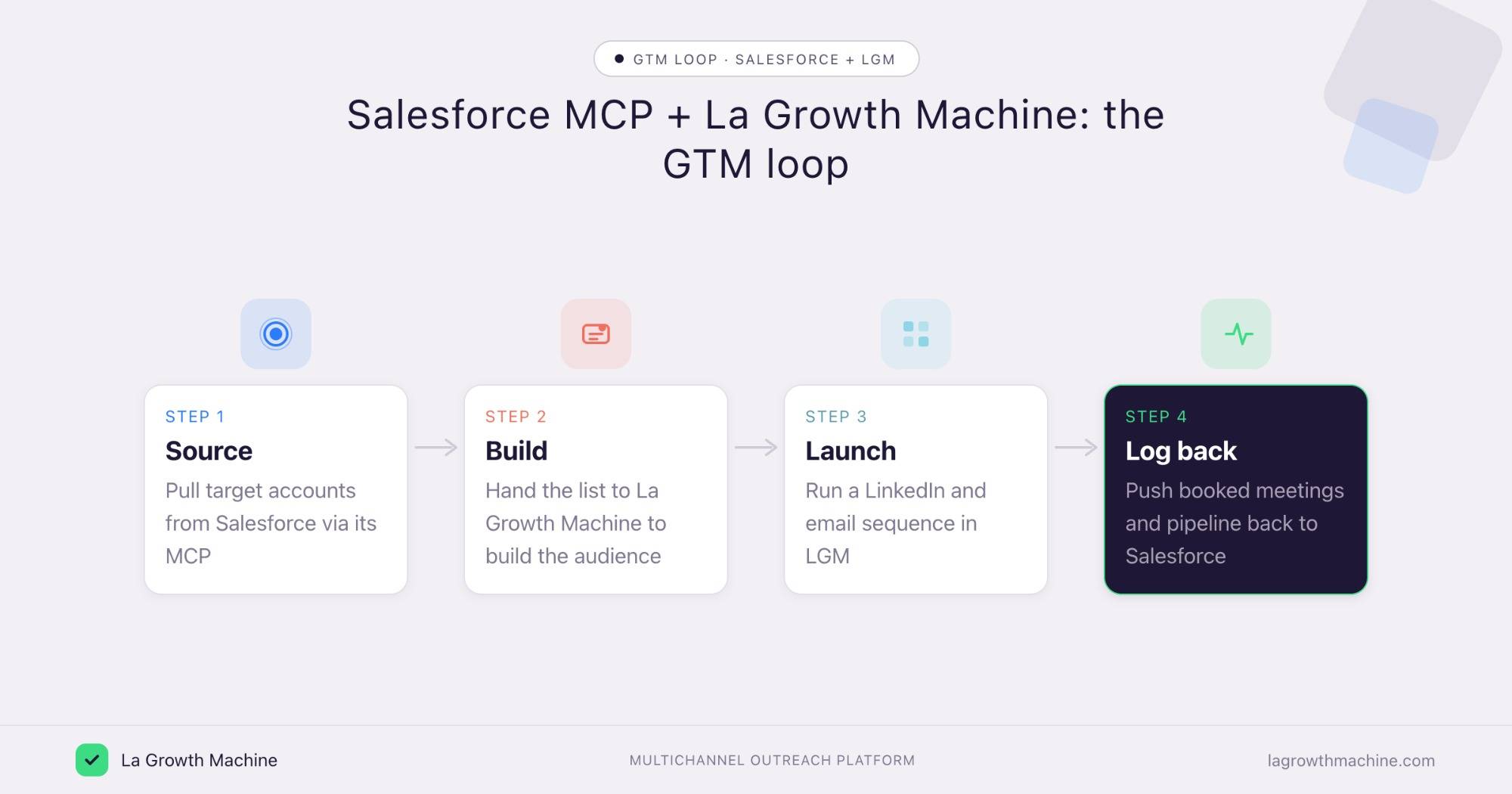
Here’s the loop a RevOps or GTM engineer can run:
- Source from Salesforce – “pull accounts in the SaaS segment with no activity in 60 days” via the Salesforce MCP.
- Build the audience and launch – hand that list to the La Growth Machine MCP to build an audience and launch a LinkedIn plus email sequence.
- Handle replies – triage and draft responses to the leads who answer, in the same assistant.
- Log back to Salesforce – push booked meetings and reply status back into the CRM and read pipeline generated against the original accounts.
⚠️ One point to be precise about
La Growth Machine doesn’t ship a native Salesforce integration (yet). You connect the two through an automation layer, Zapier, n8n, Make or any workflow tool, which takes minutes to wire up (see the La Growth Machine integrations).
The MCP servers handle on-demand orchestration from your assistant, while that automation layer keeps Salesforce and La Growth Machine in continuous sync.
The two MCP servers are complementary, not competing.
- Salesforce owns the record
- La Growth Machine owns the outreach execution
Your assistant orchestrates between them. No CSV exports, no tab-switching.
Tips and security
The Salesforce MCP can read and change CRM data, so scope it carefully.
- Connect a least-privilege user. The assistant inherits that user’s permissions; give it only what the task needs.
- Enable only the toolsets you need. On the DX server, the
--toolsetsflag controls which tool groups are exposed. - Confirm before writes. Let the assistant query freely, but require confirmation before it creates or updates records.
- Prefer hosted for non-developers. It avoids local credentials and is easier to revoke.
Frequently asked questions
Does Salesforce officially support MCP? Yes. Salesforce announced MCP support across its platform in 2025 and ships an official DX MCP Server (salesforcecli/mcp) plus hosted MCP servers, alongside a partnership with Anthropic.
What can the Salesforce MCP server do? It lets an AI assistant run SOQL queries, read and update records, inspect object schemas, retrieve filtered data, and run actions, all under your org’s permissions.
How do I connect the Salesforce MCP to Claude? Use the hosted MCP servers and add them as a connector in Claude’s Customize panel (see Salesforce’s connect-Claude guide), or run the local DX server with sf org login web and point Claude Code at it.
Is the Salesforce MCP server free? The DX MCP Server is open-source, and hosted MCP servers are available in every Developer Edition org. Production use follows your Salesforce edition and limits.
Can I use Salesforce and La Growth Machine MCP together? Yes, and it’s the point. Salesforce holds the data, La Growth Machine runs the outreach, and one assistant orchestrates the loop: source accounts, launch campaigns, and log pipeline back.
Does La Growth Machine integrate natively with Salesforce? Not natively. You connect the two through an automation tool, Zapier, n8n, Make, or any similar workflow tool (see the La Growth Machine integrations), and both expose MCP servers your assistant can orchestrate together.