

TL;DR
– Single-channel outreach underperforms in 2026 because inbox saturation and LinkedIn noise reduce reply rates — coordinated multichannel sequences consistently generate more pipeline.
– A proper setup requires 5 steps: waterfall enrichment to unlock every channel per prospect, a deliberate channel sequence (LinkedIn-first, email as fallback), channel-specific messaging, conditional logic with 2-3 day delays, and a unified inbox with CRM sync.
– Ready-to-use templates cover LinkedIn-first (Day 1-11), email-first for non-LinkedIn audiences, and a full multichannel sequence for high-value accounts combining LinkedIn, email, and voice messages.
– La Growth Machine handles the entire setup natively: visual sequence builder with conditional branching, waterfall enrichment, multichannel inbox, and native HubSpot/Salesforce/Pipedrive sync — starting at €60/month per identity.
Single-channel outreach is running out of steam. Cold email inboxes are saturated, LinkedIn connection request rates keep dropping, and the average B2B decision-maker gets hit from every direction. If you send emails alone, you compete with hundreds of other sequences. If you only use LinkedIn, your messages get buried in a notification feed no one reads carefully anymore.
The teams booking the most meetings in 2026 are not sending more messages. They are running coordinated, channel-diverse sequences where every touchpoint is deliberate, every fallback is automatic, and no prospect slips through because of a single non-reply. The setup matters just as much as the messaging. A well-written message in the wrong sequence, at the wrong time, on the wrong channel, does not convert.
This guide walks you through the full multichannel outreach setup: the mechanics behind why it works, the five steps to build your first sequence, ready-to-use templates, and how La Growth Machine makes the entire workflow run without manual intervention.
Why multichannel gets more replies
The performance gap between single-channel and multichannel outreach is not a mystery. It comes down to three mechanics that work together.
Multiple touchpoints build familiarity. The first time a prospect sees your name, they do not know you. The second time, they recognize you. By the third or fourth touchpoint across different contexts, you feel familiar. That familiarity lowers the friction to reply. You are no longer a cold stranger; you are someone they have seen a few times across channels. This is not manipulation. It is how trust works in any professional context.
Channel diversity reaches prospects where they actually respond. Some people live in their email inbox. Others only check LinkedIn during commute hours. A senior VP of Sales might ignore cold emails but reply instantly to a thoughtful LinkedIn voice message. You cannot know in advance which channel will land. Multichannel removes that bottleneck by covering the surfaces your prospect actually uses.
Conditional logic ensures no prospect falls through. The real power of multichannel is not just using more channels. It is using them intelligently. When someone accepts your LinkedIn connection but does not reply, your sequence should skip the generic email intro and move directly to a follow-up that acknowledges the connection. When someone opens your email three times but never responds, that is a warm signal that should trigger a different channel, not a fourth identical email. Conditional branching turns a sequence from a broadcast into a conversation.
Together, these three mechanics explain why coordinated multichannel sequences consistently outperform single-channel approaches in both reply rates and pipeline generated.
The 5-step multichannel outreach setup
Step 1: Build your prospect list and enrich it
A multichannel sequence only performs as well as the data it runs on. If you have a LinkedIn URL but no verified email and no phone number, you can only reach that prospect on one channel. Waterfall enrichment solves this.
The waterfall logic works in order of confidence: start with the LinkedIn URL, use it to find a verified professional email, then look for a phone number for high-value accounts where voice outreach makes sense. La Growth Machine’s waterfall enrichment automates this entire flow, so you start every sequence with complete prospect data.
Tools like Clay let you build waterfall enrichment workflows visually, pulling from multiple data providers in sequence until you get a verified result. You define the fallback chain: try Provider A for the email, if not found try Provider B, if still not found flag the lead for manual review. This approach maximizes your enrichment coverage without paying for duplicates or low-quality data.
For your ICP (Ideal Customer Profile), aim to enrich at minimum: LinkedIn profile URL, professional email, first name, last name, company name, and job title. For accounts you are prioritizing, add phone number and recent LinkedIn activity data.
The better your enrichment, the more channels you can activate per prospect, and the more conditional logic you can apply in your sequence.
Step 2: Design your channel sequence
With enriched data in hand, you design the order in which your channels fire. The most effective approach in 2026 for most B2B audiences is LinkedIn-first, with email as the fallback and voice messages reserved for warm or high-value prospects.
LinkedIn-first works because it creates a visible, low-friction entry point. A profile visit followed by a connection request is a human signal, not a marketing blast. It gives the prospect a chance to check who you are before any message arrives. When you then follow up with a LinkedIn message after the connection is accepted, you are already a known entity in their feed.
Email becomes the fallback when LinkedIn has not generated a reply after two touchpoints. At this stage, email allows more context and a slightly longer message. It reaches prospects who are email-first responders and re-engages those who saw your LinkedIn activity but did not act on it.
Voice messages are powerful specifically for warm signals: a prospect who accepted your connection, engaged with your content, or visited your profile more than once. A short, conversational voice message on LinkedIn triggers a different psychological response than text. It feels personal, not automated, and stands out in a feed full of text.
The key rule for channel sequence design: each channel should feel like a natural next step, not a new campaign starting from scratch.
Step 3: Write channel-specific messaging
The biggest mistake in multichannel outreach is writing one message and adapting it slightly for each channel. Channel-specific messaging means writing for how people actually read and respond on each surface.
LinkedIn messages should be shorter and more direct. The mobile notification preview shows roughly 80 characters before cutting off. Your opening line needs to create enough curiosity or relevance to make someone tap through. Avoid long intros about your company. Get to the value exchange in the first sentence. For connection request notes, keep it under 200 characters and focus on a shared context or specific reason for connecting.
Email allows more context. A prospect who opens your email has already decided to read it. You can afford a slightly longer message: a relevant observation about their business, a specific pain point you have noticed in their industry, and a clear ask. Still keep it under 150 words for the first email. Save the case studies and social proof for follow-ups after engagement signals.
Voice messages work best when they sound genuinely human. Do not script them word for word. Use a few bullet points as a guide and record in a conversational tone. Reference something specific: their recent post, a company milestone, a shared connection. Keep it under 45 seconds. End with a clear, low-friction call to action, such as asking if it makes sense to connect for a quick call rather than asking for 30 minutes in their calendar.
Step 4: Set delays and conditional logic
Delays and conditions are what separate a smart sequence from a batch-and-blast campaign. Getting this right is the operational core of your multichannel setup.
Delay rules that work: Wait 2 to 3 business days between touchpoints on the same channel. Give prospects time to see and process your message before following up. Shorter delays feel pushy and correlate with higher unsubscribe rates. Longer delays lose momentum and reduce familiarity.
Conditional logic you should always build in:
- If LinkedIn connection request accepted and message sent: skip the “intro” email and jump to a follow-up that references the LinkedIn conversation.
- If email opened 2 or more times with no reply: switch to LinkedIn instead of sending a third email. High open frequency with no reply usually means interest but hesitation, not disinterest.
- If no reply after 2 follow-ups on a channel: switch channels rather than continuing on the same one.
- If reply received at any point: stop the sequence immediately and route to your unified inbox for manual handling.
Conditional logic is not about overwhelming prospects with messages from every direction simultaneously. It is about making the right decision at each node based on what the prospect has actually done. When built correctly, it feels respectful rather than aggressive.
Step 5: Manage replies in a unified inbox and sync to CRM
Multichannel outreach generates replies across multiple channels at the same time. Without a unified inbox, you end up context-switching between LinkedIn, email clients, and other tools to manage conversations. At scale, you miss replies, slow response times, and lose deals that were already warmed up.
A unified multichannel inbox aggregates all incoming messages from every channel into a single view. You see the full conversation history, the channel it came from, and the sequence context, all in one place. This is not just a convenience feature. It directly affects revenue because faster, context-aware replies at the moment of interest convert at significantly higher rates than delayed follow-ups.
CRM sync closes the loop. Every reply, every conversation thread, and every lead status change should flow automatically into your CRM without manual data entry. Whether you use HubSpot, Salesforce, or Pipedrive, the integration should be bidirectional: sequences personalized by CRM data, and conversions tracked back to revenue.
Multichannel sequence templates that work in 2026
Template 1: LinkedIn-first (standard B2B)
This template works for most B2B audiences where prospects have an active LinkedIn presence.
| Day | Action | Channel |
|---|---|---|
| Day 1 | Profile visit | |
| Day 2 | Connection request (with or without note) | |
| Day 5 | Follow-up message (if connected, no reply) | |
| Day 8 | First email (if no LinkedIn reply) | |
| Day 11 | Follow-up email |
Conditional rule: if the prospect accepts the connection and replies at Day 5, remove from sequence and route to inbox. If they accept but do not reply, skip the generic email intro and reference the LinkedIn connection in the Day 8 email.
Template 2: Email-first for non-LinkedIn audiences
Some audiences, particularly in finance, operations, or technical roles, are email-first respondents. For these segments, leading with email outperforms LinkedIn.
| Day | Action | Channel |
|---|---|---|
| Day 1 | First email | |
| Day 4 | Follow-up email (same thread) | |
| Day 7 | LinkedIn connection request | |
| Day 10 | LinkedIn message (if connected) |
Conditional rule: if no email reply after Day 4 but the prospect opens 2 or more times, add a LinkedIn voice message at Day 10 instead of a standard LinkedIn text message.
Template 3: Full multichannel for high-value accounts
For strategic accounts or high-value prospects where pipeline impact justifies more touchpoints, this full multichannel prospecting campaign combines LinkedIn, email, and voice messages.
| Day | Action | Channel |
|---|---|---|
| Day 1 | Profile visit | |
| Day 2 | Connection request | |
| Day 4 | First LinkedIn message (if connected) | |
| Day 7 | First email (if no LinkedIn reply) | |
| Day 9 | LinkedIn voice message (if no email reply) | |
| Day 12 | Follow-up email | |
| Day 15 | Final LinkedIn message |
Conditional rules: if connected and replied at any point, stop and route to inbox. If no reply after Day 15, mark as no response and move to a nurture flow rather than continuing direct outreach.
How La Growth Machine makes this setup easy
Building a multichannel sequence from scratch can get complex fast, especially when you factor in conditional logic, channel-specific timing, and CRM synchronization. La Growth Machine was built specifically to make this setup accessible without sacrificing the sophistication that drives results.
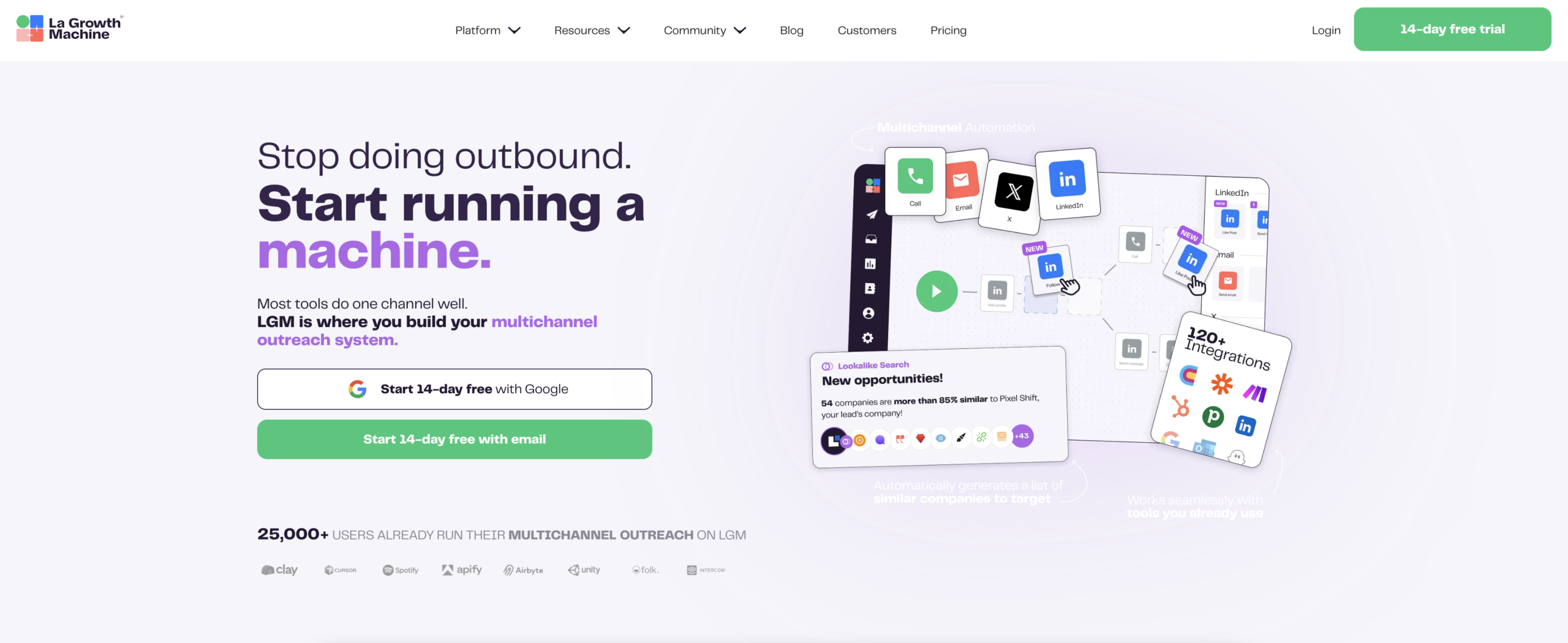
Visual sequence builder. La Growth Machine gives you a drag-and-drop sequence builder to build LinkedIn, email, and voice message sequences with conditional branching built in. You define the logic visually: if/then conditions at each node, delays between steps, channel fallbacks. No code required, but with the flexibility to create sequences as complex as your workflow demands.
Waterfall enrichment. When you import a prospect list, La Growth Machine’s enrichment engine finds professional emails and phone numbers automatically, using a waterfall approach to maximize coverage. You go from a LinkedIn URL or a basic contact record to a fully enriched profile ready for multichannel outreach in minutes.
Unified inbox. Every reply from every channel (LinkedIn, email, and voice messages) lands in a single inbox inside La Growth Machine. You see full conversation context, the sequence history, and can respond directly from the platform. No context switching, no missed messages.
Native CRM sync. La Growth Machine connects natively with HubSpot, Salesforce, and Pipedrive. Sequence activity syncs to your CRM automatically, and CRM data feeds back into your sequences for personalization. The integration is bidirectional and built for teams who need reliable data flow, not just a basic Zapier connection.
Social Warming. La Growth Machine’s Social Warming feature keeps your LinkedIn account active and within LinkedIn’s usage patterns, reducing the risk of restrictions when running outbound sequences at scale. This is the kind of infrastructure detail that matters when you are running multiple identities or scaling volume.
La Growth Machine is available from €60 per month per identity on the Basic plan, €120 per month per identity on the Pro plan, and €180 per month per identity on the Ultimate plan (annual billing). You can start a 14-day free trial without a credit card.
FAQ
How many touchpoints does a multichannel sequence need?
For most B2B audiences, 5 to 7 touchpoints across 2 to 3 channels is the right range. Fewer than 5 touchpoints means you give up too early before familiarity builds. More than 8 to 10 touchpoints without a reply usually signals a wrong ICP or a messaging problem, not a volume problem. Focus on quality of touchpoints and smart conditional logic over raw quantity.
What is the best channel order for outreach?
For most B2B audiences in 2026, LinkedIn first, then email as the fallback is the strongest default setup. LinkedIn creates a human, visible entry point. Email reaches prospects who are inbox-first responders. Voice messages work well as a third channel for warm or high-value accounts. If your target audience is less active on LinkedIn (finance, technical ops roles), flip to email-first and use LinkedIn as the third channel.
How long should I wait between follow-ups?
2 to 3 business days between touchpoints on the same channel is the proven range for most B2B sequences. It gives prospects time to see your message without losing momentum. For cross-channel switches, 1 to 2 days is acceptable because you are reaching out on a different surface, not repeating the same action. Always adjust based on your audience’s typical response behavior: enterprise buyers often need longer delays, high-velocity SMB sequences can run tighter.
Does multichannel outreach work for all industries?
Multichannel outreach works best for B2B audiences where decision-makers are reachable across LinkedIn and email. It is most effective for software, SaaS, business services, and financial services targeting professional audiences. Industries with heavy compliance requirements (banking, healthcare) or where decision-makers are not on LinkedIn (trades, construction, some manufacturing segments) may see lower results from LinkedIn-heavy sequences and need to adjust their channel mix.
What tool should I use for multichannel outreach?
The right tool depends on your setup complexity and stack. For teams that need a visual sequence builder, waterfall enrichment, unified inbox, and native CRM integration in one platform, La Growth Machine is purpose-built for this use case. It handles the operational complexity of multichannel sequences without requiring you to stitch together multiple tools. You can connect it with Clay for enrichment workflows and HubSpot, Salesforce, or Pipedrive for CRM sync.
Start running structured multichannel outreach
The gap between teams generating consistent pipeline from outreach and those struggling with single-digit reply rates usually comes down to setup. Single-channel outreach with no conditional logic and no unified reply management is not a messaging problem. It is an infrastructure problem.
A proper multichannel outreach setup gives you waterfall enrichment, channel-diverse sequences, conditional branching that adapts to prospect behavior, and a reply management workflow that keeps conversations moving from first touch to booked meeting.
La Growth Machine gives you all of this in one platform, with a visual builder that makes it fast to build and easy to iterate. Start your 14-day free trial today and run your first multichannel sequence before the week is out.