



How to Make Your Automated LinkedIn Outreach Feel Human
All you need
Summary of what you'll do
Duplicate campaign in5steps!
Write your value-first opener
The secret to effective LinkedIn outreach isn't just the tool you use - it's also how you write. Most LinkedIn messages fail because they sound like marketing emails, not human conversations.
Here's how to write messages that get responses:
- Keep sentences under 15 words: Short, punchy sentences are easier to read
- Think conversational: Write like you're messaging a colleague or a peer, not sending a formal email
- End with engagement: Always finish with a question or clear next step
Why this works: It leads with genuine congratulations, acknowledges a real challenge they likely face, and ends with a question that gets them talking about their problems, not your solution (yet).

Create your industry insight follow-up
When prospects don't respond to your first message, your follow-up needs to bring fresh value, not repeat the same pitch.
Best practices for follow-up messages:
- Reference industry trends: Show you understand their market challenges
- Contrast approaches: Highlight what's working vs. what's outdated
- Stay curious: Ask about their current approach, don't assume
Why this works: It positions you as an industry expert, creates curiosity about better approaches, and invites them to share their current results without being pushy.
Write your problem-solution bridge message
Your third message should acknowledge the core problem they're likely facing and hint at your solution without being salesy.
Problem-solution bridge principles:
- Name the pain point: Be specific about what's not working
- Tease the solution: Mention you've solved this without revealing everything
- Offer value: Suggest sharing insights, not booking a demo
Note: These are template structures you can customize for your industry, product, and target audience. Replace the bracketed placeholders with your specific value propositions and pain points.
To make it easier, you can directly duplicate the campaign in LGM and adapt the messaging.
Set up Real Chat Mode in your La Growth Machine sequence
Now that we have written your messages, it’s time to enable Real Chat Mode in your sequence:
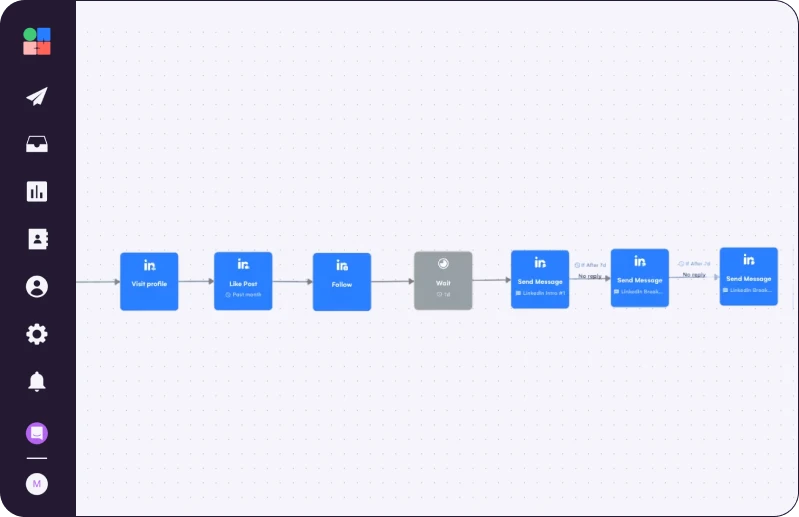
- Add a LinkedIn "Send Message" step
- Write your message using the conversational structure from previous steps
- Toggle on Real Chat Mode in the message composer
- Preview the split - LGM shows you exactly how your message will appear as multiple bubbles
Pro tips for setup:
The system automatically splits at strong punctuation marks (., ?, !) and line breaks. You'll get up to 6 sub-messages sent 1 second apart.
What you'll see in the preview: Your message transforms from one long block of text into a natural conversation flow that looks like someone typing in real-time.
Duplicate Brice's campaign

Read Next


How to Build Your First Multichannel AI Sales Agent


Turn Cold Prospects into $3,000+ Clients

How to Become “Product of the Day” on Product Hunt