


Inbox Rotation for safer domains
Up to 10 inboxes per identity, one address per lead.
- Google, Outlook, SMTP
- SPF, DKIM, DMARC
10,000+ GTM teams run their outreach on La Growth Machine



 Use case€1.2Mqualified pipeline with multichannel outreach
 InvoxUse case€430kpipeline from one LinkedIn + email campaign
 Kodiak HubUse case$500kin pipeline generated with La Growth Machine
 Use case30 to 35%of pipeline now from outbound, up from ~10%
 Use case12%of replies converted
 UtilaUse case15%+reply rate across campaigns
How teams send from several mailboxes

Spread your sends across mailboxes

Three addresses for Sam, on two domains: hollowbrook.io and gethollowbrook.com.
Connect Google, Outlook or SMTP mailboxes to one identity, on one domain or several. La Growth Machine spreads your cold emails across them, so no single address carries all your volume.
task_altEach lead always hears from the same address, in the same thread.

Pick the mailboxes for each campaign
Campaign “Ops leaders Q4”: send from 3 of Sam’s 4 addresses.
In the Identity step of a campaign, select the addresses to use. Keep your main domain for your team’s day-to-day email, and let your outreach domains do the cold sending.

Every mailbox checked before you send
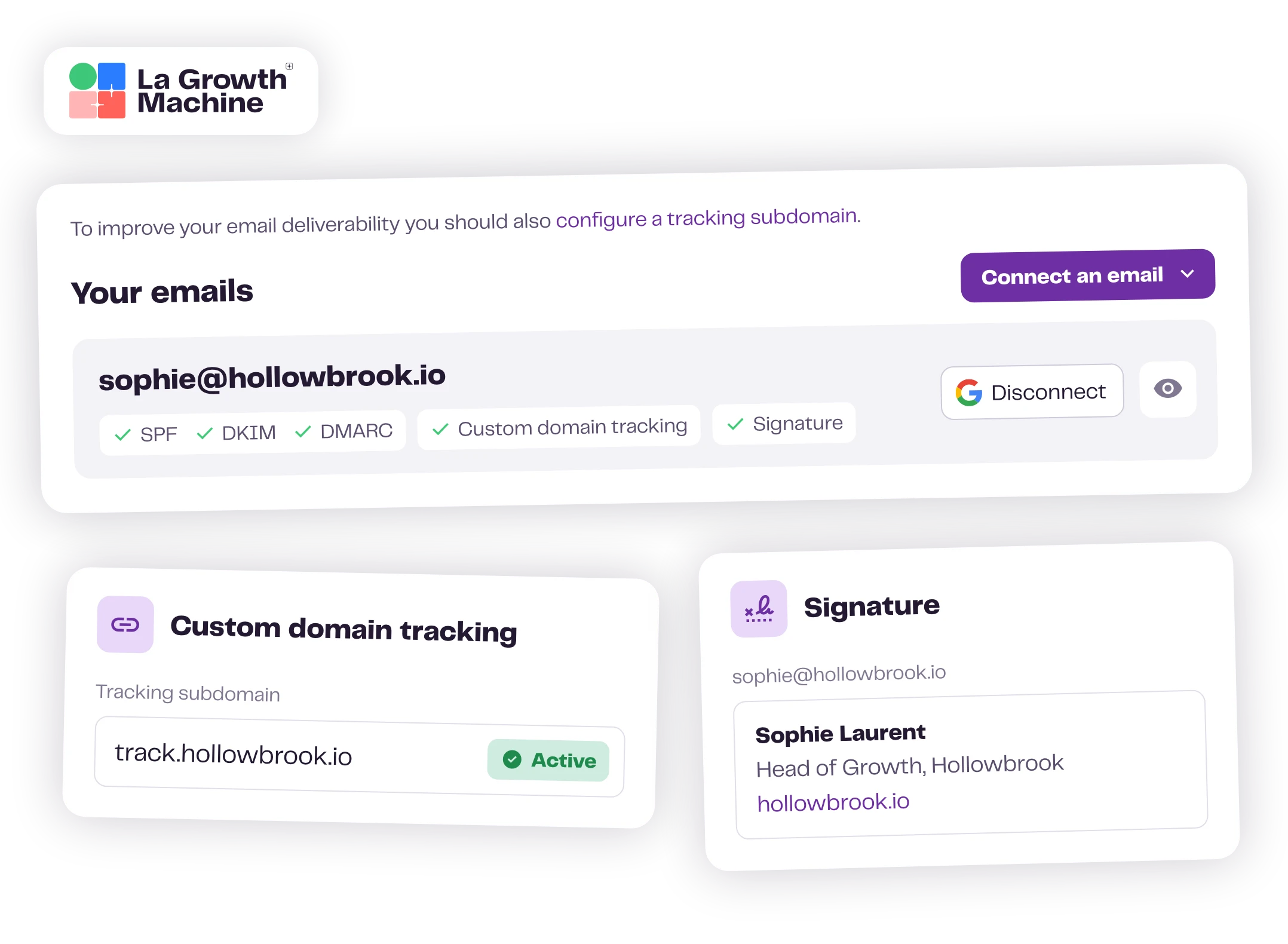
SPF, DKIM and DMARC: OK on all three addresses, tracking domain track.hollowbrook.io.
The email settings of each identity show the SPF, DKIM and DMARC status of every mailbox, so a setup error shows up before your campaign starts. Add your own tracking domain, and your reputation stays yours.

A bounce doesn’t end the conversation
If Bounced: send the lead a LinkedIn message instead.
Inbox Rotation runs inside your multichannel sequences. If an email bounces, only the email channel stops for that lead: your LinkedIn steps keep going, and an If Bounced condition can route the lead to a LinkedIn branch.
task_altLa Growth Machine never emails a bounced address again.
You set the pace
Your sends follow your limits and your hours, from verified addresses only.
- speedDaily limits for each sending address
- scheduleSends in your working hours
- verifiedOnly verified business emails
Everything Inbox Rotation takes care of
From the connection to the reply.
See all settings expand_more
mailMailboxes
- Google, Outlook or any provider over SMTP
- Mailboxes on one domain or several
- Up to 10 sending addresses per identity
- A signature for each mailbox, your Gmail signature synced every day
sync_altRotation
- Select the addresses to use in the Identity step of each campaign
- Sends spread across the selected addresses automatically
- Each lead always receives emails from the same address
- Follow-ups sent in the same email thread
verified_userChecks
- SPF, DKIM and DMARC status of every mailbox, in the email settings
- Your own tracking domain
- Turn off open tracking whenever you want
schedulePace
- Daily limits for each sending address
- Sends spaced out, only during your working hours
alt_routeBounces and data
- By default, La Growth Machine only emails verified business addresses
- La Growth Machine never emails a hard-bounced address again
- If Bounced condition to switch a lead to LinkedIn
forumReplies
- Every email reply in the multichannel inbox, next to the LinkedIn conversation
- Answer from the same address, in the same thread
Set up your rotation in a few clicks
Connect once, then choose per campaign.
Identities Email Settings Connect an email
Read the status next to each mailbox add your tracking domain
Select your email(s) launch

We've got you.
Your performance is our retention plan. Our team answers fast when you need help, and growing teams get their own Outreach Expert to review their campaigns and send a quarterly report with the actions that matter.
Talk to our teamMore mailboxes, healthier domains
Connect your mailboxes once, and pick them for each campaign.
Frequently asked questions
How many inboxes can I rotate? add
Up to 10 sending addresses per identity, on one domain or several. You choose the ones each campaign uses.
Will each lead get emails from different addresses? add
No. Each lead always receives emails from the same address, so your follow-ups stay in the same thread and the conversation reads naturally.
Which email providers work? add
Google, Outlook and any provider over SMTP. You can mix mailboxes on one domain or several under the same identity.
Should I send from my main domain? add
Keep your main domain for your team's everyday email, and send cold outreach from dedicated domains or subdomains with their own mailboxes. Connect them to one identity and pick them per campaign.
Does La Growth Machine warm up my new mailboxes? add
Warm up new mailboxes with the warm-up tool of your choice before you add them to a campaign. Once they send, La Growth Machine spaces your emails within your working hours and your daily limits.
How do I know my mailboxes are set up correctly? add
The email settings of each identity show the SPF, DKIM and DMARC status of every mailbox, before your campaign starts. You can also add your own tracking domain.
What happens when an email bounces? add
La Growth Machine never emails that address again. Only the email channel stops for that lead: LinkedIn steps keep going, and an If Bounced condition can send the lead down a LinkedIn branch.
Can I choose different mailboxes for different campaigns? add
Yes. In the Identity step of each campaign, select the addresses to use. One campaign can rotate across three mailboxes while another uses a single one.
How is this different from a cold email tool with inbox rotation? add
Here the rotation runs inside LinkedIn and email sequences: a bounce doesn't end the conversation, every reply lands in one inbox with the LinkedIn thread, and each lead keeps one address from the first email to the last.
Why rotate instead of sending everything from one mailbox? add
Email providers cap what one mailbox can send, and spam filters judge each sender on its own history. Spreading your sends keeps the pressure low on each address and keeps your main domain out of your cold outreach.