

TL;DR
Email prospecting is still king for B2B. To convert, emails need personalization, value, and a clear CTA. This guide offers 16 templates for various scenarios (first contact, follow-ups, etc.), explains the 7 key components of a good email (subject, hook, personalization, value prop, social proof, CTA, P.S.), and provides tips on deliverability, A/B testing, and automation tools like La Growth Machine. Key takeaway: personalized templates with dynamic variables are crucial for scaling outreach effectively.
Your prospect receives between 100 and 200 emails per day. Your outreach email has exactly 3 seconds to stand out before ending up in the trash or, worse, spam.
A well-crafted email can generate exceptional response rates. But most outreach emails are so generic that they kill any chance of conversion from the very first line.
In this article, you’ll discover 16 tested professional email examples for all your outreach scenarios: first contact, follow-ups, post-event, name-dropping, breakup emails… Everything is covered.
And most importantly, we’ll analyze why these email examples work so you can adapt them intelligently to your context.
Why Email Remains the King of B2B Prospecting
Despite the explosion of new channels (LinkedIn, X, TikTok for some…), email remains the cornerstone of B2B prospecting for one simple reason: it’s the most direct channel to your decision-maker.
- B2B buyers overwhelmingly prefer to be contacted by email rather than phone. It’s less intrusive, allows them to respond at their convenience, and leaves a written record of the exchange.
- Email also offers an unbeatable ROI compared to other acquisition channels. Why? Because it costs almost nothing to send, scales easily, and you can precisely track what works.
The key? Personalization. A generic email will have a near-zero response rate. But a well-targeted, personalized email that provides value from the first line? Your response rate can skyrocket.
Email vs. Other Channels: The Matchup
Why bet on email over phone or LinkedIn messages?
Advantages of Email:
- Less intrusive than a cold call that interrupts your prospect
- Scalable: you can contact 50 prospects in the time it would take to call 5
- Trackable: you know who opens, who clicks, who replies
- Asynchronous: your prospect reads at their own pace, when they want
- Allows inclusion of resources: case studies, links, personalized videos
Let’s focus first on the art of the perfect email.
The 7 Components of a Prospecting Email That Converts
What makes the difference between an ignored email and one that generates responses? Here are the 7 essential elements.
1. The Subject Line: Your Gateway
The subject line determines whether your email will be opened. If no one opens it, the rest is useless.
10 High-Performing Subject Line Formulas:
- The personalized question: “Quick question about [specific problem], Sophie?”
- The intriguing number: “3 minutes to save 8 hours a week”
- The common reference: “Following up on our LinkedIn chat”
- The sincere compliment: “Congrats on your funding round!”
- Pure curiosity: “I noticed something interesting…”
- The empty subject line (yes, really): sometimes, leaving the subject mysterious works
- Mentioning a mutual contact: “Recommended by John from [Company]”
- The direct benefit: “Double your conversion rate in 30 days”
- Gentle urgency: “Last chance before your case closes”
- Mastered humor: “My boss will kill me if I don’t contact you”
Keep your subject line between 30 and 50 characters. Beyond that, it will be truncated on mobile.
2. The Hook: 2 Seconds to Convince
The first two sentences of your email determine if your prospect will continue reading.
What works:
- Starting with a personalized observation about the prospect
- Asking a question that touches a real pain point
- Congratulating them on a recent success (promotion, article, funding)
- Mentioning a mutual connection
What kills your response rate:
- “I’m contacting you to…”
- “I hope you are well”
- Talking about yourself for 3 paragraphs before mentioning the prospect
3. Personalization: Beyond Just the First Name
Using {{firstName}} is no longer enough. True personalization requires research:
- Professional: company news, funding rounds, hiring, new product launches
- Personal: recent LinkedIn post, blog article published, podcast appearance
- Industry-specific: common pain points for companies in their sector
Invest 3 minutes of research on each high-potential prospect. Your response rate will double.
4. The Value Proposition: One Sentence, Not a Novel
Your prospect should understand what you do and how you help them in a single sentence.
Bad example: “Our innovative next-generation AI-powered solution synergistically optimizes…”
Good example: “We help B2B marketing teams generate 50% more qualified leads through content marketing.”
6. The Call-to-Action: Simple and Frictionless
The best performing CTAs:
- “Do you have 10 minutes next Thursday for a quick chat?”
- “Would you be interested if I sent you a concrete example?”
- “Click here to book 15 minutes on my calendar: [Calendly link]”
CTAs to avoid:
- “Feel free to contact me if you are interested”
- “I await your feedback”
- Offering 15 different time slot options
One CTA per email. Don’t dilute attention.
7. The P.S. (Postscript): The Secret Weapon
The P.S. is often the most read element of an email. Use it to:
- Remind them of a personalization point
- Add a touch of humor
- Mention a bonus or a free resource
- Create a sense of scarcity (“Only 3 spots available”)
16 Cold Outreach Email Examples for All Your Scenarios
Here are 16 ready-to-use templates, adaptable to your industry and offer.
Example Email 1: The Personalized First Contact Email
Ideal Context: First cold approach to a qualified prospect.
Example Email 2: The AIDA Prospecting Email
Use this template when you want a structured approach that guides the prospect to action.
The AIDA framework (Attention, Interest, Desire, Action) has been a proven formula for decades.
Example Email 3: The PAS Prospecting Email
When to use it: Your prospect has an obvious pain point that your product solves.
The PAS framework (Problem, Agitate, Solution) amplifies the pain before presenting your solution.
Example Email 4: The Post-LinkedIn Engagement Email
Ideal Context: A prospect liked, commented on, or shared your content on LinkedIn.
Example Email 5: The Congratulatory Email
Use this template when: The prospect or their company has positive news (funding, promotion, press article, award).
Example Email 6: The Email with Integrated Case Study
When to use it: You want to prove your value immediately with a concrete example.
Example Email 7: The Name-Dropping Email
Ideal Context: You are already working with a competitor or a similar company in their sector.
Example Email 8: The Gift Email (Immediate Value)
When to use it: You want to demonstrate your expertise even before the first call.
Example Email 9: Follow-up Email #1 (D+3) – Provide Value
Use this template when: No response to your first email after 3 days.
Example Email 10: Follow-up Email #2 (D+7) – The Direct Question
Ideal Context: Still no response after 7 days.
Example Email 11: Follow-up Email #3 (D+14) – “Right Contact?”
When to use it: Third attempt without a response – you’re checking if you’re contacting the right person.
Example Email 12: The Final Breakup Email (D+21) – Permission to Close
Ideal Context: Last attempt before closing the prospect.
Example Email 13: The Referral Email
Use this template when: A client or mutual contact has recommended you.
Example Email 14: The Post-Event or Trade Show Email
When to use it: You met the prospect at a physical event.
Example Email 15: The Personalized Loom Video Email
Ideal Context: You really want to stand out with a high-potential prospect.
Example Email 16: The Post-Call Thank You Email
When to use it: After a first call or demo with a prospect.
How to Adapt Templates to Your Context
These 16 email examples are solid foundations, but personalization is the key to success.
The 5 Essential Personalization Variables
For each template, personalize at least these 5 elements:
- The trigger – why you are contacting this prospect now (news, detected issue, mutual reference)
- The pain point – the specific problem this prospect is facing in their role/industry
- The social proof – similar client, quantified result, testimonial relevant to this profile
- The CTA – adapted to their maturity level (discovery, demo, trial, purchase)
- The P.S. – a highly personalized element showing you’ve truly done your research
Expert Tip
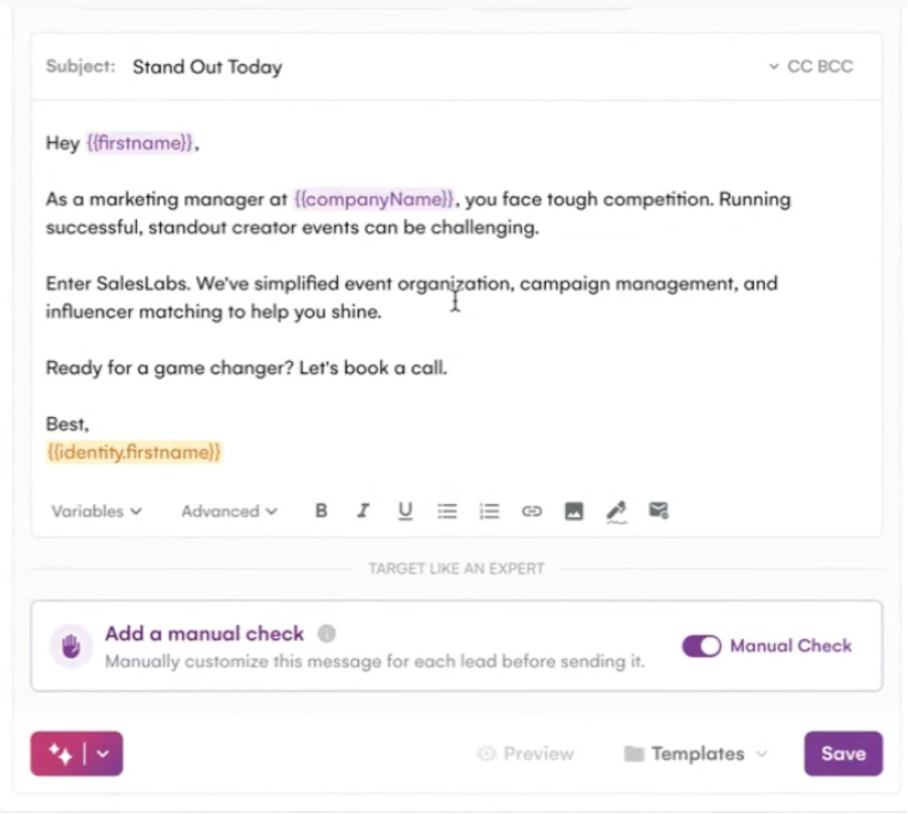
With La Growth Machine, you can automate these 5 personalization variables using dynamic variables. Insert {{company}}, {{firstName}}, {{jobTitle}}, or any custom data directly into your messages. Your personalization scales without losing quality.
Common Mistakes to Avoid
- Brutal copy-pasting – Your prospects will immediately sense it’s a generic template
- Talking about yourself for 3 paragraphs – No one cares about your company until they understand what you can do for them
- Using corporate jargon – “We are delighted to present our innovative, next-generation solution…” Yuck.
- Sending a 500-word novel – Keep your emails short (150-250 words max)
- Not testing – What works for one industry might fail in another. A/B test systematically.
Bonus tip: Read your email aloud. If it sounds fake or corporate, rewrite it.
Fatal Mistakes in Email Prospecting (and How to Avoid Them)
Even with the best templates, your response rate can plummet if you make these classic errors. After analyzing 12,000+ cold email campaigns, here are the 7 pitfalls that kill 80% of prospecting campaigns.
| Mistake | Why It Kills Your Response Rate | Concrete Solution |
|---|---|---|
| Targeting Too Broadly Without Segmentation | A generic message for 500 prospects = 0% relevance. LinkedIn CFO ≠ startup founder. | Segment into 3-5 lists max (by industry, size, pain point). Adapt 1 template per segment. |
| Sending 100% Generic Emails | “Hello, I’m contacting you about…” = instant deletion. No personalization = spam. | Minimum 1 dynamic variable per email (first name, company, pain point). Ideally: 3-4 contextual variables. |
| Ignoring Send Timing | Email sent Saturday 10 PM = invisible. Monday 8 AM = drowned in 150 emails. | Send Tuesday-Thursday 10 AM-11 AM or 2 PM-3 PM. Avoid Mondays/Fridays + weekends. Test based on your target audience. |
| Neglecting Deliverability | 60% of your emails in spam = dead campaign. Cold domain + spam words = blacklist. | Email warmup is mandatory 2 weeks prior (30 emails/day progressively). Check SPF/DKIM/DMARC. Avoid “free,” “urgent,” visible tracked links. |
| Never Testing (A/B Testing) | Keeping the same subject line that converts 2% when another could achieve 8%. Optimization = 0. | Test 2 different subject lines on 50 prospects. Keep the best one. Then test hooks, CTAs. 1 test/week = +40% response in 2 months. |
| Giving Up After Just One Email | 80% of positive responses arrive after the 3rd touchpoint. 1 email = max 5% response rate. | Minimum 4 touchpoint sequence: Email 1 → Follow-up D+3 → Follow-up D+7 → Breakup D+14. Multi-channel (email + LinkedIn) = 3.5x more responses. |
| Only Talking About Your Product | “Our solution does X, Y, Z…” = prospect doesn’t care. 0 perceived value. | PAS Framework: Pain (prospect’s problem) → Agitate (consequences) → Solve (solution). 70% prospect’s problem, 30% your solution. |
Immediate Action: Before sending your next campaign, go through this 7-point checklist. If you tick 5/7 errors, pause your campaign and fix the foundations first. A well-crafted email to 50 prospects is better than 500 poorly targeted emails.
Optimizing Your Prospecting Email Performance
You have the templates. Now, let’s talk performance.
Avoiding Spam Filters: Deliverability Rules
Your perfect email is useless if it ends up in spam. Here’s how to avoid this trap:
Do’s for good deliverability:
- Authenticate your domains: configure SPF, DKIM, and DMARC (mandatory by 2025)
- Progressive warmup: don’t go from 0 to 500 emails/day. Gradually increase over 2-3 weeks
- Use a dedicated domain for prospecting (e.g., outreach.yourcompany.com)
- Maintain a balanced text/HTML ratio: too many images = spam
- Limit links: maximum 2-3 links per email
- Truly personalize: generic emails are detected by algorithms
Don’ts that kill your deliverability:
- Using spam trigger words: “free,” “urgent,” “unique opportunity,” too many exclamation points!!!
- Sending from a personal Gmail/Hotmail address
- Buying lists of cold emails
- Ignoring unsubscribes and bounces
- Sending too many emails too quickly
Modern automation tools generally handle warmup automatically and progressively.
A/B Testing: What to Test and How
The 5 elements to A/B test first:
- The subject line – Test question vs. statement, short vs. long, with/without emoji
- The hook – Compliment vs. question vs. stat vs. observation
- Length – Short email (100 words) vs. medium (200 words)
- The CTA – Open-ended question vs. specific time slot proposal vs. Calendly link
- The P.S. – With vs. without, humor vs. seriousness
Methodology:
- Change ONLY ONE variable at a time
- Test on a minimum of 100 prospects per version
- Keep the winner, test a new element
- Document your results
Best Days and Times to Send Emails
Best days:
- Tuesday and Thursday generally perform best
- Wednesday is a good compromise
To avoid:
- Monday mornings (inbox overloaded after the weekend)
- Friday afternoons (everyone is already in weekend mode)
Best times:
- 8 AM – 9 AM: before the morning rush
- 12 PM – 1 PM: lunch break
- 5 PM – 6 PM: end of the day
But beware: these averages vary depending on your industry and target audience. A startup CEO might check emails at 7 AM, a CMO of a large corporation more like 9:30 AM.
The Best Tools to Automate Your Prospecting Emails
Smart automation saves you 10 hours/week on manual prospecting. But stacking 5 tools = unmanageable complexity. Here’s the optimal stack to automate email + LinkedIn without losing quality.
| Category | Purpose | Recommended Tools | Indicative Price |
|---|---|---|---|
| Sales Intelligence | Build prospect lists enriched with professional/personal emails, phone numbers, firmographic data | Pharow, Cognism, Kaspr | €49-299/month |
| CRM | Centralize all prospect data, track interactions, manage sales pipeline | HubSpot (free starter), Pipedrive, Salesforce | Free – €50/user/month |
| Email Sequences | Automate multi-step email + LinkedIn outreach with scalable personalization | La Growth Machine, Lemlist, Instantly | €60-120/month |
| Email Verification | Clean your lists (hard bounces) and protect your sender reputation before sending | ZeroBounce, NeverBounce, Bouncer | €0.004-0.01/email |
Featured: Why La Growth Machine for Your Sequences
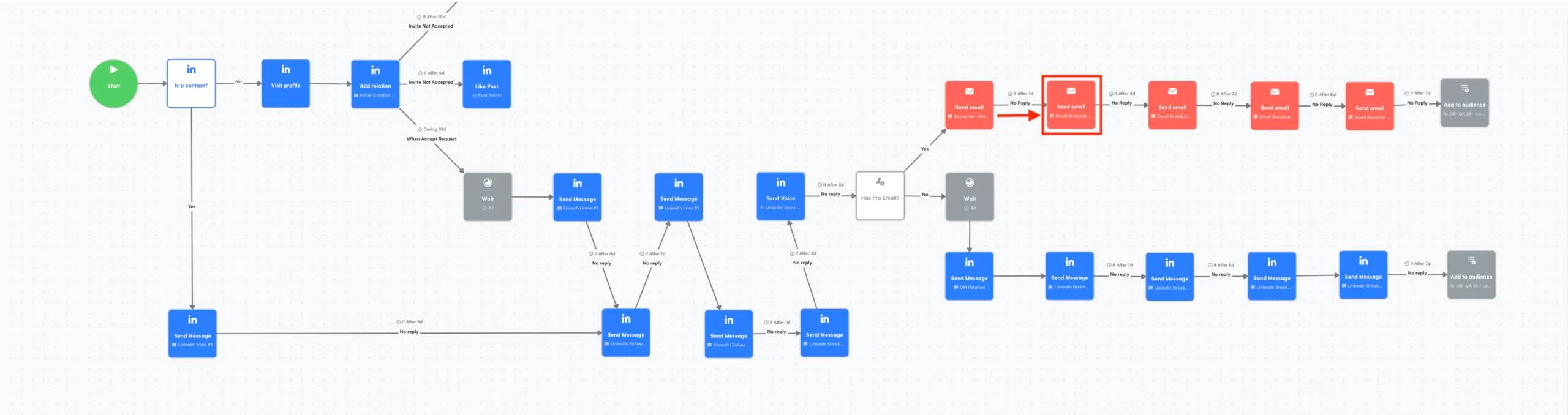
With La Growth Machine, you automate your email + LinkedIn + call sequences in a single tool. No need for risky Chrome extensions or juggling between 3 platforms.
Key Difference: Scalable personalization without losing quality. Unlimited dynamic variables, integrated email enrichment (no need for separate Apollo or Hunter), and automatic detection of LinkedIn interest signals (profile visits, post likes).
Concrete Result: 3.5x more responses than with email alone. An email + LinkedIn sequence converts 12-18% vs. 3-5% for email-only.
Recommended Optimal Stack:
- 1 Sales Intelligence tool (build list)
- 1 CRM (centralize + track)
- 1 multi-channel sequence tool (La Growth Machine for automation)
- 1 email verifier (protect deliverability)
Avoid Multiplicity: 6 different tools = broken connections, duplicate data, constant bugs. Prefer all-in-one tools with native integrations.
Frequently Asked Questions About Prospecting Emails
What is the best subject line for a first contact email?
Short subject lines (3-5 words), personalized, and intriguing convert 2x better than generic ones. Three formats that work:
Direct question: “{{firstName}}, 15% less churn?” (open rate 35-42%)
Personalized observation: “Saw your post on {{topic}}” (32-38%)
Quantified benefit: “3 clients in 2 weeks for {{company}}” (28-35%)
Absolutely avoid: “Collaboration,” “Quick question,” “Important,” or anything that looks like spam. Always test 2 different subject lines with A/B testing on 50 prospects before scaling.
How many follow-ups should I send after a first email with no response?
Minimum 3 follow-ups. 80% of positive responses arrive after the 2nd or 3rd email. Optimal sequence:
- Email 1 (D0): Introduction + value
- Follow-up 1 (D+3): Provide a free resource (case study, template)
- Follow-up 2 (D+7): New angle (client case, quantified result)
- Follow-up 3 (D+14): Breakup email (“Last message, I assume this isn’t a priority”)
Breakup emails often have the highest response rate (8-12%) as they create urgency and a last opportunity.
What is a good response rate in B2B cold emailing?
Realistic benchmark:
- Email alone: 3-5% response rate (of which 1-2% are positive)
- Email + LinkedIn: 12-18% response rate (of which 4-7% are positive)
- Highly targeted campaigns (<100 prospects): 15-25%
If you’re below 2% after 100 sends, there’s an issue with targeting, message relevance, or deliverability. First, check if your emails are landing in spam (send yourself tests).
Improvement factors: Precise segmentation (+40%), multi-channel email+LinkedIn (+250%), advanced personalization (+60%).
How to personalize a prospecting email without rewriting everything?
Use dynamic variables within a base template. 3 levels of personalization:
Level 1 – Basic (5 sec/prospect): {{firstName}}, {{company}}, {{jobTitle}}
Level 2 – Contextual (30 sec/prospect): Add 1 unique variable per prospect (recent LinkedIn post, company news, identified pain point)
Level 3 – Hyper-personalized (2 min/prospect): Specific reference to their context + screenshot/link to their content
To scale, aim for Level 2: structured template + 1 fully personalized sentence in the hook. Example: “I saw that {{company}} just raised €X – congratulations! You’re probably hiring SDRs to support this growth…”
What are the best days to send a prospecting email?
Top 3 days according to analysis of 50,000+ B2B emails:
- Tuesday (open rate 24%, response 6.2%) – Best performer
- Wednesday (23%, 5.8%) – Stable
- Thursday (22%, 5.4%) – Good backup
Avoid:
- Monday: Inbox overloaded after the weekend (-30% open rate)
- Friday after 2 PM: Weekend mode (-40%)
- Weekends: Nearly invisible, emails drowned out Monday morning
Optimal times: 10 AM-11 AM (after morning urgent emails) or 2 PM-3 PM (after lunch). Avoid 8 AM-9 AM (morning rush) and after 5 PM (end of day).
Should I use a template or write each email from scratch?
Personalized template = best balance. Writing from scratch for 200 prospects = impossible to scale. 100% generic email = 0% response.
Winning approach:
- Create 3-5 templates per segment/persona
- Fixed structure (hook, problem, solution, CTA)
- 1-2 fully personalized sentences per prospect (hook or transition)
- Dynamic variables for the rest
The best SDRs spend 70% of their time on targeting/research, 30% on writing. A well-built template + 30 seconds of personalization per prospect beats a too-generic from-scratch email.
How do I prevent my emails from going to spam?
7 critical actions to protect your deliverability:
Before sending:
- Warm up your domain for 2 weeks (30 emails/day progressively to 50-80)
- Configure SPF, DKIM, DMARC (check via MXToolbox)
- Use a dedicated prospecting domain (not your main domain)
In your emails:
- Avoid spam words: free, urgent, money, click here, guarantee
- Text/image ratio 80/20 (too many images = spam)
- Max 1-2 links per email (too many links = trigger)
After sending:
- Monitor bounce rate (<3%), complaint rate (<0.1%)
Essential tool: Mail Tester (mail-tester.com) – send a test before each campaign, aim for a score of 8+/10.
How long should I wait between follow-ups?
Optimal timing based on sequence position:
- Email 1 → Follow-up 1: 3 days (allow time to see and think)
- Follow-up 1 → Follow-up 2: 4-5 days (space them out more)
- Follow-up 2 → Follow-up 3: 7 days (last chance)
Why space them out: Follow-ups too close together (D+1, D+2) = perceived as spam/harassment. Too far apart (D+14 between each) = loss of momentum.
Multi-channel speeds things up: If you combine email + LinkedIn, you can create closer touchpoints without being intrusive. Example: Email D0 → LinkedIn Profile Visit D+2 → Email Follow-up D+4 → LinkedIn Connection Request D+6. 4 touchpoints in 6 days without a spammy feel.
Conclusion
You now have:
- 16 ready-to-use email templates for all your scenarios
- The 7 components of a converting email
- The frameworks (AIDA, PAS) to build your own emails
- Best practices for deliverability and optimization
Email remains the channel with the best ROI for B2B prospecting in 2026. But you need to know how to use it intelligently: personalization, multi-channel, automation, continuous optimization.
Obtiens 3,5 fois plus de leads !