Convert Your Website Visitors into Customers
All you need


Summary of what you'll do
Duplicate campaign in9steps!
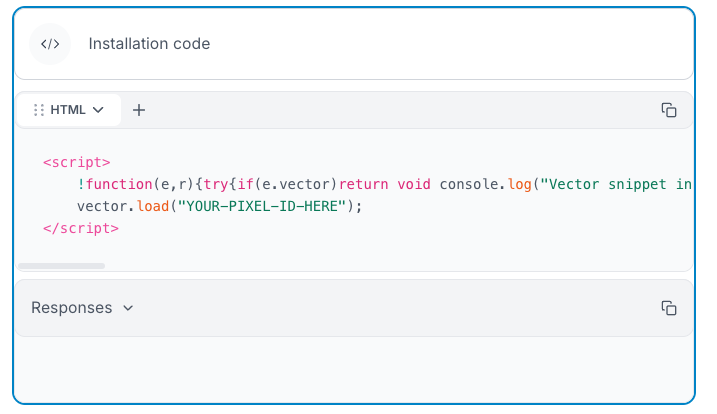
Install & configure Vector (Free Setup)
- Sign up for Vector.co (free plan = 1,000 monthly exports)
- Copy tracking code snippet into your website's
<head>section - Verify installation shows green checkmark
Create high-intent segments in Vector
A visitor who navigates to specific pages like pricing, features, and case studies is demonstrating clear research intent.
Unlike homepage visitors who may be casually browsing, these prospects are actively seeking information to make a decision
- Set up "All Visitors" segment (default)
- Create "High Intent" segment filtering for visitors on: pricing pages, features pages, case studies, demo pages
- Configure 30-minute push intervals to Clay

Connect Vector to Clay
Now, let’s automate the flow of segmented leads into your qualification workflow.
- In Vector, find the Clay integration, copy your table URL, and add it to Clay’s settings.
- Configure Vector playbook to push high-intent visitors to Clay
- Map all data fields: company, title, LinkedIn URL, pages visited, search terms
.png)
Filter & qualify in Clay
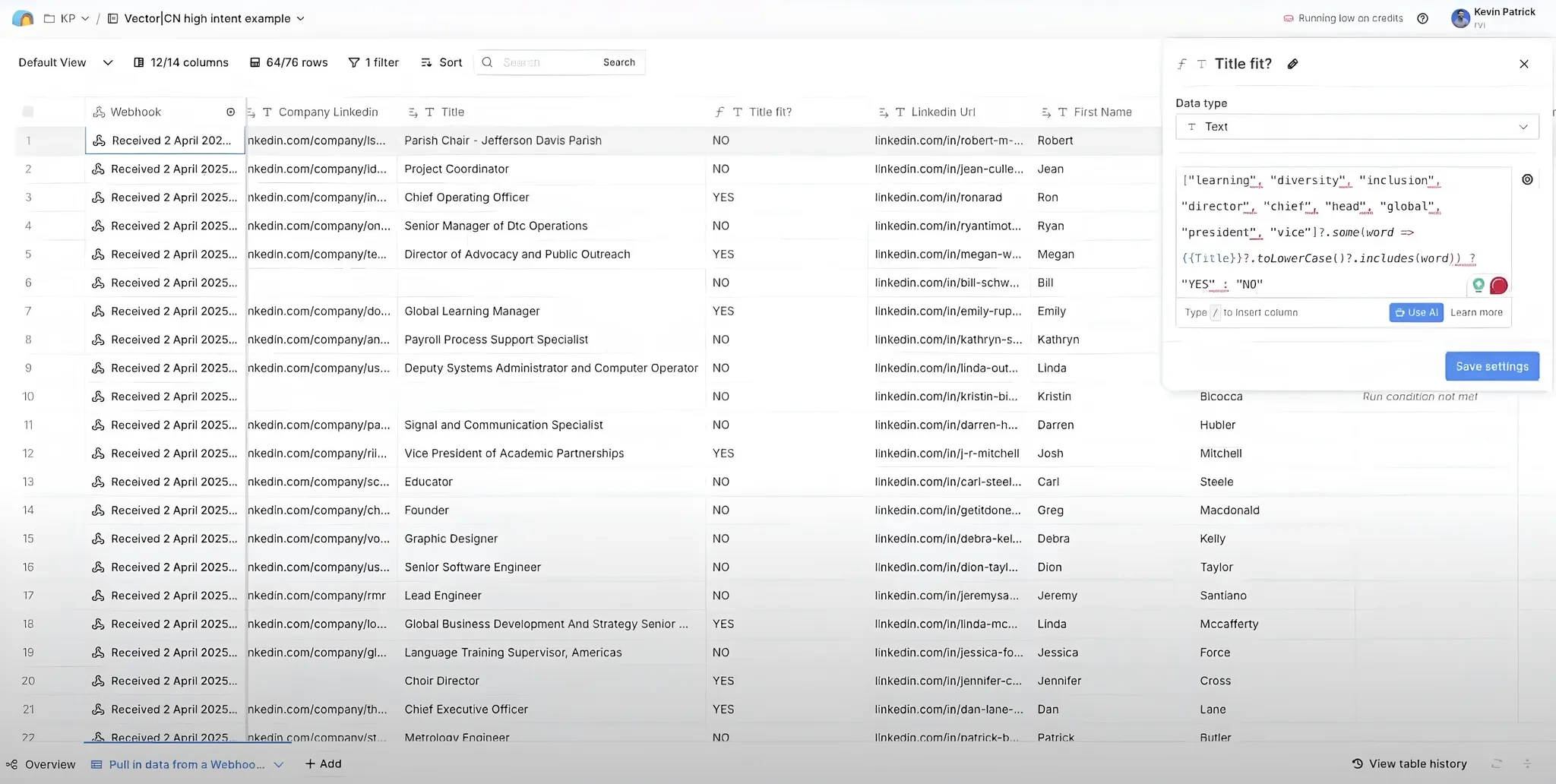
Create filters at role level:
- Target decision-makers only: Use formula column to identify roles with buying power - "if title contains: learning, diversity, director, chief, head, global, president, vice = YES"
- Match your ICP company size: Set up GPT-4o mini prompt (using your OpenAI account) to scan LinkedIn company pages for employee count.
Expert tip: Only run expensive enrichments IF title fit = YES. Don't burn Clay credits on prospects who aren't decision-makers.
Use this prompt:
Set ICP thresholds & configure push to La Growth Machine
Define your company size target: Set the minimum company size you want to reach out to based on your ICP (Kevin's example: 100+ employees) - this ensures you're not wasting outreach on companies too small for your solution
- Create conditional logic for double qualification: Set up Clay's conditional push to La Growth Machine that only runs when BOTH criteria are met:
- Criteria #1: Title fit = YES (decision-maker roles)
- Criteria #2: Company size ≥ 100 employees (or your ICP threshold)
- Configure the rule: In Clay's La Growth Machine integration, add the condition "only run if company size response is greater than or equal to 100 AND title fit = YES"
Result: Only qualified, high-intent decision-makers at companies matching your ICP enter your outreach sequence.
.png)
Set up your multichannel campaign in La Growth Machine
See how to set up the campaign in LGM.
Now that Clay is filtering and qualifying your high-intent website visitors, it's time to set up the automated outreach campaigns in La Growth Machine.
Your qualified prospects will automatically flow from Clay into LGM every 30 minutes.
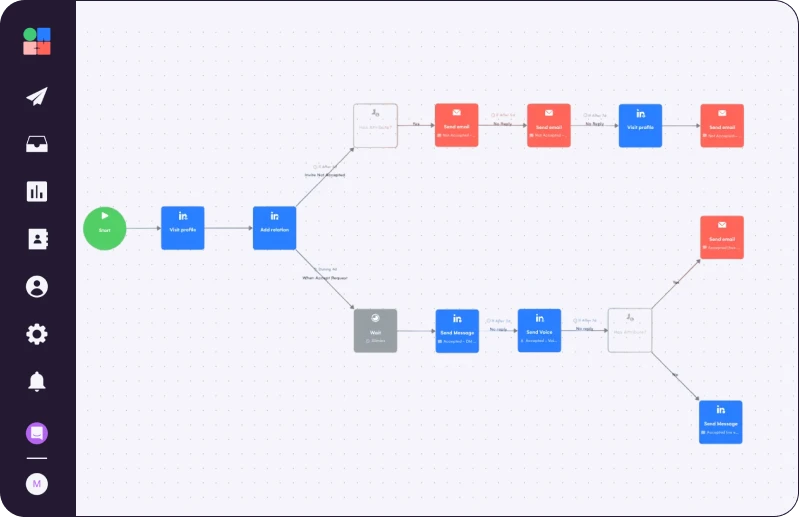
Choose Campaign Template: In LGM, select the "LinkedIn + Email - 4 Follow-ups" workflow from the catalog
Connect Your Audience: Link the Vector.co audience you created in Clay to this campaign
Set Your Identity: Configure your sender profile and email address for the multichannel sequence

Build your LinkedIn outreach sequence
First, get connected: Set up profile visit and then a connection request with NO invitation note (Kevin gets 40-70% acceptance rates this way).
Then, configure Message 1 (one day after connection): "Hey {{first name}}, a clever marketing colleague mentioned you might have been on our website recently. If so, I wanted to make sure you found all the info you're looking for. Happy to help if you need anything."
- Enable Real Chat Mode: Turn on LGM's real chat feature to break messages into natural conversation flow
Set up your Voice Message follow-up on day 5: Record 25-second personalized voice note: "Hey {{first name}}, not sure if you saw on our website, but we offer a two-week free trial..."
Now, for the final LinkedIn Message (on day 7): Try a new angle - "Hey {{first name}}, we're hosting a masterclass (fancy word for webinar) very soon and thought you might find it interesting. Feel free to register here."
.png)
Configure your email backup sequence
Trigger logic to send email sequence if LinkedIn connection isn't accepted after 4 days
Email 1, plain text only:
Subject: "re: recent website visit" - Body: Same as LinkedIn Message 1 but adapted for email format, no links, no signature
Email 2 (Day 5): Subject: "re: recent website visit" - Add value with free trial link: "Not sure if you saw on our website, but we offer a two-week free trial to test drive our platform. Here's the link for your convenience."
Email 3 (Day 7): New conversation angle with masterclass/webinar invitation - include registration link
Expert tip
.png)
Duplicate Kevin’s Campaign

Read Next


Stop Cold Calling: Use Intent Signals to Trigger Calls Prospects Actually Answer


How to Make Your Automated LinkedIn Outreach Actually Convert


Transform Online Mentions into Customers