



Stop Cold Calling: Use Intent Signals to Trigger Calls Prospects Actually Answer
All you need

Summary of what you'll do
Duplicate campaign in9steps!
Identify the intent signals that matter for your use case
Cold calling fails because your reps call at the wrong time. The fix starts before any sequence. You need to know what signals indicate that a prospect is ready to hear from you.
Ask yourself:
- What behavior suggests my prospect has a problem I can solve right now?
- What changes in their situation make them more likely to pick up?
Common intent signals to look for:
- Posted on Sales Navigator in the last 30 days (they are active and reachable)
- Recently changed jobs or expanded their sales team
- Their company is hiring in a role that signals a pain you address
- They are already using tools that integrate with your stack
The more signals you stack on your list, the warmer every touchpoint that follows.

Route existing connections and warm up new ones
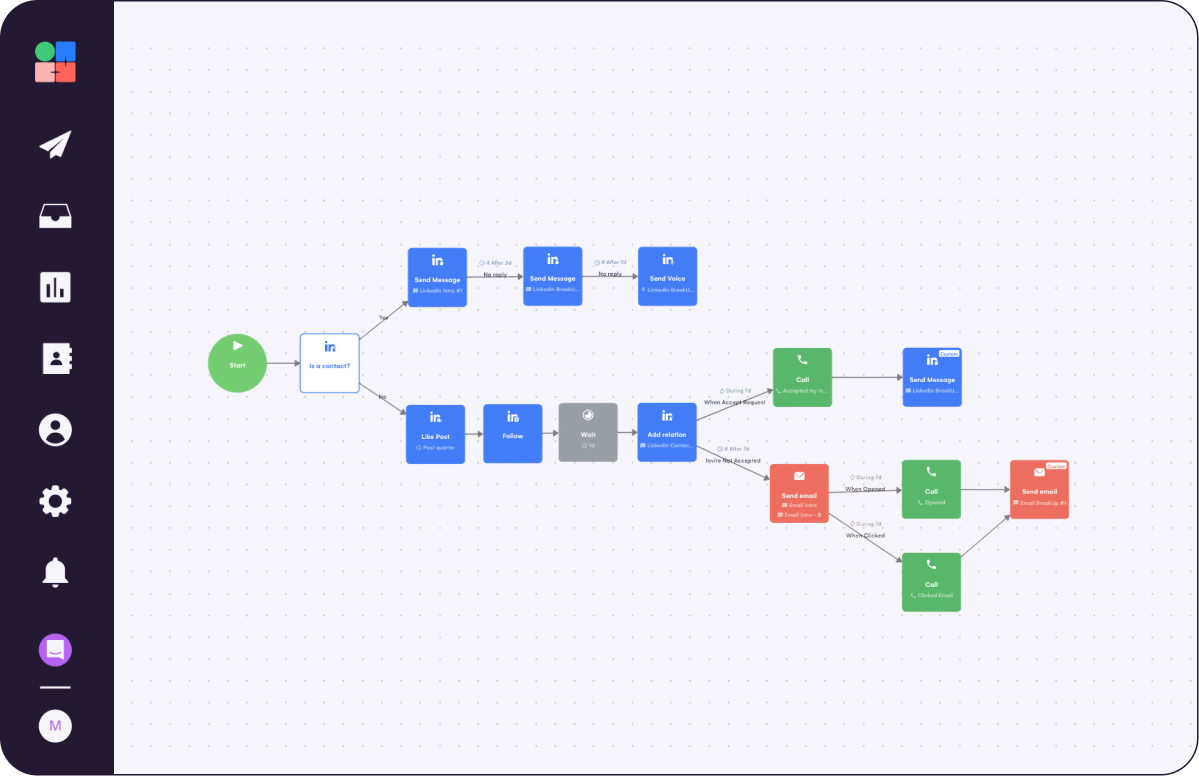
You can start your sequence by checking the lead's LinkedIn connection status using the Is a contact block.
- Yes (already connected): You could go straight to a direct message. No warm-up needed.
- No (not yet connected): You could add two silent warm-up actions first. A Like Post (set to "past quarter") and a Follow. Both generate a LinkedIn notification with your name. By the time your connection request arrives 24 hours later, your prospect already knows who you are.
In LGM, add a Like Post block, a Follow block, and a Wait of 1 day before the Add Relation block on the No branch. If no post is found in the past 90 days, the Like Post step is skipped automatically and the sequence continues.
Send your connection request
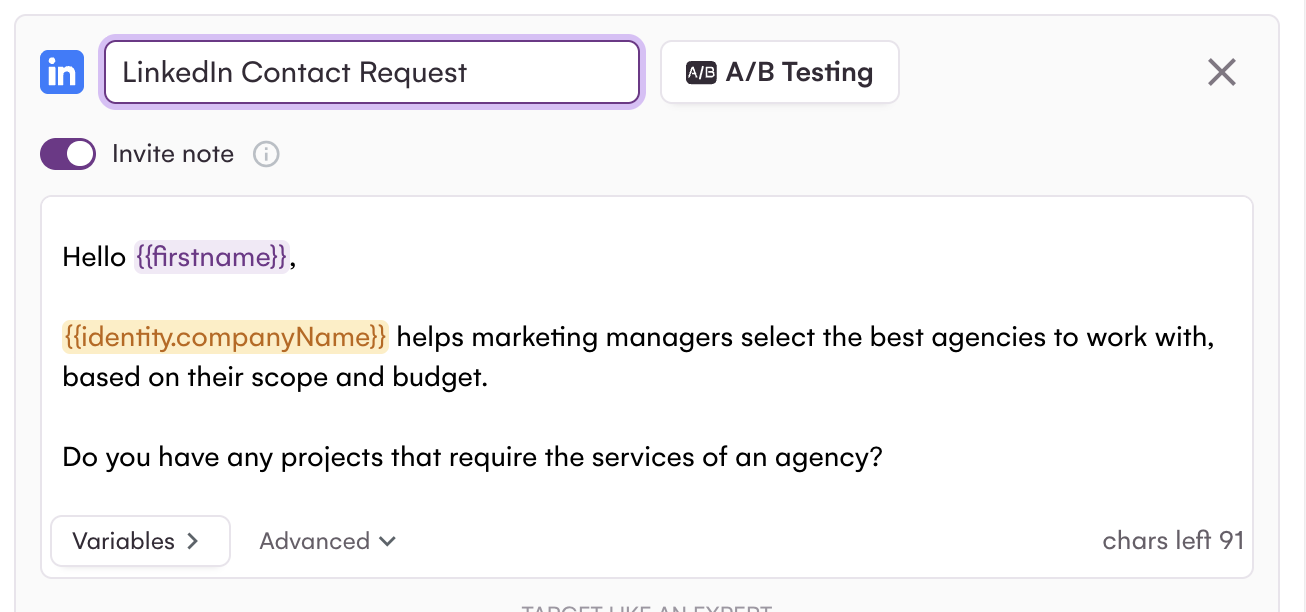
For prospects not yet in your network, you can send a LinkedIn connection request with a short note after the warm-up.
What makes a good connection note:
- Specific to their context: reference something real (a shared tool, a mutual connection, something you noticed about their company)
- Low-commitment: you are asking to connect, not to book a call
- Under 300 characters (Premium or Sales Navigator): Basic accounts are limited to 200 characters and can only send 10 personalized notes per month
Note: variables like {{firstname}} and {{companyName}} count toward the character limit. Test before launching to avoid the "Invite note too long" error.
Call the moment they accept your invitation
Once a prospect accepts your connection request, that's your trigger. They have just taken an active step toward you: they know your name, they are likely still on LinkedIn, and the context is fresh.
LGM detects it and you can create a manual Call task in the sequence.
In LGM:
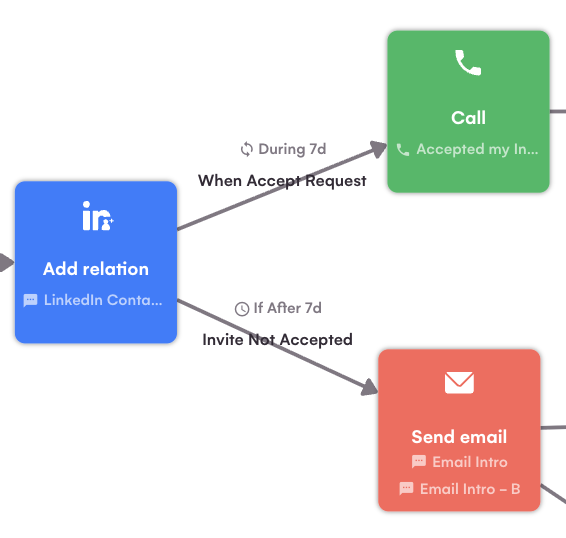
- Add a When Accept Request condition (set to "during 7 days")
- Connect it to a Call action on each branch
- Set the Invite Not Accepted branch to the same delay (7 days). If the delays differ, leads who accept on day 8 fall through neither branch and exit the sequence.
Follow up with a message or a voice message
At any point in your LinkedIn sequence, you can also add a voice message as a touchpoint. In a text-heavy inbox, a short audio message stands out and signals extra effort. Prospects are significantly more likely to respond to voice than to a third text follow-up.
How to record in LGM:
- Open the Send Voice block and allow microphone access
- Record under 60 seconds (30 seconds is the sweet spot)
- Add a personalized intro with variables ({{firstname}}, {{companyName}}). LGM Voice AI combines your intro with the recording into one fluid audio file per prospect.
Switch to email and trigger calls on intent signals
For leads who never accepted the connection request after 7 days, you could route them to email via the Invite Not Accepted branch.
Email best practices:
- Keep your emails short and precise: nobody likes to read long sales pitches
- Use LGM's A/B test feature to compare two copy variants and identify what resonates best with your audience
The same intent-first logic applies to email. You could set up call tasks that trigger based on email behavior:
- Email opened: the prospect is in their inbox right now. You could add a Call task that syncs to HubSpot. Your rep picks it up and calls via the Aircall dialer in HubSpot, with the prospect's full context already loaded.
- Email clicked: they engaged with your content. This is a stronger signal, prioritize these calls.
After the call, your Sales person fills the dedicated HubSpot contact property with the outcome:
- Continue sequence
- Replied
- Won
- Lost
Once the task is marked as Done in HubSpot, LGM uses the outcome to decide what happens next in the sequence.
Call with full context
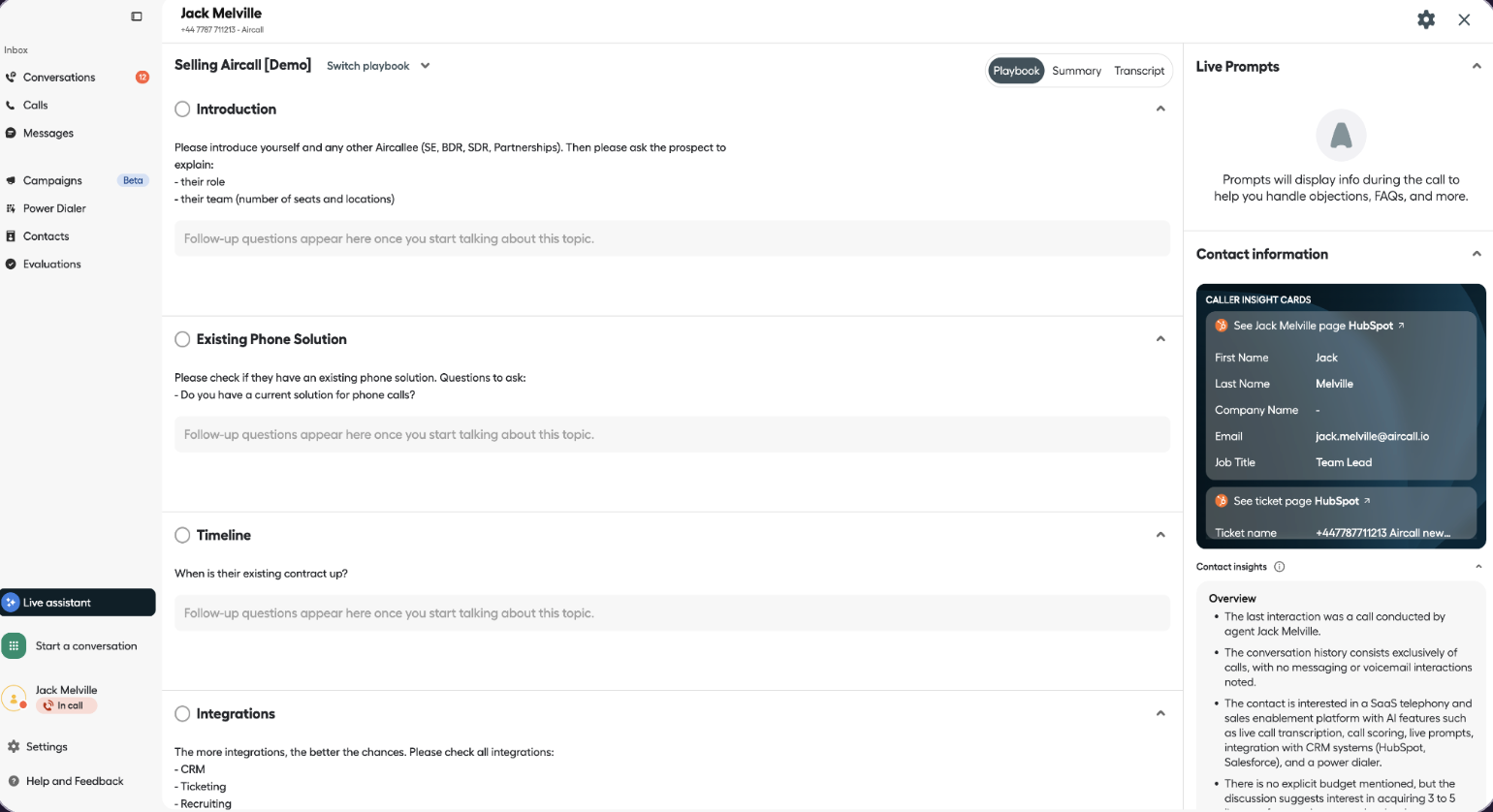
When a call task is ready, you will get a notification in La Growth Machine. Click the phone button in the task view to open Aircall straight from there.
Your rep lands on the call with everything already loaded: who the prospect is, what they received, what they did (accepted your invite, opened the email, clicked the link), and when. The full context and history is right there before they pick up the phone.
They know exactly why they are calling and why now is the right moment. That context is what turns a cold dial into a conversation worth having.
Log every touchpoint automatically in HubSpot
Every action from your LGM sequence (LinkedIn messages, emails, call tasks) syncs automatically into HubSpot as native activities: emails appear as HubSpot emails, LinkedIn messages as LinkedIn HubSpot messages, call tasks as open HubSpot tasks.
Each activity is attributed to the right owner automatically. Your reps never have to switch between tools to log activity. You see the full commercial history per contact and per channel.

Duplicate the LGM x Aircall Campaign
We built this campaign for you. It combines everything covered in this playbook: LinkedIn warm-up, multichannel outreach, intent-based call triggers via Aircall, and full HubSpot logging. One sequence, ready to duplicate in one click.
Adapt the copy to your ICP and your use case.

Read Next


How to Make Your Automated LinkedIn Outreach Actually Convert


Transform Online Mentions into Customers


Convert Your Website Visitors into Customers