


HubSpot + La Growth Machine: outreach at scale, a CRM you can still trust.
Run LinkedIn, email and call sequences from La Growth Machine. HubSpot gets the right activities, the right owner and the right leads, and your campaigns never touch a deal you're already working.
14 Days Free | No Credit Card Required
Most CRM integrations push everything. We built ours to keep HubSpot clean.
A generic sync dumps every lead into your CRM and leaves the mess to you. Two reps call the same person, a customer gets a cold message, and LinkedIn touches pile up as flat notes nobody reads. The point isn't to push more contacts into HubSpot. It's to make HubSpot a source of truth your team can rely on.
- closeEvery lead in the campaign becomes a HubSpot contact on day one
- closeLinkedIn and email touches logged as generic notes
- closeCustomers and open deals get prospected like anyone else
- closeContacts land without an owner, or with the wrong one
- closeOne-way push: the CRM and the outreach tool drift apart
- checkThe contact is created only when the lead reaches a stage you choose
- checkNative HubSpot emails, LinkedIn messages and tasks on the timeline
- checkOpen deals, lifecycle stages and HubSpot lists are skipped automatically
- checkEach sender mapped to a HubSpot owner, existing owners never overwritten
- checkTwo-way: a call task marked Done in HubSpot moves the sequence forward
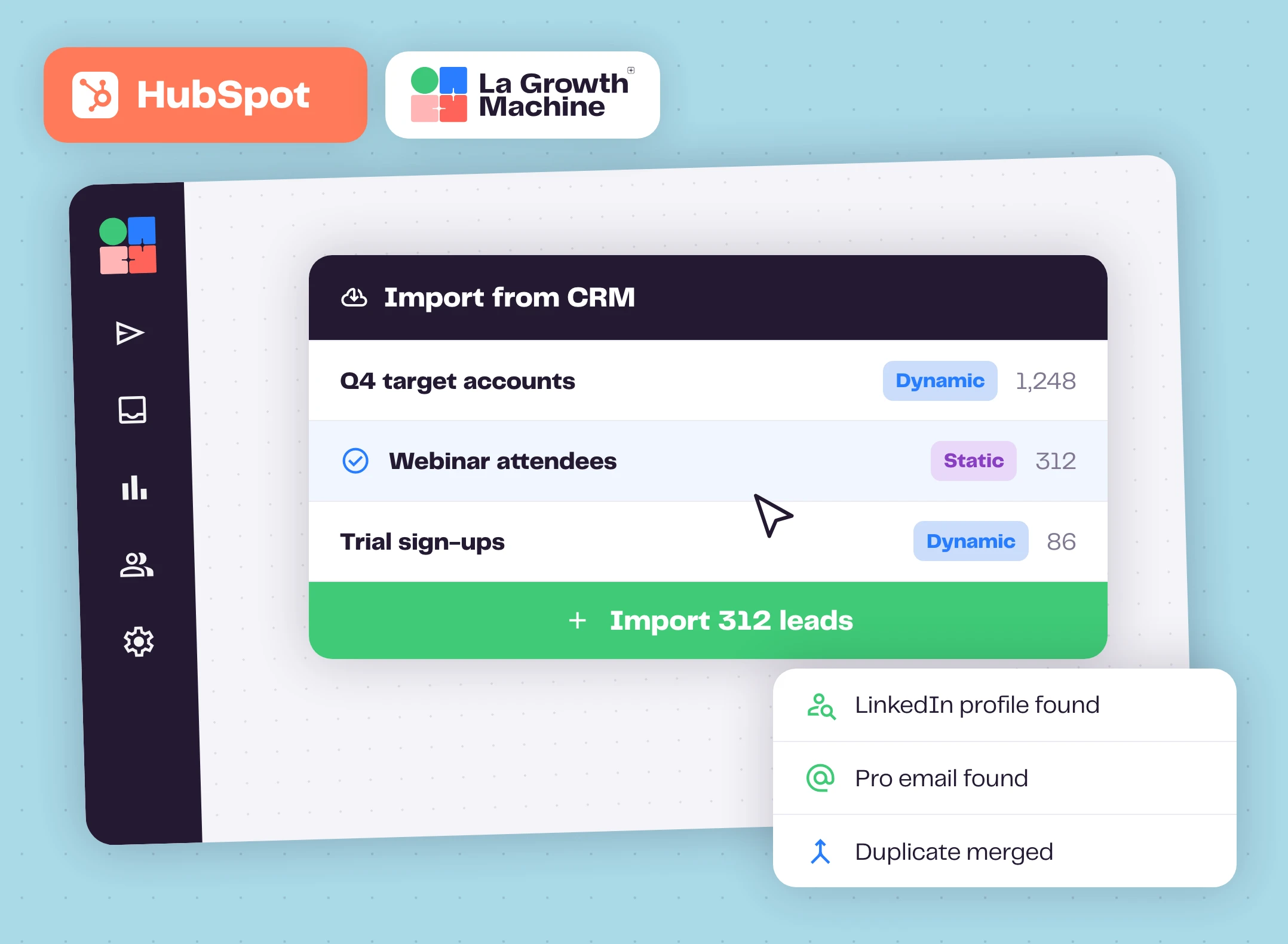
Start from the lists you already have
Pick any HubSpot list, static or dynamic, and import it into La Growth Machine in one click. Update the list later and re-import it.
Missing an email or a LinkedIn URL? A first name, last name and company are enough. When the campaign starts, La Growth Machine finds the LinkedIn profile, then the professional email with the enrichment credits included in your plan, charged only when an email is found. Duplicates are merged automatically and nothing you already had is lost.
What La Growth Machine needs per lead expand_more
- An email address, or
- A LinkedIn URL, or
- First name, last name and company name.
La Growth Machine finds the rest when the campaign starts.
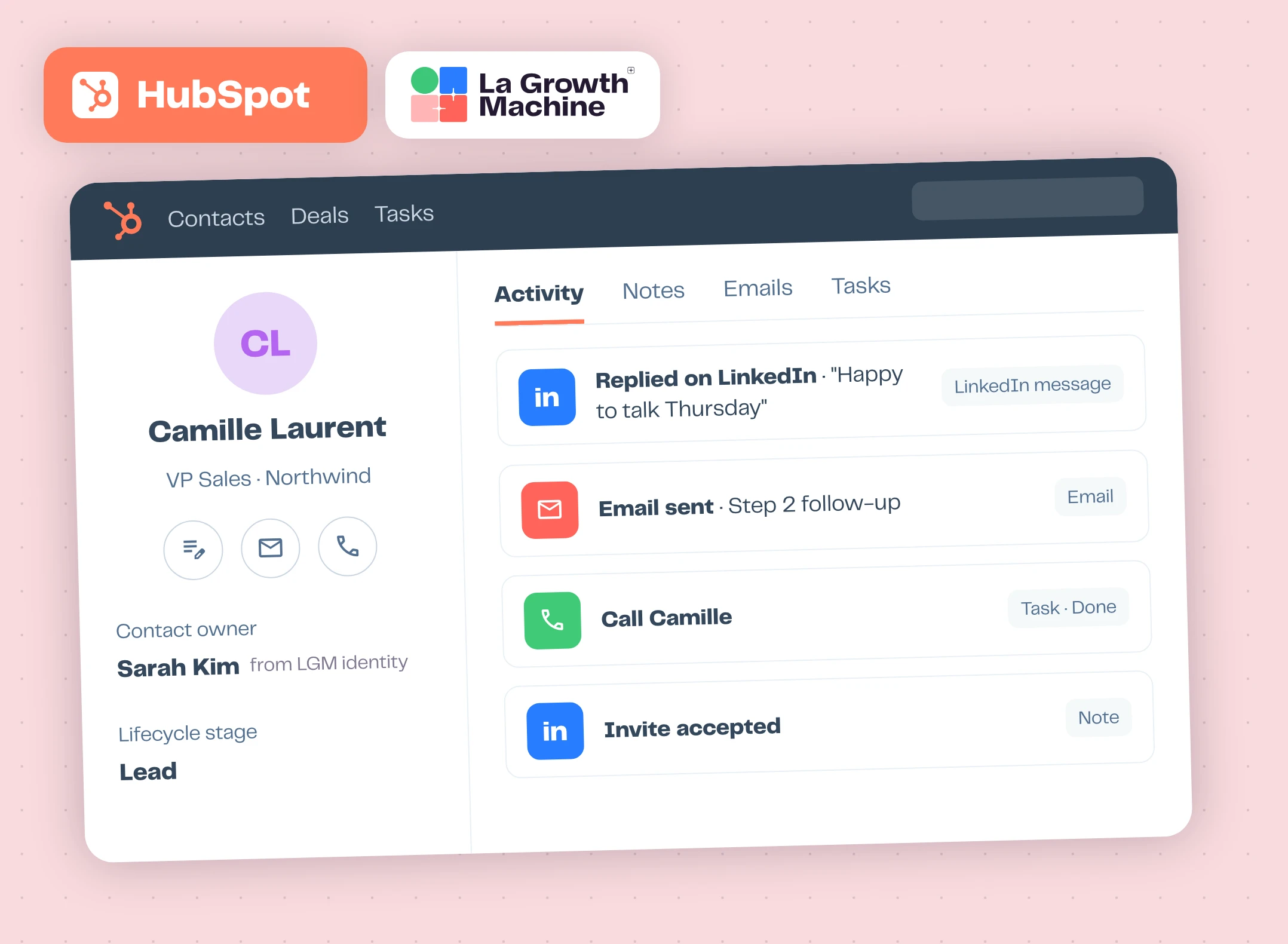
Every touch on the timeline, as a real HubSpot activity
Emails, LinkedIn messages and call tasks land on the HubSpot timeline in their native format, not as a pile of generic notes. Your reps and managers read the whole commercial history, channel by channel, without opening La Growth Machine.
Each La Growth Machine identity is tied to a HubSpot owner. The owner is applied only when the contact doesn't have one, never overwritten, so attribution stays clean and reporting stays honest.
How each action is logged expand_more
| La Growth Machine action | In HubSpot |
|---|---|
| Email sent or replied | HubSpot Email |
| LinkedIn message sent or replied | HubSpot LinkedIn message |
| Call task, to do or done | HubSpot Task (Open / Done) |
| Email open or link click | Note |
| LinkedIn invite sent or accepted | Note |
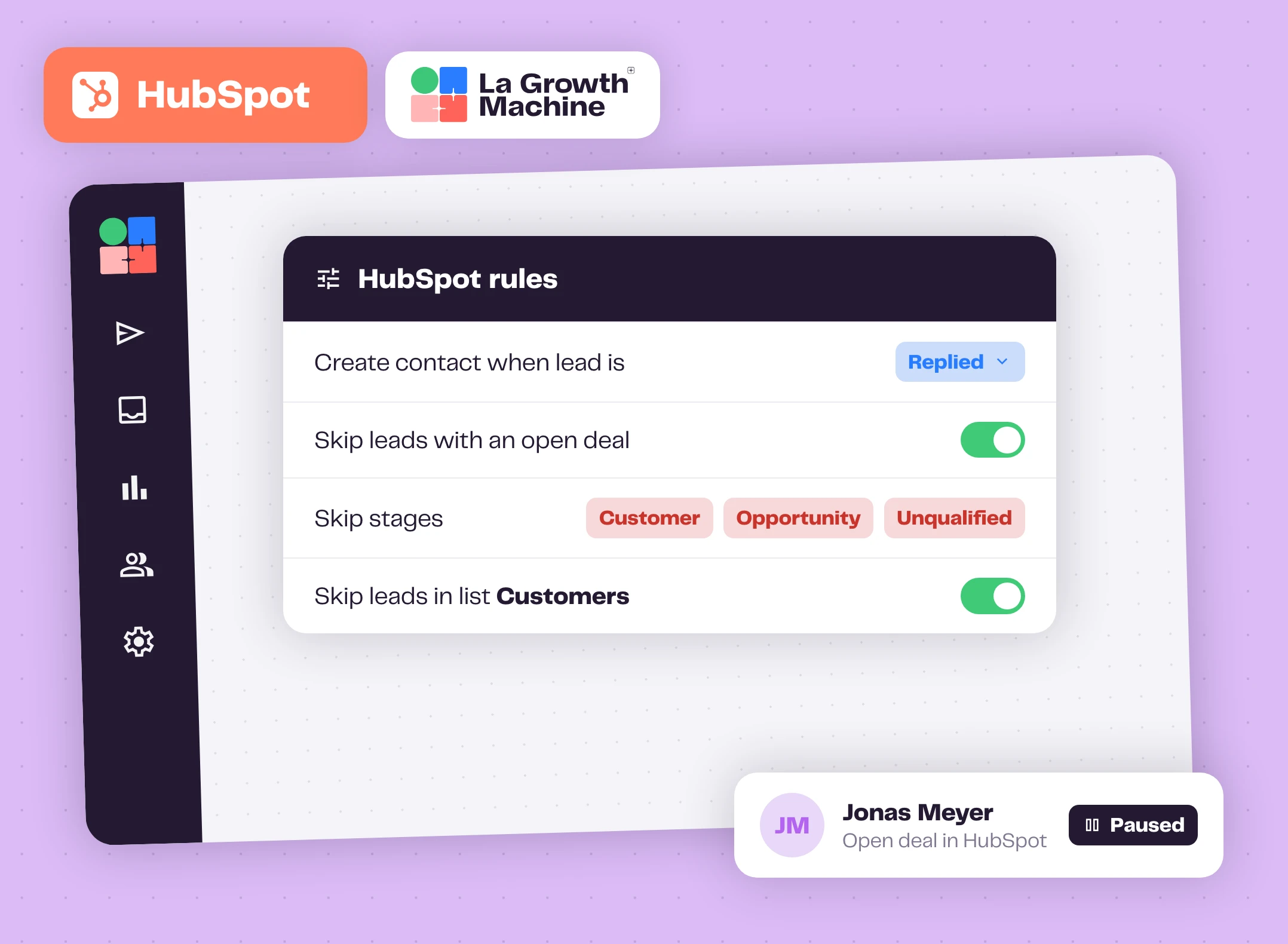
Never prospect a customer or an open deal again
You choose when a lead becomes a HubSpot contact: once it's contacted, once it replies, or once it gets a won tag, for example. HubSpot receives the leads that reached a real commercial step, not the whole top of your list.
And your campaigns respect your pipeline. A lead with an open deal is paused. A lead in a blocking lifecycle stage like Customer, Opportunity or Unqualified is never contacted. Any HubSpot list, static or dynamic, can act as a live exclusion list.
The 4 rules, in detail expand_more
- Contact creation trigger: Contacted, Replied, or a tag like won.
- Open deal: the lead is paused if a deal already exists. Applies to new campaigns, not retroactively.
- Lifecycle stage: pick the stages that block first contact.
- HubSpot list: skip anyone in a static or dynamic list, like "Customers" or "Contacted this quarter".
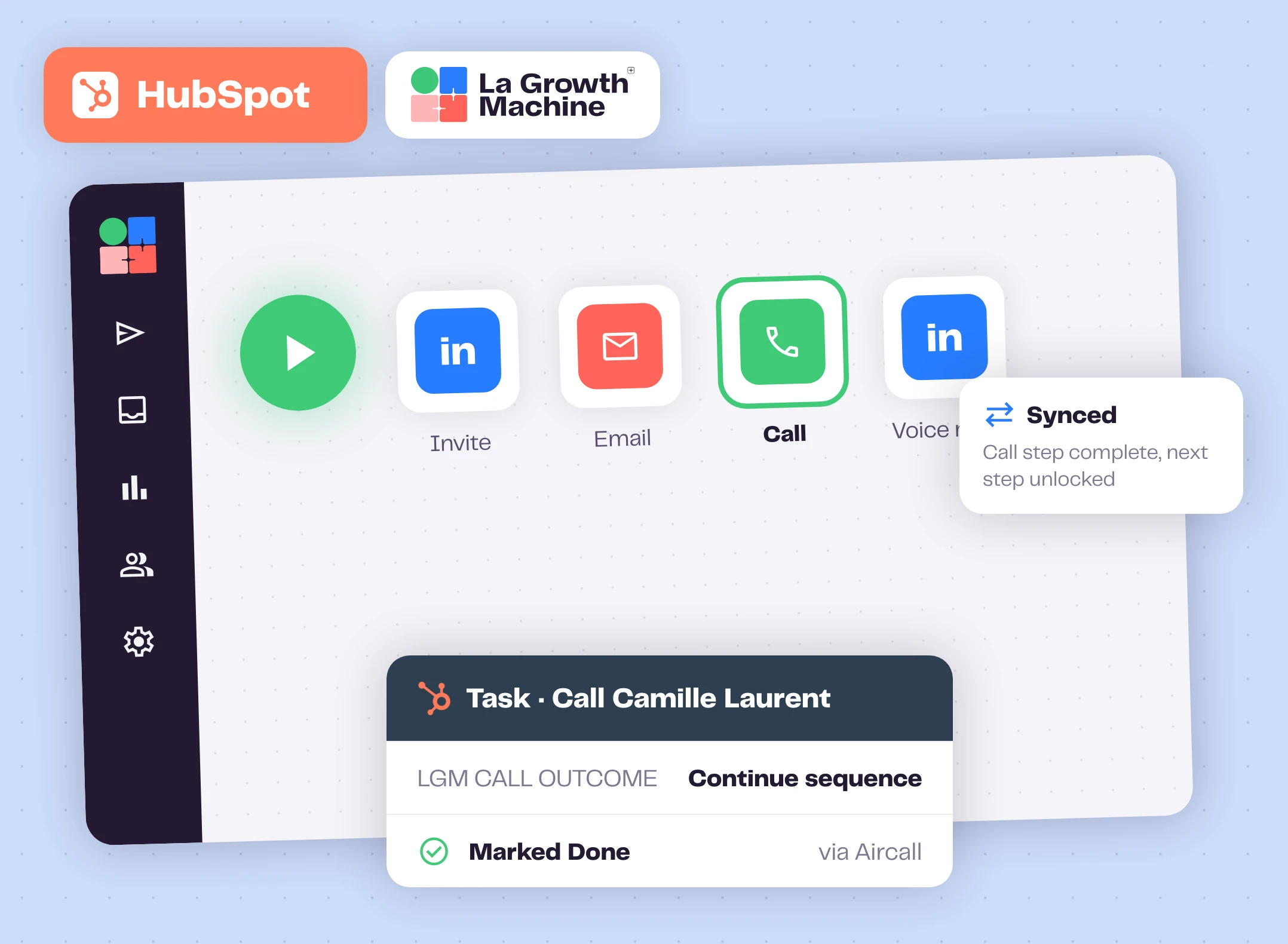
Your reps work in HubSpot. The sequence keeps up.
When a lead accepts your invite or opens your email, the sequence moves to a Call step and La Growth Machine creates the call task in HubSpot. Your rep calls with their usual dialer, like Aircall, and marks the task Done. La Growth Machine reads it and moves the sequence forward.
The sync runs both ways, field by field. You decide which side wins for each property, so a change made in HubSpot flows back into La Growth Machine and nobody maintains two tools by hand.
Per-field sync options expand_more
- La Growth Machine writes only if the field is empty
- La Growth Machine always overwrites
- HubSpot to La Growth Machine only
- Both directions
- Don't sync
How to get started?
From connection to first campaign, in four steps.
- linkStep 1
Connect HubSpot
One click from Settings, Integrations.
- cloud_downloadStep 2
Import a list
Static or dynamic. La Growth Machine enriches and de-duplicates it.
- tuneStep 3
Set your rules
Turn on CRM Sync, map identities to owners, choose who gets created and who gets skipped.
- rocket_launchStep 4
Launch your campaign
LinkedIn, email, voice and calls. HubSpot updates itself as leads move.
Put your outreach data to work in HubSpot
Replies, LinkedIn acceptances and interest tags become HubSpot data. Here's what teams build on top.
Dynamic lists
Segment contacts by what happened in your campaigns: replied, accepted, interested.
Lead scoring
Score prospects in HubSpot with La Growth Machine engagement data.
Rep assignment
Route interested prospects to the right sales rep automatically.
Workflows
Trigger a HubSpot workflow the moment a lead replies on LinkedIn or by email.
HubSpot works with these La Growth Machine features
HubSpot logs what they do: emails, LinkedIn messages and call tasks.
Multichannel Sequences
Combine LinkedIn and email steps in one sequence.
Discover the feature arrow_forward forumMultichannel Inbox
All your LinkedIn and email conversations in one place.
Discover the feature arrow_forward callCalls
Add calls to your campaigns, alongside LinkedIn and email.
Discover the feature arrow_forwardGo further with HubSpot
Webinars, playbooks and guides from the La Growth Machine team and our partners.
The AI-era discovery loop: from AEO inbound to multichannel outbound, all in HubSpot
La Growth Machine and HubSpot show how to turn AI search signals into booked meetings. Live on October 29.
Save your seat arrow_forward menu_bookPlaybookTurn Every HubSpot Lead into a Booked Meeting Automatically
An 8-step multichannel sequence and a campaign you duplicate in one click.
Open the playbook arrow_forward articleGuideBuild dynamic lists in HubSpot with LinkedIn and email data
Segment contacts on what happened in your campaigns.
Read the guide arrow_forward articleGuideLead scoring in HubSpot with LinkedIn and email data
Score prospects on replies, acceptances and clicks synced from La Growth Machine.
Read the guide arrow_forward auto_awesomeClaude skillCampaign Impact Analyzer
Rank your campaigns by the HubSpot deals they generated, in Claude or ChatGPT.
Get the skill arrow_forward articleArticleHubSpot + La Growth Machine, the complete walkthrough
Import, two-way sync, skip rules and call tasks, step by step.
Read the article arrow_forwardFrequently asked questions
Want the full walkthrough? Read HubSpot + La Growth Machine, step by step.
Does La Growth Machine sync with HubSpot both ways? add
Yes. La Growth Machine pushes activities, call tasks and lead data to HubSpot, and HubSpot sends back task statuses and contact changes. You set the direction field by field.
Will it overwrite data or owners already in HubSpot? add
Not unless you ask it to. By default La Growth Machine fills what's missing without overwriting what you trust, and it never replaces an existing contact owner.
Can I avoid contacting existing customers or open deals? add
Yes. Skip leads with an open deal, leads in lifecycle stages you choose, or anyone in a static or dynamic HubSpot list.
Are LinkedIn messages logged in HubSpot? add
Yes. LinkedIn messages sent and replied are logged as native HubSpot LinkedIn messages. Invites sent and accepted are logged as notes.
Which plan includes the HubSpot integration? add
The full HubSpot sync, native activities and the advanced rules are part of the Ultimate plan.