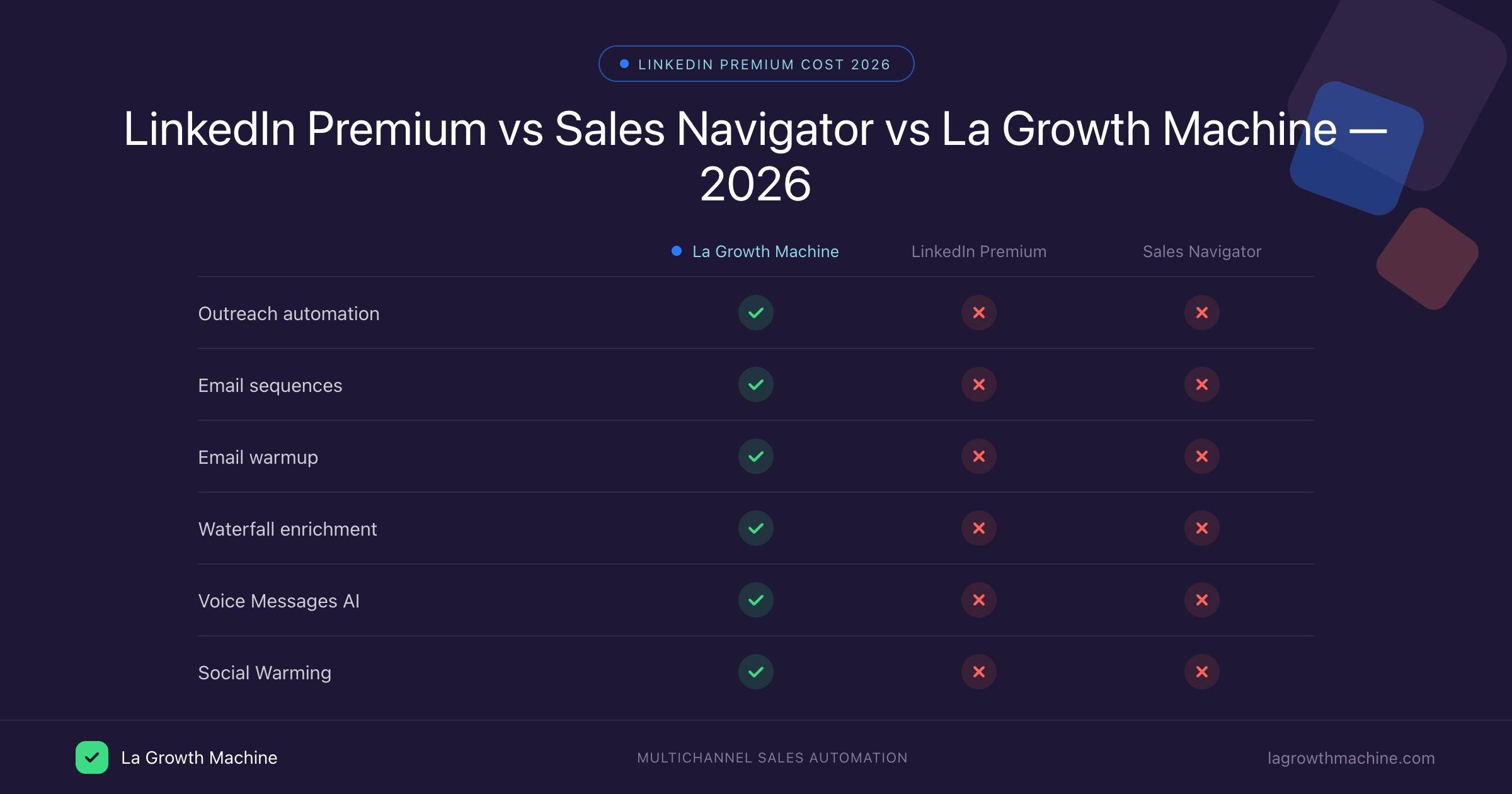
– LinkedIn Premium Career/Business gives profile visibility and InMail credits but no outreach automation.
– Sales Navigator is the best LinkedIn prospecting tool but does not automate connection requests or sequences.
– La Growth Machine runs automated LinkedIn + email sequences natively from €60/month — no Premium required.
– Use Sales Navigator to find leads, LGM to reach them at scale. LinkedIn Premium Career/Business adds little value for B2B outreach.
LinkedIn Premium costs anywhere from $39.99 to $170 per month, depending on the plan. Most people searching this question are trying to figure out which plan is worth it — or whether they need Premium at all for B2B outreach. The pricing is confusing because LinkedIn bundles four very different products under the same “Premium” label: a career tool, a networking add-on, a prospecting platform (Sales Navigator), and a recruiting suite. This article breaks down every plan, what is included, and when La Growth Machine replaces the need to upgrade entirely.
LinkedIn Premium Plans: The Full Breakdown
LinkedIn offers five paid plans in 2026. Prices below are monthly billing rates; annual billing reduces costs by roughly 20-25%.
The jump from Business ($59.99) to Sales Navigator Core ($99.99) is significant, and the feature gap between them is even larger. Sales Navigator is a separate product with its own interface, not just a tier upgrade to your existing LinkedIn account.
If you pay annually, Sales Navigator Core drops to roughly $79.99 per month — still nearly double the Business plan. Teams considering Sales Navigator Advanced ($149.99/month billed monthly) should factor in that the per-seat annual cost approaches $1,440/year.
What LinkedIn Premium Actually Includes
Understanding what you get for each price point helps separate genuine value from marketing noise.
Career ($39.99/month): 5 InMail credits per month, who viewed your profile for the past 90 days, access to LinkedIn Learning, and applicant insights showing how your profile compares to other job applicants. Designed exclusively for job seekers.
Business ($59.99/month): 15 InMail credits per month, unlimited people browsing, company insights (headcount trends, hiring patterns), and the full LinkedIn Learning library. Useful for B2B networking but does not unlock any prospecting tools.
Sales Navigator Core ($99.99/month): 50 InMail credits per month, advanced search filters (including company size, seniority, function, geography, and growth signals), lead and account lists, account alerts when contacts change jobs, CRM sync (Salesforce, HubSpot), and a dedicated Sales Navigator inbox. This is the plan most B2B sales professionals consider.
Sales Navigator Advanced ($149.99/month): Everything in Core, plus TeamLink (view connections across your entire team), advanced reporting, buyer intent signals, and multi-seat management tools. Designed for sales teams rather than individual contributors.
Recruiter Lite ($170/month): 30 InMail credits per month, recruiter-specific search filters, applicant tracking, and pipeline tools. Built for talent acquisition, not B2B sales.
InMail Credits: What They Actually Cost
InMail credits are LinkedIn’s paid messaging system for contacting people outside your network. At the Core tier you get 50 per month — that is $2 per InMail at the monthly rate ($99.99 divided by 50). Unused credits roll over up to 90 credits maximum.
The catch: InMail has a reply rate of 10-25% for well-crafted messages, compared to 20-40% for personalized automated connection requests sent via outreach tools. You are paying a premium per message for a channel that often underperforms free alternatives.
What LinkedIn Premium Does NOT Include
This is the section most people miss when evaluating LinkedIn Premium pricing.
Automated connection requests. You still send them manually, one by one.
Message sequences or drip campaigns. No way to send follow-up messages automatically.
Multi-step outreach workflows. LinkedIn has no native automation for prospects.
Email enrichment or waterfall enrichment. LinkedIn does not find or validate email addresses.
Voice messages. LinkedIn supports voice messages manually, but nothing is automated.
Social Warming. No tool to automatically engage with a prospect’s content before reaching out.
Any form of outreach automation. LinkedIn Premium is a data and research product, not an outreach product.
This distinction matters enormously for B2B sales teams. LinkedIn Premium helps you find and research prospects. It does nothing to help you reach them at scale.
Sales Navigator vs La Growth Machine: The Real Comparison
Sales Navigator and La Growth Machine solve different problems. Understanding where each tool fits prevents the most common mistake: paying for Sales Navigator and assuming it handles outreach.
Sales Navigator wins on the prospecting research side: its search filters, company growth signals, and lead list management are genuinely best-in-class. No third-party tool replicates the depth of data LinkedIn exposes through Sales Navigator.
La Growth Machine wins on everything that happens after you have a lead list: connection requests, follow-up messages, email sequences, enrichment, and engagement. LGM is the execution layer; Sales Navigator is the research layer.
The most effective B2B outreach stacks use both: Sales Navigator to build curated lead lists, La Growth Machine to automate the outreach sequences across LinkedIn and email.
Do You Need LinkedIn Premium for La Growth Machine?
Short answer: no. La Growth Machine works on a standard, free LinkedIn account.
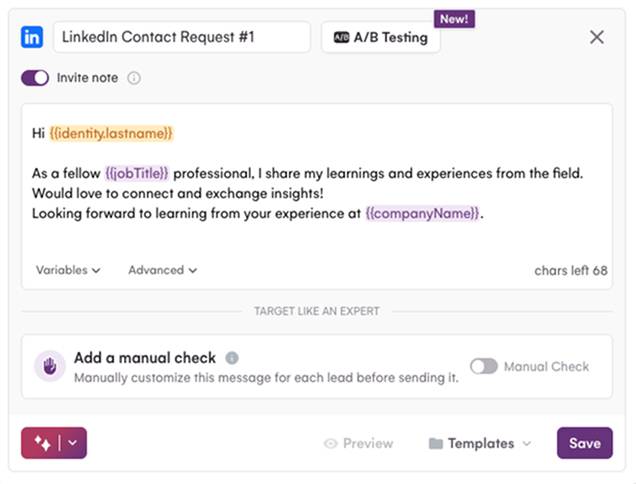
LGM connects to your LinkedIn account and runs sequences on your behalf, including connection requests, follow-up messages, profile visits, and post interactions for Social Warming. None of this requires a Premium subscription.
Sales Navigator does integrate with LGM, and it is a useful pairing. You can build a lead list in Sales Navigator, import it directly into LGM, and launch a sequence immediately. But this is an enhancement, not a requirement.
If budget is limited: invest in LGM Basic (€60/month) before paying for Sales Navigator ($99.99/month). LGM automates your outreach, which directly increases the number of conversations you start. Sales Navigator only helps find prospects — it does not help you reach them any faster.
If budget allows: Sales Navigator Core plus LGM Basic is a proven combination. Use Sales Navigator to identify and organize your ICP, import into LGM, then run multichannel sequences that hit LinkedIn and email in parallel.
LGM pricing for reference:
Basic (€60/month per identity):LinkedIn outreach, email outreach, Social Warming, Voice Messages AI, and Waterfall Enrichment
Pro (€120/month): Adds LinkedIn Intents, Real Chat Mode, and A/B Testing
Ultimate (€180/month): Adds Twitter/X outreach and native HubSpot/Pipedrive CRM sync
Is LinkedIn Premium Worth It for B2B Sales?
The answer depends entirely on which plan you are considering and what you need it to do.
Career plan ($39.99/month): Only useful for job seekers. If you are in B2B sales and not actively looking for a new role, skip this entirely. The InMail credits are too few (5/month) to be useful for outreach, and the applicant insights add no value for sales workflows.
Business plan ($59.99/month): Marginally useful for B2B sales. The company insights and unlimited people browsing have real value for account research. But the 15 InMail credits per month work out to roughly $4 per message — expensive compared to what you can achieve with automated connection requests. The Business plan makes sense as a light account research tool, not as an outreach investment.
Sales Navigator Core ($99.99/month): Genuinely valuable for B2B prospecting research. The advanced search filters, growth signals, and account alerts save significant time when building targeted lead lists. The CRM sync with Salesforce and HubSpot is useful for teams with clean CRM hygiene. The caveat: Sales Navigator does not automate anything. Every InMail it sends is manual. Every connection request is still manual.
The common mistake: paying $99.99/month for Sales Navigator but continuing to send connection requests and follow-up messages manually. You have paid for the best prospecting research tool on the market and are still limited to whatever your manual outreach capacity allows — typically 20-30 connection requests per day.
Pairing Sales Navigator with LGM resolves this entirely. Sales Navigator handles the research; LGM handles the execution.
FAQ
How much does LinkedIn Premium cost per month?
LinkedIn Premium costs between $39.99 and $170 per month depending on the plan. Career is $39.99/month, Business is $59.99/month, Sales Navigator Core is $99.99/month, Sales Navigator Advanced is $149.99/month, and Recruiter Lite is $170/month. Annual billing reduces these costs by approximately 20-25%.
Is LinkedIn Premium worth it for B2B sales?
Sales Navigator is worth it if you spend significant time prospecting and building lead lists. The Career and Business plans add limited value for B2B sales specifically. The key thing to understand is that no LinkedIn Premium plan automates outreach — for that, you need a separate tool like La Growth Machine.
Do I need LinkedIn Premium to use automation tools?
No. La Growth Machine works on a standard LinkedIn account. You do not need any Premium subscription to run automated connection requests, message sequences, or email outreach through LGM. Sales Navigator enhances the prospecting research phase but is not required.
What is the difference between LinkedIn Premium and Sales Navigator?
LinkedIn Premium (Career and Business) gives you InMail credits, profile visibility features, and LinkedIn Learning. Sales Navigator is a separate prospecting product with advanced search filters, lead lists, account alerts, and CRM sync. Sales Navigator is significantly more powerful for B2B prospecting but costs $99.99/month minimum and still does not include any outreach automation.
Can I use La Growth Machine without LinkedIn Premium?
Yes. LGM runs on a standard LinkedIn free account. You can send automated connection requests, LinkedIn messages, email sequences, and use features like Social Warming and Voice Messages AI without any LinkedIn Premium subscription. If you want to use Sales Navigator lead lists as your import source in LGM, you need a Sales Navigator subscription — but it is not required to use LGM.